Hi,
I am getting assertion failed error when putting the device in System off. Could you please help me understand why?
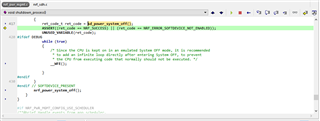
Below in the code where the error happens:
I am using SDK 17.0.2 and Soft device S140.
Many thanks
Hi,
I am getting assertion failed error when putting the device in System off. Could you please help me understand why?
Below in the code where the error happens:

I am using SDK 17.0.2 and Soft device S140.
Many thanks
The documented return value of this function is NRF_ERROR_SOC_POWER_OFF_SHOULD_NOT_RETURN.
AFAIK it will only ever return if the debugger is enabled, as connecting a debugger disables some power features to keep debug clocks on.
Yes, as Turbo says, the program should only ever return from sd_power_system_off() if the chip is in debug interface mode. Because then the chip does not enter the normal System OFF mode, but rather "Emulated System OFF mode". And to add to the confusion, the ASSERT is checking the wrong error code and/or is misplaced. The program is meant to enter the sleep loop below during debugging, which the assert prevents. This has been reported as a bug internally.
I would comment the ASSERT line for now. I don't see any reason for keeping it.
Many thanks for your reply.
How do I make sure I am in debug mode?
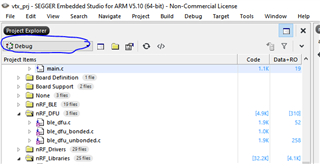
I am using Seeger Embedded Studio. Is being in debug mode means selecting debug in the IDE?
See below debug mode selection in the IDE.

Many thanks
Many thanks for your reply.
How do I make sure I am in debug mode?
I am using Seeger Embedded Studio. Is being in debug mode means selecting debug in the IDE?
See below debug mode selection in the IDE.

Many thanks
You circled around the build configuration where you can choose between 'Debug' and 'Release'. The difference between the two is mostly the compiler optimization settings. It's also worth noting that ASSERTs are only enable in the "Debug" configuration.
But "Emulated System OFF mode" is when the chip is physically in debug mode. This is usually during programming of the chip, or when you are actively debugging the application through your IDE (setting breakpoints, stepping through code, etc).