This post is older than 2 years and might not be relevant anymore
More Info: Consider searching for newer posts

Connect to peripheral only if specific manufacturer data found

Hello,

I have two nrf52840 DKs. 

I can get the central to connect based off the device name or a specific UUID but what I want is the central device to scan for the peripheral that is advertising "Hello" as its manufacture specific data and connect to only that one. I have looked into the filters but am not sure how to do this.

Here is what the peripheral advertising_init looks like:
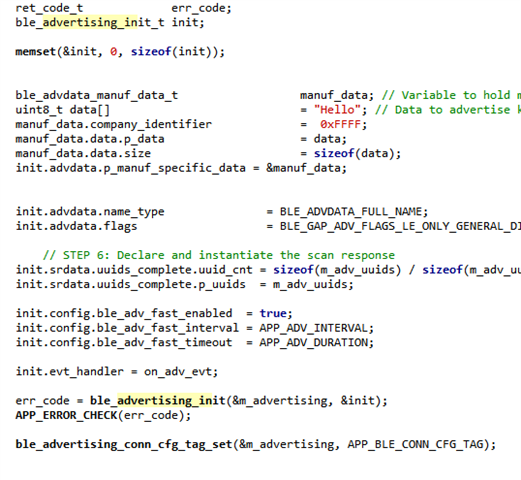
  

I can confirm that it does advertise "Hello" (As hex) by using a scanner. Can someone help me figure out how to get my central device to check for that data and connect if "Hello" is present?

If this isnt possible please let me know. 

Thanks!

Parents
  • Hi 

    I don't think there is a filter that will allow you to do this automatically. 

    Instead you need to process the advertise report in your application, look for the manufacturer specific data field, and manually match the company ID and data content in the code. 

    If you need some help with this just let me know, and I can provide an example early next week. 

    Best regards
    Torbjørn

  • I have tried quite a few different things to process the advertise report but could not get it working. If you could provide that example early next week that would be fantastic. 

    Thank you.

  • Hi 

    You will find the example attached:

    271085_ble_app_blinky_c.zip

    It is based on the ble_app_blinky_c example, so I would suggest just copying out the functions that are relevant (such as the scan module init and the scan event handler). 

    On a second note, a more typical way to connect only to devices from your company or product is to include a unique 128-bit UUID in the advertising payload. This will require a larger part of the advertising payload (18 bytes total for the 2 byte header and the 16 byte UUID), but will ensure that no one else accidentally uses the same UUID (the chance of generating the same 128-bit UUID twice is virtually zero). 

    Best regards
    Torbjørn

Reply
  • Hi 

    You will find the example attached:

    271085_ble_app_blinky_c.zip

    It is based on the ble_app_blinky_c example, so I would suggest just copying out the functions that are relevant (such as the scan module init and the scan event handler). 

    On a second note, a more typical way to connect only to devices from your company or product is to include a unique 128-bit UUID in the advertising payload. This will require a larger part of the advertising payload (18 bytes total for the 2 byte header and the 16 byte UUID), but will ensure that no one else accidentally uses the same UUID (the chance of generating the same 128-bit UUID twice is virtually zero). 

    Best regards
    Torbjørn

Children
No Data
Related