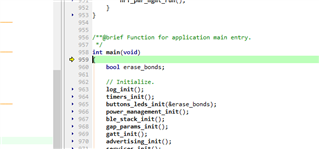
Motivation: I would like to use SEGGER Embedded Studio V4.10 to use sample projects whose size is not available in keil(no license).
Problem: I can't check the operation of the program (nothing is displayed in TeraTerm), even though the writing seems to be successful. When I write the exact same program from keil, I can see it with TeraTerm.
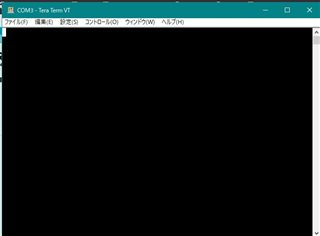
failure: used segger
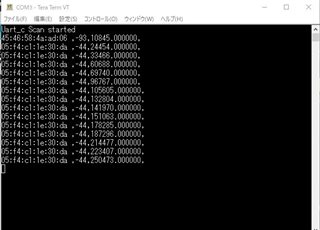
success: used keil
I am using SDK12.3.0 and nRF51822.
The evaluation board is EBSGCNZWY by TAIYOYUDEN, and system_nrf51.c is modified according to the specification.
#define __SYSTEM_CLOCK      (32000000UL)     /*!< nRF51 devices use a fixed System Clock Frequency of 16MHz */

static bool is_manual_peripheral_setup_needed(void);
static bool is_disabled_in_debug_needed(void);
static bool is_peripheral_domain_setup_needed(void);


#if defined ( __CC_ARM )
    uint32_t SystemCoreClock __attribute__((used)) = __SYSTEM_CLOCK;
#elif defined ( __ICCARM__ )
    __root uint32_t SystemCoreClock = __SYSTEM_CLOCK;
#elif defined   ( __GNUC__ )
    uint32_t SystemCoreClock __attribute__((used)) = __SYSTEM_CLOCK;
#endif

void SystemCoreClockUpdate(void)
{
    SystemCoreClock = __SYSTEM_CLOCK;
}

void SystemInit(void)
{
if (*(uint32_t *)0x10001008 == 0xFFFFFFFF)
{
NRF_NVMC->CONFIG = NVMC_CONFIG_WEN_Wen<<NVMC_CONFIG_WEN_Pos;
while (NRF_NVMC->READY == NVMC_READY_READY_Busy){}
*(uint32_t *)0x10001008 = 0xFFFFFF00;
NRF_NVMC->CONFIG = NVMC_CONFIG_WEN_Ren<<NVMC_CONFIG_WEN_Pos;
while (NRF_NVMC->READY == NVMC_READY_READY_Busy){}
NVIC_SystemReset();
while (true){}
}
    /* If desired, switch off the unused RAM to lower consumption by the use of RAMON register.
       It can also be done in the application main() function. */

    /* Prepare the peripherals for use as indicated by the PAN 26 "System: Manual setup is required
       to enable the use of peripherals" found at Product Anomaly document for your device found at
       https://www.nordicsemi.com/. The side effect of executing these instructions in the devices
       that do not need it is that the new peripherals in the second generation devices (LPCOMP for
       example) will not be available. */
    if (is_manual_peripheral_setup_needed())
    //The following are unchanged
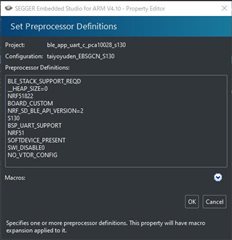
I changed the settings of segger by referring to the following link.
The only differences from the settings are the following.
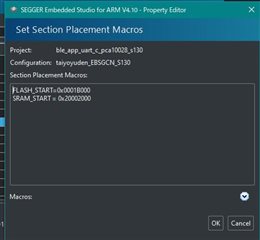
And "Target Device" is nRF51822xxAC .
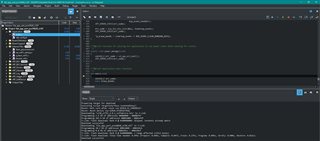
The write operation was probably successful.
Connecting ‘J-Link’ using ‘USB’
Connecting to target using SWD
Loaded C:/Program Files/SEGGER/SEGGER Embedded Studio for ARM 4.10/bin/JLink_x64.dll
Firmware Version: J-Link Lite-Cortex-M V9 compiled Feb  2 2021 16:33:27
DLL Version: 6.34h
Hardware Version: V9.00
Target Voltage: 3.386
Device "NRF51822_XXAC" selected.
Found SW-DP with ID 0x0BB11477
Scanning AP map to find all available APs
AP[1]: Stopped AP scan as end of AP map has been reached
AP[0]: AHB-AP (IDR: 0x04770021)
Iterating through AP map to find AHB-AP to use
AP[0]: Core found
AP[0]: AHB-AP ROM base: 0xF0000000
CPUID register: 0x410CC200. Implementer code: 0x41 (ARM)
Found Cortex-M0 r0p0, Little endian.
FPUnit: 4 code (BP) slots and 0 literal slots
CoreSight components:
ROMTbl[0] @ F0000000
ROMTbl[0][0]: E00FF000, CID: B105100D, PID: 000BB471 ROM Table
ROMTbl[1] @ E00FF000
ROMTbl[1][0]: E000E000, CID: B105E00D, PID: 000BB008 SCS
ROMTbl[1][1]: E0001000, CID: B105E00D, PID: 000BB00A DWT
ROMTbl[1][2]: E0002000, CID: B105E00D, PID: 000BB00B FPB
ROMTbl[0][1]: F0002000, CID: B105900D, PID: 000BB9A3 ???
Preparing target for download
Executing script TargetInterface.resetAndStop()
Reset: Halt core after reset via DEMCR.VC_CORERESET.
Reset: Reset device via AIRCR.SYSRESETREQ.
Downloading ‘s130_nrf51_2.0.1_softdevice.hex’ to J-Link
Programming 1.9 KB of addresses 00000000 — 000007bf
Programming 103.9 KB of addresses 00001000 — 0001afdf
J-Link: Flash download: Bank 0 @ 0x00000000: Skipped. Contents already match
Download successful
Downloading ‘ble_app_uart_c_pca10028_s130.elf’ to J-Link
Programming 30.8 KB of addresses 0001b000 — 00022b87
Programming 0.0 KB of addresses 00022b88 — 00022b9f
J-Link: Flash download: Bank 0 @ 0x00000000: Skipped. Contents already match
Download successful
Executing disconnect script
Executing script TargetInterface.resetAndStop()
Reset: Halt core after reset via DEMCR.VC_CORERESET.
Reset: Reset device via AIRCR.SYSRESETREQ.
The output is shown above.
I checked the programmer of nRF connect and it is as follows.
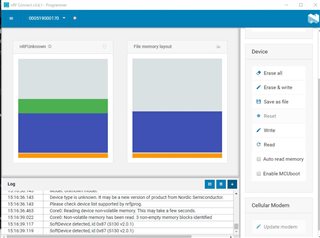
Please give me suggestions for improvement.