This post is older than 2 years and might not be relevant anymore
More Info: Consider searching for newer posts

How can I use DFU with peripherals/blinky?

I have flashed DFU OTA bootlaoder to my nRF82540 DK. (C:\nRF5_SDK_17.0.2_d674dde\examples\dfu\secure_bootloader\pca10056_s140_ble_debug)

It shows the two LEDs 1 and 2.

I can flash ble_blinky. It shows LEDs 1 and 3 when flashing. It works.

BUT So I can get some understanding of what is going on I would like to flash plain old blink to the device using the OTA.

I change the blink *.ld file from

MEMORY
{
FLASH (rx) : ORIGIN = 0x1000, LENGTH = 0xff000
RAM (rwx) : ORIGIN = 0x20000008, LENGTH = 0x3fff8
}

to

MEMORY
{
FLASH (rx) : ORIGIN = 0x27000, LENGTH = 0xff000
RAM (rwx) : ORIGIN = 0x20000008, LENGTH = 0x3fff8
}

So that the application is now above the softdevice. It all looks fine, but it doesn't work.

So how do things work. I'm assuming that somewhere there is a jump to the address where the blinky app is loaded (at 0x27000?) and then blinky runs.

I'm guessing that my ignorance is going to give me a heart attack at some point. 

Is there a document that explains for newbies how all of this hangs together?

Gordon

(In my research I've seen references to a define for APPLICATION_START_ADDRESS or something similar, but I can't find it. It may have been an old sdk?)

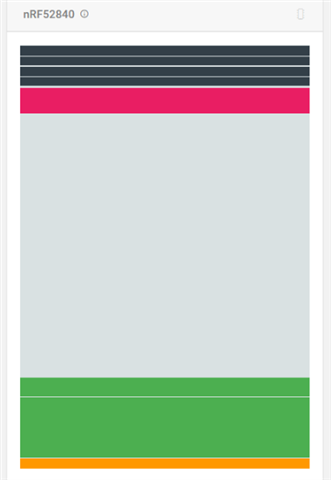
Here is my memory map
Parents
  • Uhmmm, somehow, I've done it! Was it the --debug-mode flag which I stopped using? Ordinary blinky has flashed across. Yay

    So is there an issue with:

    nrfutil pkg generate --debug-mode --hw-version 52 --application-version 1 --application $(OUTPUT_DIRECTORY)/nrf52840_xxaa.hex --sd-req 0x00 --key-file $(PROJ_DIR)/private.key $(PROJ_DIR)/dfu_blinky.zip

    Edit: add

    Without the --debug-mode I guess I have to update the --application-version each time?

    Is there not a conflict with using --debug-mode and --application-version=1?

    I'm using VS Code hence $(PROJ_DIR)

    Oh and for anyone else, to get into debug mode turn on whilst pressing Button 4 and only flash the application (I used the Nordic nRF Toolbox and DFU from my tablet. (My phone a Samsung Note 4.0 (with custom ROM (ViperOS)) won't show the advertisement, for DfuTarg, though it will for ble_app_blinky!! )

    And what gives with the formatting?

Reply
  • Uhmmm, somehow, I've done it! Was it the --debug-mode flag which I stopped using? Ordinary blinky has flashed across. Yay

    So is there an issue with:

    nrfutil pkg generate --debug-mode --hw-version 52 --application-version 1 --application $(OUTPUT_DIRECTORY)/nrf52840_xxaa.hex --sd-req 0x00 --key-file $(PROJ_DIR)/private.key $(PROJ_DIR)/dfu_blinky.zip

    Edit: add

    Without the --debug-mode I guess I have to update the --application-version each time?

    Is there not a conflict with using --debug-mode and --application-version=1?

    I'm using VS Code hence $(PROJ_DIR)

    Oh and for anyone else, to get into debug mode turn on whilst pressing Button 4 and only flash the application (I used the Nordic nRF Toolbox and DFU from my tablet. (My phone a Samsung Note 4.0 (with custom ROM (ViperOS)) won't show the advertisement, for DfuTarg, though it will for ble_app_blinky!! )

    And what gives with the formatting?

Children
Related