This post is older than 2 years and might not be relevant anymore
More Info: Consider searching for newer posts
This discussion has been locked.
You can no longer post new replies to this discussion. If you have a question you can start a new discussion

Unable to flash Thread NCP on nRF52840dongle

Hi Support,

   I have nRF52840 Dongle (PCA10059) on which i am trying to flash thread ncp example as explained here (https://infocenter.nordicsemi.com/index.jsp?topic=%2Fstruct_sdk%2Fstruct%2Fsdk_thread_zigbee_latest.html -->

Option B: Flashing the Network Co-Processor to the nRF52480 Dongle)

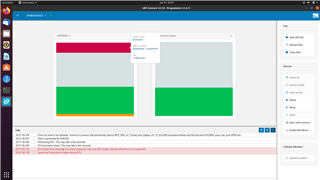
I am trying to flash it using nRF Connect --> programmer application. I am getting the following error everytime. i have tried it multiple times and i am getting the same error. I have an altrernative nRF52840dongle but facing the same problem with alternative dongle as well. Kindly help.

Error:
Parents
  • Hi,

    Sorry for the late reply, I see you are still struggling with this.

    It's normal to get some error after sucessfully flashing the dongle, as the application will be running instead of the dongle going into "DFU mode/bootloader". Only if you are using USB SDFU protocol you will able to connect to the dongle again. You may see this message right after programming:

    And you will need to press the reset button in the dongle to go into bootloader mode again.

    Have you tried to test if the application is running as intended after the programming with the nRF Connect programmer app? Because it could looked as if it was successfully programmed.

    You can also double check that the NCP application is built with FLASH_START at 0x1000 so there is space for the dongle's MBR.

    When using nrfutil, remember to set the dongle in bootloader mode before running it.

    You could also test using another PC, just to make sure this is not an USB transfer issue.

    Best regards,

    Marjeris

Reply
  • Hi,

    Sorry for the late reply, I see you are still struggling with this.

    It's normal to get some error after sucessfully flashing the dongle, as the application will be running instead of the dongle going into "DFU mode/bootloader". Only if you are using USB SDFU protocol you will able to connect to the dongle again. You may see this message right after programming:

    And you will need to press the reset button in the dongle to go into bootloader mode again.

    Have you tried to test if the application is running as intended after the programming with the nRF Connect programmer app? Because it could looked as if it was successfully programmed.

    You can also double check that the NCP application is built with FLASH_START at 0x1000 so there is space for the dongle's MBR.

    When using nrfutil, remember to set the dongle in bootloader mode before running it.

    You could also test using another PC, just to make sure this is not an USB transfer issue.

    Best regards,

    Marjeris

Children
No Data
Related
