This post is older than 2 years and might not be relevant anymore
More Info: Consider searching for newer posts

NRF52 DK is missing 40% of advertising packets

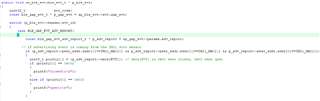
I am using the NRF52 DK with Keil IDE in Windows. I uploaded the ble_app_uart_c example (Examples > ble_central > ble_app_uart_c) and modified it so that it would print a message whenever it received data from a sensor with a specific MAC address.

It works wonderfully... 60% of the time. The packets it's dropping seem to be random. I do not know what could be causing this. I tried commenting out everything else in the function, but this did not help anything at all.

I have attached a screenshot of the changes I made to the file. Any help is greatly appreciated!
Parents
  • Hello,

    It works wonderfully... 60% of the time. The packets it's dropping seem to be random. I do not know what could be causing this. I tried commenting out everything else in the function, but this did not help anything at all.

    There could be many reasons why you are not seeing all the advertisements on the other side of your link. For example, one of the three advertisement channels can be completely engulfed in the noise from a WiFi network, or the route of your packets may be blocked by dense obstructions, etc.
    How are the two devices positioned in relation to each other? What is the distance between them, and do they have line of sight?
    Does this testing happen in a noisy environment?
    Advertising packets can often be lost or corrupted along the way. If you need to transfer data without loss you will need to enter into a connection, to be able to ensure that all packets are successfully received on the other side of the link.
    How are you measuring how many packets the peripheral is sending?

    Are you familiar with the nRF Sniffer tool? It is a powerful tool to wield when developing with BLE, since it allows you to monitor the on-air BLE traffic. This could be helpful to take a look at in this case, to get a better overview of what is happening on the air. Please keep in mind that the Sniffer only reports on the packets that it successfully is able to intercepts, so it may loose the same amount of packets as the central, if placed with a similar position and environment.

    Best regards,
    Karl

  • Hi,

    Thank you for your thorough reply!

    The two devices are positioned roughly 5cm from each other with no obstructions between them. I am in an apartment building - not sure if that qualifies as a noisy environment. Should I try testing in a field or something? The sensor I am reading from is a door sensor: it is unable to enter into a connection and advertises data when the door opens/closes. I can verify that it is advertising as there is a status LED. 

    I'll download the NRF Sniffer tool and see if I can get any more insight from that!

    Thank you again,

    Maria

Reply
  • Hi,

    Thank you for your thorough reply!

    The two devices are positioned roughly 5cm from each other with no obstructions between them. I am in an apartment building - not sure if that qualifies as a noisy environment. Should I try testing in a field or something? The sensor I am reading from is a door sensor: it is unable to enter into a connection and advertises data when the door opens/closes. I can verify that it is advertising as there is a status LED. 

    I'll download the NRF Sniffer tool and see if I can get any more insight from that!

    Thank you again,

    Maria

Children
  • Hello again Maria,

    panda_noob_2000 said:
    Thank you for your thorough reply!

    No problem at all, I am happy to help!

    panda_noob_2000 said:
    The two devices are positioned roughly 5cm from each other with no obstructions between them. I am in an apartment building - not sure if that qualifies as a noisy environment. Should I try testing in a field or something?

    No, then this should be no problem at all. The communication shouldn't see much disruption over a 5 cm direct line. An apartment building could definitely be considered a noisy environment, but it should not cause you to drop 40 % of advertising packets nevertheless. I think we should look at how the 40% advertising packet loss is measured.

    panda_noob_2000 said:
    The sensor I am reading from is a door sensor: it is unable to enter into a connection and advertises data when the door opens/closes. I can verify that it is advertising as there is a status LED.

    Hmm, is the blinking of the status LED the only indication that it is advertising? Did you design the firmware for this lock yourself - do you know the advertising interval and duration, for instance? Could it be that the LED blinking is not corresponding to advertising directly, but rather that it is blinking at a standard frequency whenever it is in the advertising state?
    This is a great opportunity for the sniffer tool, since we then may know exactly what is happening on air when this happens.

    panda_noob_2000 said:
    I'll download the NRF Sniffer tool and see if I can get any more insight from that!

    Great! Please do not hesitate to ask if you should encounter any issues or questions with the sniffer tool. It might seem daunting to familiarize with in the beginning since the learning curve is so steep, but luckily it does not take too long to get up to speed with - and once you are all future BLE debugging will be easier! :)

    Best regards,
    Karl

  • Hello again and apologies for the late reply,

    I tested the door sensor with a different piece of hardware (the Argon device by Particle, programmed using the Particle BLE library) with otherwise the same setup and it worked flawlessly. My understanding is that the Particle device also uses a Nordic BLE chip, leading me to believe that it is the Nordic BLE callback function that is dropping the advertising packets.

    I would greatly appreciate your thoughts on this.

    Thanks,

    Maria

  • Hello again Maria,

    panda_noob_2000 said:
    apologies for the late reply,

    No need to apologize - we continue this whenever you have the chance.

    panda_noob_2000 said:
    I tested the door sensor with a different piece of hardware (the Argon device by Particle, programmed using the Particle BLE library) with otherwise the same setup and it worked flawlessly. My understanding is that the Particle device also uses a Nordic BLE chip, leading me to believe that it is the Nordic BLE callback function that is dropping the advertising packets.

    That certainly narrows it down more, thank you for the update.
    Could it be an option to use the Filter functionality of the BLE Scanning library to filter the Advertising packets, instead of the current application-layer filter?
    Filtering on Device address directly or device name, for instance?
    If every advertising packet that is picked up if forwarded to the application I suppose this might cause a congestion in which following advertising packets might be lost.

    Please also see my previous comments with remarks about the sniffer tool and its usefulness in this particular situation.
    It would be very helpful to see a sniffer trace of the on-air BLE traffic for both scenarios - one in which it successfully picks it up, and one of where the packets are dropped.
    I still also would like to hear how you measured that 60% of the packets were dropped.

    Best regards,
    Karl

  • Hi,

    It would be very helpful to see a sniffer trace of the on-air BLE traffic for both scenarios - one in which it successfully picks it up, and one of where the packets are dropped.

    I'll try to implement the sniffer when I get home. 

    I still also would like to hear how you measured that 60% of the packets were dropped.

    In the code, I check the MAC address and if it is the door sensor, I flash an LED. With the NRF52 DK, the LED flashed 60% of the time the door sensor sent a message. With the Particle device, the LED flashed 100% of the time the door sensor sent a message. I know the door sensor sends a message because there is a signal LED. With the NRF52 DK, I have also tried using print statements instead of an LED flash to indicate a message received, and the results also indicated that 40% of the packets were dropped.

    If every advertising packet that is picked up if forwarded to the application

    My impression was that the BLE callback function ( on_ble_evt() ) was the first piece of code run when the NRF picks up a Bluetooth signal, and that a new thread running this function was created whenever a bluetooth signal was encountered. What is the application? Is it the code I am programming? Is there other code run on the NRF that I don't have access to that runs first?

    I am very new to this so am still very unfamiliar with how the device reacts to signals.

    Thank you!

    Maria

  • Hello Maria,

    panda_noob_2000 said:
    I'll try to implement the sniffer when I get home. 

    Great! Please do not hesitate to open a ticket if you should encounter any issues or questions about the sniffer and its setup.

    panda_noob_2000 said:
    In the code, I check the MAC address and if it is the door sensor, I flash an LED. With the NRF52 DK, the LED flashed 60% of the time the door sensor sent a message. With the Particle device, the LED flashed 100% of the time the door sensor sent a message. I know the door sensor sends a message because there is a signal LED. With the NRF52 DK, I have also tried using print statements instead of an LED flash to indicate a message received, and the results also indicated that 40% of the packets were dropped.

    Aha, I see. Thank you for elaborating!
    This is unfortunately not a entirely accurate way of measuring the percentage of received advertisements, since the device likely is advertising multiple times in the given interval, etc. but this explanation gets your point very well across, and I suspect that this behavior might be caused by the device being busy sorting through all other advertisements being present, or similar. I suggest that we get the sniffer up and running so we may see the exact contents of the lock's advertisments, and then add a filter so that the application is only ever told of relevant advertisements.

    panda_noob_2000 said:
    My impression was that the BLE callback function ( on_ble_evt() ) was the first piece of code run when the NRF picks up a Bluetooth signal, and that a new thread running this function was created whenever a bluetooth signal was encountered. What is the application? Is it the code I am programming? Is there other code run on the NRF that I don't have access to that runs first?

    This is not exactly correct, but I understand where the confusion comes from. The BLE callback will be the first part of your application that runs when a BLE event is passed to the application. However, the SoftDevice lies on top of the application, and takes control of the CPU whenever it needs to meet any of the timing-critical deadlines to uphold the BLE specification. The SoftDevice then uses the CPU and radio peripheral to receive and send messages, before it then generates the appropriate BLE events for the application. Then, after it finishes up its BLE event handling it gives control of the CPU back to the application, so that the application may proceed with whatever logic you have implemented.
    The reason why the SoftDevice is implemented in this way is that the BLE Specification is very strict, and must be followed to the letter in order to get certified as a BLE device. Luckily, the SoftDevice takes care of all these things for the developer, so the only thing the developer needs to do instead is to account for the fact that their application may be interrupted at any time by the SoftDevice (for a short time each time).
    Does this make sense? 

    panda_noob_2000 said:
    I am very new to this so am still very unfamiliar with how the device reacts to signals.

    This is good for me to know so I can be more thorough in my explanations, great!
    Please do not hesitate to let me know if any parts of my answer should be unclear :)

    Best regards,
    Karl

Related