This post is older than 2 years and might not be relevant anymore
More Info: Consider searching for newer posts

unable to detect my light device on nrf mesh app

Hello,

i am currently trying to create a project that uses the NRF52840 board as a switch to control sylvania smart+ A19 filament light bulb.

However, i am unable to detect the light bulb through nrf mesh even after using different phone models, iPhone and android. I am currently using nrf mesh version 3.1.4 and nrf sdk mesh version 5.0.0

I could still connect to it via nrf connect.

The project i am trying to recreate: The Ultimate Bluetooth Mesh Tutorial (Part 7) - Novel Bits

Parents
  • Hi,

    I am not familiar with the tutorial from NovelBits, but from the looks of it the issue is with using the nRF Mesh app for connecting to a Bluetooth mesh light bulb.

    Note that in order to provision a node in the latest version of the nRF Mesh app, you do not go to a "scanner" tab. Rather, you need to use the "+ add node" button (at least on Android, it may be slightly different for iOS.)

    From what I can tell, there might be different versions of such light bulbs, where some use Wi-Fi, some use Bluetooth LE, some use Bluetooth mesh, some use other wireless protocols. If you are able to provision the DK, and the same method does not work for the bulb: When you connect from nRF Connect, what services and characteristics do you see then?

    Regards,
    Terje

  • Hello,

    I used the add node button however my device did not show up, the lightbulb is Bluetooth mesh certified.

    I am able to provision my DK. 

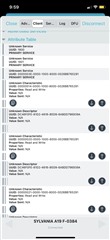
    As for services and characteristics, do you mean this?

Reply Children
Related