This post is older than 2 years and might not be relevant anymore
More Info: Consider searching for newer posts

nRF52805 Buttonless OTA DFU

Hi, dear Nordic team. I would like to use buttonless OTA DFU for nRF52805.

Here is what I did: 

Step 1) install all tools

Step 2) Build my ADC code, rename the output hex file as "app.hex"

Step 3) Because I use nRF52805, so I selected PCA10040e. Since both S112 and S113 support the nRF52805 BLE function, I just randomly selected S112. The final selected folder for bootloader code is: SDK_17.0.2\examples\dfu\secure_bootloader\pca10040e_s112_ble\ses

Build this project, rename the output hex file as "bootloader.hex"

Step 4) Generating the BootLoader settings page hex file "settings.hex" by using this command in win10 command promot: 

nrfutil settings generate --family NRF52 --application app.hex --application-version 1 --bootloader-version 1 --bl-settings-version 2 settings.hex

/*
Win10 cmd returns:

Note: Generating a DFU settings page with backup page included.
This is only required for bootloaders from nRF5 SDK 15.1 and newer.
If you want to skip backup page generation, use --no-backup option.

Generated Bootloader DFU settings .hex file and stored it in: settings.hex

Bootloader DFU Settings:
* File:                     settings.hex
* Family:                   nRF52
* Start Address:            0x0007F000
* CRC:                      0x4ED1A154
* Settings Version:         0x00000002 (2)
* App Version:              0x00000001 (1)
* Bootloader Version:       0x00000001 (1)
* Bank Layout:              0x00000000
* Current Bank:             0x00000000
* Application Size:         0x00009C10 (39952 bytes)
* Application CRC:          0xAC4D0291
* Bank0 Bank Code:          0x00000001
* Softdevice Size:          0x00000000 (0 bytes)
* Boot Validation CRC:      0xDF751A8C
* SD Boot Validation Type:  0x00000000 (0)
* App Boot Validation Type: 0x00000001 (1)

*/

Step 5) Merge all above 3 hex files and softdevice s112 version 7.2.0 by using this command

mergehex --merge bootloader.hex settings.hex --output bl_temp.hex
mergehex --merge bl_temp.hex app.hex s132_nrf52_7.0.1_softdevice.hex --output whole.hex

Step 6) Upload combined hex file "whole.hex" to nRF52805 by using this command: 

nrfjprog --eraseall -f NRF52 
nrfjprog --program whole.hex --verify -f NRF52 
nrfjprog --reset -f NRF52

Question: 

When I'm using command nrfjprog --program whole.hex --verify -f NRF52, the win10 command prompt gives me the following error. I found it's my bootloader.hex and app.hex overlaps. 

Parsing image file.
ERROR: The file specified is not a valid hex file, has data outside valid areas
ERROR: or does not have data in valid areas.


/*
I found the issue was caused by bootloader.hex and app.hex, because in win10 cmd: 

D:\buttonlessOTA>mergehex --merge bootloader.hex app.hex --output bootloader_app.hex
Parsing input files.
Merging file "bootloader.hex" into output.
Merging file "app.hex" into output.
Overlapping segments detected at address 102400.ERROR: The hex files cannot be merged since there are conflicts.

My SEGGER link-->section placement macros is:

FLASH_PH_START=0x0
FLASH_PH_SIZE=0x80000
RAM_PH_START=0x20000000
RAM_PH_SIZE=0x10000
FLASH_START=0x71000
FLASH_SIZE=0xd000
RAM_START=0x20005968
RAM_SIZE=0xa698
*/

What's the correct to select FLASH and RAM for my project, please? Should I choose "just enough" FLASH and RAM?

Thanks in advance! 

  • Hi Einar, here is the log for the issue of “it keeps showing "Starting DFU, Starting Bootloader" repeatedly. OTA DFU process is never finished.” It shows "Error 8 (0x8): GATT CONN TIMEOUT"

    nRF Connect, 2021-07-03
    Nordic_Buttonless (CF:0C:87:EC:12:1B)
    V 14:52:18.398 Connecting to CF:0C:87:EC:12:1B...
    D 14:52:18.398 gatt = device.connectGatt(autoConnect = false, TRANSPORT_LE, preferred PHY = LE 1M)
    D 14:52:18.842 [Callback] Connection state changed with status: 0 and new state: CONNECTED (2)
    I 14:52:18.843 Connected to CF:0C:87:EC:12:1B
    V 14:52:18.867 Discovering services...
    D 14:52:18.867 gatt.discoverServices()
    D 14:52:18.870 [Broadcast] Action received: android.bluetooth.device.action.ACL_CONNECTED
    I 14:52:19.175 Connection parameters updated (interval: 7.5ms, latency: 0, timeout: 5000ms)
    D 14:52:19.350 [Callback] Services discovered with status: 0
    I 14:52:19.350 Services discovered
    V 14:52:19.355 Generic Access (0x1800)
    - Device Name [R W] (0x2A00)
    - Appearance [R] (0x2A01)
    - Peripheral Preferred Connection Parameters [R] (0x2A04)
    - Central Address Resolution [R] (0x2AA6)
    Generic Attribute (0x1801)
    - Service Changed [I] (0x2A05)
       Client Characteristic Configuration (0x2902)
    Secure DFU Service (0xFE59)
    - Buttonless DFU [I W] (8ec90003-f315-4f60-9fb8-838830daea50)
       Client Characteristic Configuration (0x2902)
    D 14:52:19.356 gatt.setCharacteristicNotification(00002a05-0000-1000-8000-00805f9b34fb, true)
    I 14:52:19.404 Connection parameters updated (interval: 48.75ms, latency: 0, timeout: 5000ms)
    I 14:52:24.016 Connection parameters updated (interval: 198.75ms, latency: 0, timeout: 4000ms)
    V 14:53:08.787 [DFU] DFU service started
    V 14:53:08.787 [DFU] Opening file...
    I 14:53:11.894 [DFU] Firmware file opened successfully
    V 14:53:11.895 [DFU] Connecting to DFU target...
    D 14:53:11.896 [DFU] gatt = device.connectGatt(autoConnect = false, TRANSPORT_LE, preferredPhy = LE_1M | LE_2M)
    I 14:53:11.905 [DFU] Connected to CF:0C:87:EC:12:1B
    V 14:53:11.906 [DFU] Discovering services...
    D 14:53:11.906 [DFU] gatt.discoverServices()
    I 14:53:11.921 [DFU] Services discovered
    D 14:53:11.940 [DFU] wait(1000)
    W 14:53:12.938 [DFU] Application with buttonless update found
    V 14:53:12.938 [DFU] Jumping to the DFU Bootloader...
    V 14:53:12.938 [DFU] Enabling indications for 8ec90003-f315-4f60-9fb8-838830daea50
    D 14:53:12.938 [DFU] gatt.setCharacteristicNotification(8ec90003-f315-4f60-9fb8-838830daea50, true)
    D 14:53:12.938 [DFU] gatt.writeDescriptor(00002902-0000-1000-8000-00805f9b34fb, value=0x02-00)
    I 14:53:13.218 [DFU] Data written to descr.8ec90003-f315-4f60-9fb8-838830daea50, value (0x): 02-00
    V 14:53:13.218 [DFU] Notifications enabled for 8ec90003-f315-4f60-9fb8-838830daea50
    A 14:53:13.219 [DFU] Indications enabled
    D 14:53:13.219 [DFU] wait(1000)
    V 14:53:14.241 [DFU] Writing to characteristic 8ec90003-f315-4f60-9fb8-838830daea50
    D 14:53:14.241 [DFU] gatt.writeCharacteristic(8ec90003-f315-4f60-9fb8-838830daea50)
    A 14:53:14.604 [DFU] Enter bootloader sent (Op Code = 1)
    I 14:53:14.608 [DFU] Notification received from 8ec90003-f315-4f60-9fb8-838830daea50, value (0x): 20-01-01
    A 14:53:14.609 [DFU] Response received (Op Code = 1, Status = 1)
    D 14:53:18.983 [Callback] Connection state changed with status: 8 and new state: DISCONNECTED (0)
    E 14:53:18.983 Error 8 (0x8): GATT CONN TIMEOUT
    I 14:53:18.983 Disconnected
    I 14:53:18.993 [DFU] Disconnected by the remote device
    D 14:53:18.993 [DFU] gatt.refresh() (hidden)
    D 14:53:18.993 [DFU] gatt.disconnect()
    D 14:53:19.022 [DFU] gatt.close()
    V 14:53:19.022 [DFU] Scanning for the DFU Bootloader...
    D 14:53:19.025 [Broadcast] Action received: android.bluetooth.device.action.ACL_DISCONNECTED
    D 14:53:19.038 [DFU] [Broadcast] Action received: android.bluetooth.device.action.ACL_DISCONNECTED
    I 14:53:19.163 [DFU] DFU Bootloader found with address CF:0C:87:EC:12:1B
    V 14:53:19.183 [DFU] DFU service started
    I 14:53:19.183 [DFU] Firmware file opened successfully
    D 14:53:19.183 [DFU] wait(1000)
    D 14:53:20.184 [DFU] wait(1000)
    V 14:53:21.189 [DFU] Connecting to DFU target...
    D 14:53:21.210 [DFU] gatt = device.connectGatt(autoConnect = false, TRANSPORT_LE, preferredPhy = LE_1M | LE_2M)
    I 14:53:21.727 [DFU] Connected to CF:0C:87:EC:12:1B
    V 14:53:21.729 [DFU] Discovering services...
    D 14:53:21.729 [DFU] gatt.discoverServices()
    D 14:53:21.732 [Broadcast] Action received: android.bluetooth.device.action.ACL_CONNECTED
    D 14:53:21.753 [DFU] [Broadcast] Action received: android.bluetooth.device.action.ACL_CONNECTED
    I 14:53:22.236 [DFU] Services discovered
    D 14:53:22.261 [DFU] wait(1000)
    W 14:53:23.243 [DFU] Application with buttonless update found
    V 14:53:23.243 [DFU] Jumping to the DFU Bootloader...
    V 14:53:23.243 [DFU] Enabling indications for 8ec90003-f315-4f60-9fb8-838830daea50
    D 14:53:23.243 [DFU] gatt.setCharacteristicNotification(8ec90003-f315-4f60-9fb8-838830daea50, true)
    D 14:53:23.245 [DFU] gatt.writeDescriptor(00002902-0000-1000-8000-00805f9b34fb, value=0x02-00)
    I 14:53:23.342 [DFU] Data written to descr.8ec90003-f315-4f60-9fb8-838830daea50, value (0x): 02-00
    V 14:53:23.342 [DFU] Notifications enabled for 8ec90003-f315-4f60-9fb8-838830daea50
    A 14:53:23.343 [DFU] Indications enabled
    D 14:53:23.343 [DFU] wait(1000)
    V 14:53:24.364 [DFU] Writing to characteristic 8ec90003-f315-4f60-9fb8-838830daea50
    D 14:53:24.364 [DFU] gatt.writeCharacteristic(8ec90003-f315-4f60-9fb8-838830daea50)
    A 14:53:24.415 [DFU] Enter bootloader sent (Op Code = 1)
    I 14:53:24.415 [DFU] Notification received from 8ec90003-f315-4f60-9fb8-838830daea50, value (0x): 20-01-01
    A 14:53:24.415 [DFU] Response received (Op Code = 1, Status = 1)
    I 14:53:29.507 [DFU] Disconnected by the remote device
    D 14:53:29.507 [DFU] gatt.refresh() (hidden)
    D 14:53:29.507 [DFU] gatt.disconnect()
    D 14:53:29.507 [DFU] gatt.close()
    V 14:53:29.507 [DFU] Scanning for the DFU Bootloader...
    D 14:53:29.523 [Broadcast] Action received: android.bluetooth.device.action.ACL_DISCONNECTED
    D 14:53:29.539 [DFU] [Broadcast] Action received: android.bluetooth.device.action.ACL_DISCONNECTED
    I 14:53:29.953 [DFU] DFU Bootloader found with address CF:0C:87:EC:12:1B
    V 14:53:29.972 [DFU] DFU service started
    I 14:53:29.972 [DFU] Firmware file opened successfully
    D 14:53:29.972 [DFU] wait(1000)
    D 14:53:30.975 [DFU] wait(1000)
    V 14:53:31.973 [DFU] Connecting to DFU target...
    D 14:53:31.991 [DFU] gatt = device.connectGatt(autoConnect = false, TRANSPORT_LE, preferredPhy = LE_1M | LE_2M)
    I 14:53:32.274 [DFU] Connected to CF:0C:87:EC:12:1B
    V 14:53:32.275 [DFU] Discovering services...
    D 14:53:32.275 [DFU] gatt.discoverServices()
    D 14:53:32.283 [Broadcast] Action received: android.bluetooth.device.action.ACL_CONNECTED
    D 14:53:32.298 [DFU] [Broadcast] Action received: android.bluetooth.device.action.ACL_CONNECTED
    I 14:53:32.785 [DFU] Services discovered
    D 14:53:32.810 [DFU] wait(1000)
    W 14:53:33.795 [DFU] Application with buttonless update found
    V 14:53:33.795 [DFU] Jumping to the DFU Bootloader...
    V 14:53:33.795 [DFU] Enabling indications for 8ec90003-f315-4f60-9fb8-838830daea50
    D 14:53:33.795 [DFU] gatt.setCharacteristicNotification(8ec90003-f315-4f60-9fb8-838830daea50, true)
    D 14:53:33.797 [DFU] gatt.writeDescriptor(00002902-0000-1000-8000-00805f9b34fb, value=0x02-00)
    I 14:53:33.878 [DFU] Data written to descr.8ec90003-f315-4f60-9fb8-838830daea50, value (0x): 02-00
    V 14:53:33.878 [DFU] Notifications enabled for 8ec90003-f315-4f60-9fb8-838830daea50
    A 14:53:33.879 [DFU] Indications enabled
    D 14:53:33.879 [DFU] wait(1000)
    V 14:53:34.898 [DFU] Writing to characteristic 8ec90003-f315-4f60-9fb8-838830daea50
    D 14:53:34.898 [DFU] gatt.writeCharacteristic(8ec90003-f315-4f60-9fb8-838830daea50)
    A 14:53:34.949 [DFU] Enter bootloader sent (Op Code = 1)
    I 14:53:34.950 [DFU] Notification received from 8ec90003-f315-4f60-9fb8-838830daea50, value (0x): 20-01-01
    A 14:53:34.950 [DFU] Response received (Op Code = 1, Status = 1)

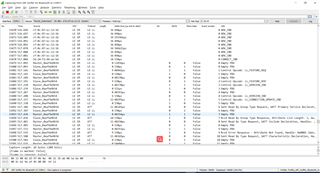
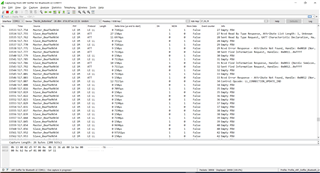
    Here is the BLE sniffer log: 

  • It seems like the Android device is constantly trying to put the nRF in DFU mode as if the bootloader never actually enters DFU mode upon reset. Some questions:

    • Do you see the same if you use nRF Connect for Desktop BLE to do the DFU? Or other DFU master?
    • I suspect you do not have enough flash space to use the debug bootloader, but perhaps you could use some GPIO's to debug in components\libraries\bootloader\nrf_bootloader.c to see if the bootloader enters DFU mode or starts the application? What does  dfu_enter_check() return?
    • Can you upload the sniffer trace files, not just the screenshot?
    • Do you use the bootloader with or without bond sharing (is NRF_DFU_BLE_REQUIRES_BONDS in the bootloader's sdk_config.h set to 1 or 0?) And do your application code reflect that?
  • Thanks for your support Einar. 

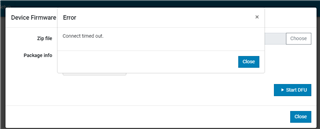
    • I tried to use nRF Connect for PC --> BLE software. I used nRF52DK as the DFU master, and I could see the "Nordic Buttonless" signal. Then I connect, upload my own application zip file. It shows "initializing", then "Error: Connect timed out". 

    • Do you mean that I need to use 

    \SDK_Code\example\dfu\secure_bootloader\pca10040e_s112_ble_debug

    to check the log/output of dfu_enter_check()? If yes, do you have any tutorial link to explain how to use this debug project (i.e. How to run this project so that I could see the log in PuTTY/other HyperTerminals?). 

    • Here is my sniffer trace file: 

    OTA_DFU_Buttonless_nRF52832.pcapng

    • NRF_DFU_BLE_REQUIRES_BONDS = 0 in my \SDK_Code\example\dfu\secure_bootloader\pca10040e_s112_ble\ses project. 

    Thank you very much for your professional support! 

  • Hi,

    StevenW807 said:
    hen I connect, upload my own application zip file. It shows "initializing", then "Error: Connect timed out". 

    I see. I think we need to debug the bootloader, then. It seems it does not enter DFU mode for some reason.

    StevenW807 said:

    • Do you mean that I need to use 

    \SDK_Code\example\dfu\secure_bootloader\pca10040e_s112_ble_debug

    to check the log/output of dfu_enter_check()? If yes, do you have any tutorial link to explain how to use this debug project (i.e. How to run this project so that I could see the log in PuTTY/other HyperTerminals?). 

    Well, that would be the easiest if it can fit. It uses RTT logging extensively, so if you are able to make it fit that would give useful information. The debug bootloader is 48 kB (0xC000) and S112 is 100 kB (0x19000), so it is a tight fit. But if you can fit a small application there as well, then it is worth a test.

    This debug project is the same as other projects. You just need to modify the dfu_public_key.c to use your public key also in the debug build. Other then that, you need to make the same adaptations as for the "normal" bootloader, just that this is larger so it needs a lower start address. You use it just like the normal bootloader, but it has RTT logging, so if you connect a Segger debugger and use the Segger J-Link RTT Viewer you will get a lot of debug logs indicating what happens in the bootloader.

    The above is a very good way to debug bootloader issues. I primarily had another approach in mind though, thinking that it might be difficult to fit this bootloader together with your application (though any dummy app with buttonless DUF support should work for the debugging purpose). The other idea was to simply toggle some GPIO's in the bootloader code to see what happens, starting with dfu_enter_check() to see if the bootloader gets the signal to enter DFU mode or not. With that you can narrow down the issue without logging just using a logic analyzer, and adding a few lines of code to manipulate some GPIO's should be possible without the bootloader crossing into the next flash page (so no relocation would be needed for the test).

    StevenW807 said:
    • NRF_DFU_BLE_REQUIRES_BONDS = 0 in my \SDK_Code\example\dfu\secure_bootloader\pca10040e_s112_ble\ses project. 

    I see. And you also have NRF_DFU_BLE_BUTTONLESS_SUPPORTS_BONDS set to 0 in the application's sdk_config.h?

  • Problem solved!

    In the secure_bootloader project, sdk_config.h file, the default value for NRF_BL_DFU_ENTER_METHOD_BUTTONLESS was 0. We must change it to 1 if we would like to use buttonless OTA DFU

    It's a very important lesson to learn for all other engineers! 

    Thanks again for Einar and Nordic support team! 

Related