This post is older than 2 years and might not be relevant anymore
More Info: Consider searching for newer posts

zsock_connect TLS debugging

Hello,

I am trying to get an MQTT TLS connection to AWS up and running on my thingie91 (nrf9160). 
I am using SDK 1.5.0 and the sample "aws_iot".

Even though there is a file certificates.h, it seems this is not used by default, and it seems the recommended way to upload them to the modem (which actually then sets up the TLS I presume) is to flash the AT firmware, and use the LTE link monitor to update the certificates (private key, client cert and CA). 

So I did that, but I still don't get a connection. Eventually mqtt_connect returns -22.

When debugging, as far as I can get is the zsock_connect call from v1.5.0\zephyr\subsys\net\lib\mqtt\mqtt_transport_socket_tls.c. This eventually goes into nrf_connect which does some RPC with the modem core presumably, but that becomes pretty hard to follow. 

So, my main question is: How can we debug the TLS setup further? Even if I were to provision a wrong private key etc, how can we debug which "type" of TLS error happened? For now, error -22 (invalid argument) does not really make it very easy to debug.

Thanks for your feedback!

Parents
  • Hello Arnout,

    finding the root cause of your problem via debugging can be a challenge with AWS IoT, as you probably already have noticed. The thing is that on both ends (the modem firmware and the server) you can not access the code. And the wrapper functions of Zephyr do not contribute to the whole debugging process neither. You basically have to know in which function you will end up and set a breakpoint there.

    However, there are some things you can check:

    1. Is the endpoint configured correctly ?

    2. Is the client ID configured correctly ? (That probably isn’t the problem right now, because a wrong client ID will result in the server immediately kicking the device out after a connection has been established.)

    3. Are the certificates and its tags correct?

    You can cross-check the stored certificates in the modem by using the Credential storage management %CMNG command. 

    Until you have solved the problem, I recommend you to delete all other certificates.

    I hope this will help you!

    Regards,

    Markus

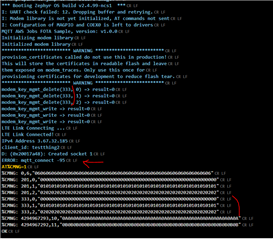
  • And FYI, also moved to aws_fota example, which allows flashing the certs directly (instead of using the AT commands myself).

    Changed the security tag to 333, and ran it. 

    Again, getting -95 as error.

Reply Children
Related