

Hi,
I am trying to check how DFU works but I have problems setting it up. I will describe all the steps that I have been doing here, so that it will be easier to try to find solution (I was mainly following the process described in DFU bootloader examles):
I am using nRF5_SDK_17.0.2 on Ubuntu 18.04.
1. Generate private key:
nrfutil keys generate ~/priv.pem
2. Generate public key and output it to a file
nrfutil keys display --key pk --format code ~/priv.pem --out_file dfu_public_key.c
3. Replace example file from SDKFolder/examples/dfu/dfu_public_key.c
with previously generated file
4. Install the external library - micro-ecc as described in Getting started with Nordic's Secure DFU bootloader, a step by step guide
- clone/download the library to the SDK folder: SDKFolder\external\micro-ecc\micro-ecc
- build it with `make` command from SDKFolder\external\micro-ecc\nrf52_armgcc\armgcc
5. Build the secure DFU example:
- by running `make` from SDKFolder/examples/dfu/secure_bootloader/pca10056_usb/armgcc/
6. Build the application example (I am using SDKFolder/examples/peripheral/spi/pca10056)
- by running `make` fromSDKFolder/examples/peripheral/spi/pca10056/armgcc/
7. Genearte settings for the application hex file:
nrfutil settings generate --family NRF52840 --application _build/nrf52840_xxaa.hex --application-version 0 --bootloader-version 0 --bl-settings-version 1 settings.hex
8. Programming the settings (previously the device is completely errased):
nrfjprog --program settings.hex --sectorerase
Output:
Note: Generating a DFU settings page with backup page included.
This is only required for bootloaders from nRF5 SDK 15.1 and newer.
If you want to skip backup page generation, use --no-backup option.

Generated Bootloader DFU settings .hex file and stored it in: settings.hex

Bootloader DFU Settings:
* File:                     settings.hex
* Family:                   NRF52840
* Start Address:            0x000FF000
* CRC:                      0x958E0D01
* Settings Version:         0x00000001 (1)
* App Version:              0x00000000 (0)
* Bootloader Version:       0x00000000 (0)
* Bank Layout:              0x00000000
* Current Bank:             0x00000000
* Application Size:         0x00002764 (10084 bytes)
* Application CRC:          0xEF9B2A69
* Bank0 Bank Code:          0x00000001
* Softdevice Size:          0x00000000 (0 bytes)
* Boot Validation CRC:      0x00000000
* SD Boot Validation Type:  0x00000000 (0)
* App Boot Validation Type: 0x00000000 (0)
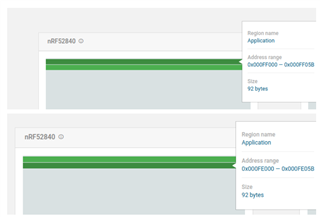
After checking the memory layout, this is what I can see:
So I continue:
9. Programming the bootloader:
If I use nrfjprog:
nrfjprog --reset --program _build/nrf52840_xxaa.hex --family NRF52840 --sectoranduicrerase
I am getting an error:
ERROR: Argument provided has a wrong value. Memory access not aligned, value
ERROR: outside of range or similar.
So I used nrf Connect again to check if there is some memory overlap:
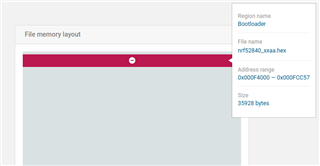
There is not, so I flashed it with the nrf Connect Desktop app and this is what I get:
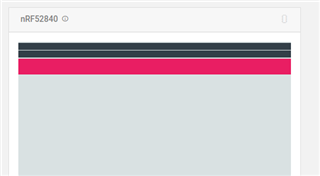
Looks ok to me. Go next:
Next I prepare the zip packet of the application in examples/peripheral/spi/pca10056/blank/armgcc:
nrfutil pkg generate --hw-version 52 --sd-req 0x00 --application-version 1 --key-file ~/priv.pem --application _build/nrf52840_xxaa.hex nrf52840_xxaa.zip
After that I try to connect to the other USB of the nrf52840 DK board and flash everything
but the problem is that once I connect it no LED is flashing
also when I try to flash it use DFU:
nrfutil dfu usb-serial -pkg nrf52840_xxaa.zip -p /dev/ttyACM0
I am getting errors that it can not find that port.
Can you help me with what might be wrong?

