Hello,
I am using NCS v1.6.0, nRF Connect for Desktop v3.7.0, and the Bluetooth Low Energy app v2.5.1 (part of nRF Connect for Desktop). I am using the nRF52840 Dongle with the Bluetooth Low Energy app and the nRF52840 DK to run the examples below.
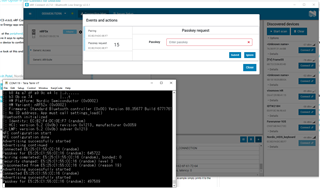
I am looking at the peripheral_hids_mouse and peripheral_hids_keyboard examples in the SDK and for both of them, in the section of "Testing with nRF Connect for Desktop" there is a step where it says to optionally enable MITM protection. When I check this box, there does not seem to be any difference in behavior. I also do not see an option to either "use a button on the device to confirm or reject the passkey value."
Can someone look at this and let me know if I am doing something wrong here?
Regards,
Akash Patel