This post is older than 2 years and might not be relevant anymore
More Info: Consider searching for newer posts

OTA DFU for production

Hi, I have successfully achieved the OTA DFU function on nRF52805. This is what I can see now: 

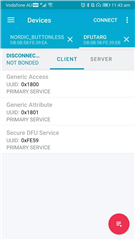
Step 1) I can see the Nordic_Buttonless BLE signal. After connection, there is a DFU button on the top right corner. 

Step 2) Use the DFU button to upload my own "LED Control by switch (no BLE function)" code to my custom board (success).

I have attached my OTA DFU hex files, and the commands I used in the Win10 command prompt. 
OTA DFU hex and commands.zip

The OTA DFU function seems to be just 1 time. After uploading the code, I cannot use the OTA DFU function again. 

Question:

1) After uploading my own code to the board, how could I use the OTA DFU function for other versions of code?

2) Why there is a BLE signal called "DFUTARG " appeared during the OTA DFU process? Where does it come from? 

Thanks! 

Parents
  • Hi,

    1) After uploading my own code to the board, how could I use the OTA DFU function for other versions of code?

    You need to include the buttonless DFU service in your application in order to enter DFU mode via BLE.

    2) Why there is a BLE signal called "DFUTARG " appeared during the OTA DFU process? Where does it come from? 

    If you look at the BLE address you will see that it is almost the same for both, just that the DFUTARG has the address increased by one. This is done in the bootloader so that the Bluetooth stacks on the phones see the device when it is in bootloader as a new device, and this causes it to perform service discovery (which it would not otherwise have done). That way the phone does service discovery and finds the DFU service when the device is in bootloader mode, and same when it is running the application, which has a different set of services.

    The OTA DFU function seems to be just 1 time. After uploading the code, I cannot use the OTA DFU function again. 

    You do not say much about what fails, so if the above doe snot help, then please note that you must generate a DFU zip package with a new (higher) version number every time you want to upgrade. If not, the bootloader will reject the update unless configured to allow downgrades.

    FYI I will be OoO for three weeks starting this afternoon so if you need more assistance before it might be a good idea to start a new thread.

Reply
  • Hi,

    1) After uploading my own code to the board, how could I use the OTA DFU function for other versions of code?

    You need to include the buttonless DFU service in your application in order to enter DFU mode via BLE.

    2) Why there is a BLE signal called "DFUTARG " appeared during the OTA DFU process? Where does it come from? 

    If you look at the BLE address you will see that it is almost the same for both, just that the DFUTARG has the address increased by one. This is done in the bootloader so that the Bluetooth stacks on the phones see the device when it is in bootloader as a new device, and this causes it to perform service discovery (which it would not otherwise have done). That way the phone does service discovery and finds the DFU service when the device is in bootloader mode, and same when it is running the application, which has a different set of services.

    The OTA DFU function seems to be just 1 time. After uploading the code, I cannot use the OTA DFU function again. 

    You do not say much about what fails, so if the above doe snot help, then please note that you must generate a DFU zip package with a new (higher) version number every time you want to upgrade. If not, the bootloader will reject the update unless configured to allow downgrades.

    FYI I will be OoO for three weeks starting this afternoon so if you need more assistance before it might be a good idea to start a new thread.

Children
No Data
Related