This post is older than 2 years and might not be relevant anymore
More Info: Consider searching for newer posts

Thingy91 unable to progress past the update firmware step

Hello,

I am stuck on the step of getting the Thingy91 to start working.

I am following this tutorial: https://www.nordicsemi.com/Products/Development-hardware/Nordic-Thingy-91/GetStarted

I uploaded the Modem firmware with the nRF programmer, followed by the MCU firmware. However, no LED lights are turning on for the Thingy91

I tried to go back to upload the modem firmware again, but when I press the modem's button and turn the device on, I can't find the device, and I am unable to reflash the modem's firmware. The device does not appear on the programmer.

I'm not sure how to proceed from this step.

nRF52 firmware: thingy91_asset_tracker_ltem_2021-06-28_7a076c22.hex

modem firmware: mfw_nrf9160_1.3.0.zip

Thank you

Parents
  • morerook said:
    I flashed thingy91_fw_2021-06-28_7a076c22\img_fota_dfu_hex\thingy91_at_client_2021-06-28_7a076c22.hex to the device,

    Yes, considering you are updating the application firmware via USB/MCUboot that would be correct. And you have flashed this image to the nRF9160, right?

    Could you even update the nRF52840 with the latest version of the Connectivity bridge?

    That would be the image img_fota_dfu_hex/thingy91_nrf52_connectivity_bridge_2021-06-28_7a076c22.hex

    Thanks and regards,

    Markus

  • Hello Markus, this is what I did, step by step.

    1. I held down the small button near the nRF52 and turned on the device

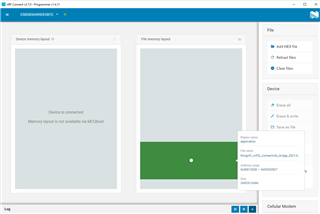
    2. I then flashed the image to the nRF52 (it is now loaded with the connectivity bridge, latest version). As you can see in the top left, it doesn't report Thingy91, so that's the nRF52 I am flashing to. It completed the flashing successfully

    3. I turned off the Thingy91, held down the big central button and turned on the device.

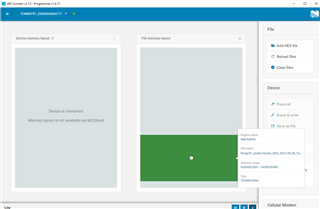
    4. Now you can see that I am flashing the ltem image to the nRF9160, as indicated by the Thingy91 in the device, v1 as you mentioned. This too was completed successfully

    5. I then deleted my sim from the cloud, and reregistered it - Nordic Cloud responded with "Sim Activated Successfully"

    6. At this point I should be waiting for the yellow light on the device to show that it is waiting for user association right?

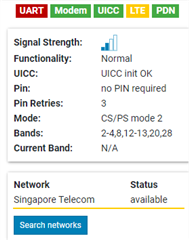
    If it helps in the LTE link monitor LTE is blinking yellow and red and UART is red. The white LED on the device just keeps flashing, it never turns blue or yellow.

    As you can see, there is a network, just that my device is unable to connect to it.

Reply
  • Hello Markus, this is what I did, step by step.

    1. I held down the small button near the nRF52 and turned on the device

    2. I then flashed the image to the nRF52 (it is now loaded with the connectivity bridge, latest version). As you can see in the top left, it doesn't report Thingy91, so that's the nRF52 I am flashing to. It completed the flashing successfully

    3. I turned off the Thingy91, held down the big central button and turned on the device.

    4. Now you can see that I am flashing the ltem image to the nRF9160, as indicated by the Thingy91 in the device, v1 as you mentioned. This too was completed successfully

    5. I then deleted my sim from the cloud, and reregistered it - Nordic Cloud responded with "Sim Activated Successfully"

    6. At this point I should be waiting for the yellow light on the device to show that it is waiting for user association right?

    If it helps in the LTE link monitor LTE is blinking yellow and red and UART is red. The white LED on the device just keeps flashing, it never turns blue or yellow.

    As you can see, there is a network, just that my device is unable to connect to it.

Children
No Data
Related