This post is older than 2 years and might not be relevant anymore
More Info: Consider searching for newer posts

Modem shell hex file is not valid

Hi 

We are trying to configure Nordic UE (NRF9160) at our local setup. In order to flash software we performed following steps:

  1. We used 'carrier_deploy_e7f4d5d4-f607-43a6-b383-cfdb6d725c82.zip' to flash SW in secure boot mode.
  2. We used 'mosh_nrf9160dk_modem_uart_trace_v104.hex' to install modem shell application
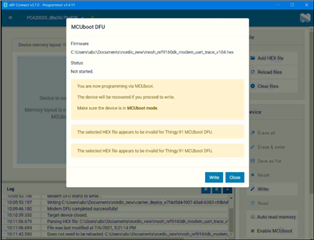
      

Can you suggest what step is wrong at our end. If we are using wrong firmware files, then can you please share the required one.
We took reference from file 'nRF9160_External_Test_tools_Flashing_and_USB_Modem_Tracing.pdf' (attaching for reference) to flash the SW in Nordic UE..
Thanks.
Parents
  • VishalGujela said:
    The file with all the binaries are located on desktop

    Which folder are the binaries located in? As you can read in the CONTEXT.txt, the image from the right folder has to be choosen:

    Folder contents:
    
    img_app_bl/
    
    - Full application images including bootloader.
    - These files can be used with:
    - nRF Connect Programmer (only with SEGGER J-Link or another debug probe)
    - nrfjprog CLI
    
    img_fota_dfu_hex/
    
    - These images contain only application and bootloader is not included.
    - Images are in HEX format.
    - These files can be used with nRF Connect Programmer (only via USB bootloader).
    
    img_fota_dfu_bin/
    
    - These images contain only application and bootloader is not included.
    - Images are in binary format.
    - These files can be used with:
    - Over-the-air update, for example, via nRF Cloud, Azure or AWS.
    - mcumgr CLI (via USB bootloader only)
    
    The following folders contain images configured for modem debugging:
    
    - img_app_bl/debug
    - img_fota_dfu_hex/debug
    - img_fota_dfu_bin/debug
     

    Regards,

    Markus

Reply
  • VishalGujela said:
    The file with all the binaries are located on desktop

    Which folder are the binaries located in? As you can read in the CONTEXT.txt, the image from the right folder has to be choosen:

    Folder contents:
    
    img_app_bl/
    
    - Full application images including bootloader.
    - These files can be used with:
    - nRF Connect Programmer (only with SEGGER J-Link or another debug probe)
    - nrfjprog CLI
    
    img_fota_dfu_hex/
    
    - These images contain only application and bootloader is not included.
    - Images are in HEX format.
    - These files can be used with nRF Connect Programmer (only via USB bootloader).
    
    img_fota_dfu_bin/
    
    - These images contain only application and bootloader is not included.
    - Images are in binary format.
    - These files can be used with:
    - Over-the-air update, for example, via nRF Cloud, Azure or AWS.
    - mcumgr CLI (via USB bootloader only)
    
    The following folders contain images configured for modem debugging:
    
    - img_app_bl/debug
    - img_fota_dfu_hex/debug
    - img_fota_dfu_bin/debug
     

    Regards,

    Markus

Children
Related