This post is older than 2 years and might not be relevant anymore
More Info: Consider searching for newer posts

nRF52810 flashing problem: NOT_AVAILABLE_BECAUSE_PROTECTION (ffffffa6)

Hi,

I'm trying to program a custom board with a nRF52810 via nRF Connect. I keep getting the following error messages:

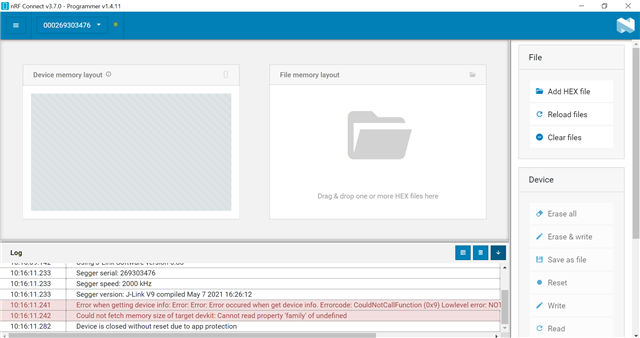
Error when getting device info: Error: Error: Error occured when get device info. Errorcode: CouldNotCallFunction (0x9) Lowlevel error: NOT_AVAILABLE_BECAUSE_PROTECTION (ffffffa6)
20:06:57.641	Could not fetch memory size of target devkit: Cannot read property 'family' of undefined

I followed this post and tried the following commands:

$ nrfjprog.exe --coprocessor CP_APPLICATION --memrd 0x00FF8000
ERROR: The operation attempted is unavailable due to readback protection in
ERROR: your device. Please use --recover to unlock the device.

$ nrfjprog.exe --coprocessor CP_APPLICATION --recover
Recovering device. This operation might take 30s.
ERROR: Recover failed. Please make sure that the correct device family is given
ERROR: and try again.

I'm using a Segger j-link debugger with a 6-pin-needle adapter to connect the board with my PC via SWD.

Any advice on how to solve this problem is very much appreciated!

Parents Reply Children
  • This doesn't really work. When selecting the j-link debugger at the top, it tries to connect to the board but fails to do so. Thus the device control stays grey.

  • Ok. Let's try one more thing, this time directly with nrfjprog.exe if you have it available. I think your custom board has the lock bits set, and that is why you can't reprogram your board.

    You can try erasing the UICR (User Information Control Register) in your chip or custom board which I think saves the options to block access to certain parts of the memory. According to the nrfjprog.exe help:

     -e  --eraseall              Erases all user available program flash memory and
                                 the UICR page. Can be combined with the
                                 --qspieraseall operation.
                                 Limitations:
                                 For nRF51 devices, if the device came from Nordic
                                 with a pre-programmed SoftDevice, only the user
                                 available code flash and UICR will be erased.

    I'm not sure if your device came pre-programmed SD from Nordic, but it is worth a try. The command is:

    nrfjprog.exe --eraseall

    And on successful completion, it should present you with:

    Erasing user available code and UICR flash areas.
    Applying system reset.

    Also I just noticed that you were trying to use the --coprocessor flag in your first description when you were following the blog. Apparently this might not be supported by the NRF52 family.

         --coprocessor <coprocessor>                    Connects the device to the
                                 selected coprocessor. Valid arguments are 
                                 CP_APPLICATION, CP_MODEM and CP_NETWORK.
                                 If --coprocessor option is not used,
                                 CP_APPLICATION will be the target of the other
                                 operation. Must be combined with another command.
                                 Limitations:
                                 For NRF51 devices, the -- coprocessor operation is
                                 not available.
                                 For NRF52 devices, the -- coprocessor operation is
                                 not available.

    Therefore, maybe try the lines that specify the --recovery flag like this:

    nrfjprog.exe -f NRF52 --recover

    Let's see what happens after this. If it is successful maybe you can try to use nRF connect to reflash your board.

    On the other hand, you can try something more elaborate like this.

  • Hi,

    Thank you very much for the detailed answer. Unfortunately, neither of the commands worked:

    $ nrfjprog.exe --eraseall
    ERROR: The operation attempted is unavailable due to readback protection in
    ERROR: your device. Please use --recover to unlock the device.
    $ nrfjprog.exe -f NRF52 --recover
    Recovering device. This operation might take 30s.
    ERROR: Recover failed. Please make sure that the correct device family is given
    ERROR: and try again.

    I think your custom board has the lock bits set, and that is why you can't reprogram your board.

    Does that mean that the factory-flashed software has memory protection enabled and the chip can therefore not be re-programmed? Or is this an issue with the board design?

    The boards were assembled by the PCB manufacturer so I can't tell what software is pre-programmed.

    I can't follow the instructions in the article you provided as the mentioned scripts only work for ST-link debuggers.

  • Hello,

    Generally speaking, if you are developing for the custom board, you ask to be provided with a blank chip without protections from the manufacturer, if possible. But if what you are trying to do is overwrite the software of a custom board, aka not a DK or dev/ev board, that already had software programmed in it with lock bits for write/read protection, there are ways to do it. One way was the one mentioned before, but I forgot to say it uses debuggers from ST.

    A more generic way to erasing a board is specified here that can work with most programmers. It involves writing directly to register bits related to memory protection. I don't think I've done this before, so I'm unsure if this will fit your case.

Related