This post is older than 2 years and might not be relevant anymore
More Info: Consider searching for newer posts

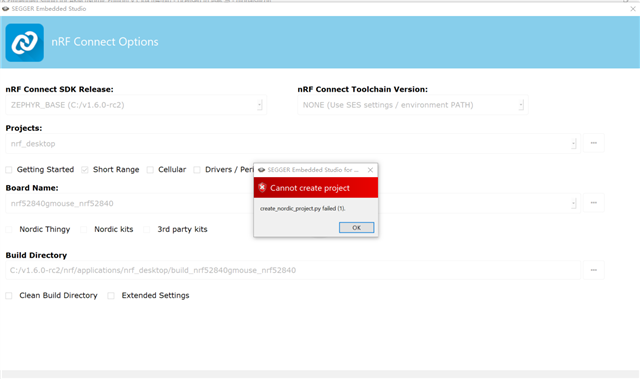
create_nordic_project.py failed(1)

NCS(nRF Connect SDK)  is a good  environment to develop nRF52,but it seems not stable until now.

I want to use NCS(nRF Connect SDK) to develop my project ,and met some unknown issuses when start up.

This my local envirment  at below:

windows version: win10 64bit

nRF connect version:v3.7.0

Toolchai Manager verison:v0.93

NCS version :V1.60

SES(segger embedded studio) version:v550d_win_x64

nRF-Command-Line-Tools_10_13_0

I follow this guide step by step ,but after all the installations ,I pressed open IDE button ,and enter the SES ,>File->Open nRF connect SDK project . I choose the "blink" project and the "nrf52840_nrf52840" board ,and pressed OK .

This error occurred:
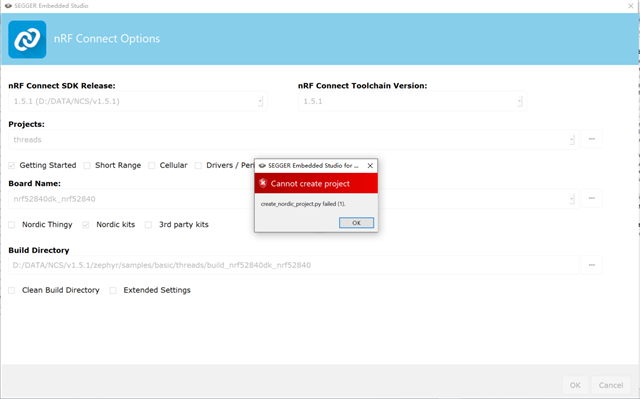
I also chose the other NCS version(v1.5.1,v1.4.2) to install ,the same error .

I also chose the ohter directory to install the NCS, the same error.

I also re-install the SES and nRF connect app, the same error.

I also chose the other PC to test ,the same error...

Please someone help me out...

I just want to start a project via NCS like "hello world". Slight smile

Thank you.

  • Creating solution threads.emProject
    D:/DATA/NCS/v1.5.1/toolchain/opt/bin/cmake.exe -GNinja -DBOARD=nrf52840dk_nrf52840 -DBOARD_DIR=D:\DATA\NCS\v1.5.1\zephyr\boards\arm\nrf52840dk_nrf52840 -BD:\DATA\NCS\v1.5.1\zephyr\samples\basic\threads\build_nrf52840dk_nrf52840 -SD:\DATA\NCS\v1.5.1\zephyr\samples\basic\threads -DNCS_TOOLCHAIN_VERSION=1.5.1 -DEXTRA_KCONFIG_TARGETS=menuconfig_ses -DEXTRA_KCONFIG_TARGET_COMMAND_FOR_menuconfig_ses=D:\DATA\NCS\v1.5.1\toolchain\segger_embedded_studio/html/configure_nordic_project_menuconfig.py
    -- Application: D:/DATA/NCS/v1.5.1/zephyr/samples/basic/threads
    -- Zephyr version: 2.4.99 (D:/DATA/NCS/v1.5.1/zephyr)
    -- Found Python3: D:/DATA/NCS/v1.5.1/toolchain/opt/bin/python.exe (found suitable exact version "3.8.2") found components: Interpreter
    -- Found west (found suitable version "0.9.0", minimum required is "0.7.1")
    -- Configuring incomplete, errors occurred!
    Including boilerplate (Zephyr base): D:/DATA/NCS/v1.5.1/zephyr/cmake/app/boilerplate.cmake
    -- Using NCS Toolchain 1.5.1 for building. (D:/DATA/NCS/v1.5.1/toolchain/cmake)
    CMake Error at D:/DATA/NCS/v1.5.1/zephyr/cmake/zephyr_module.cmake:61 (message):
    Unmet or cyclic dependencies in modules:

    D:/DATA/NCS/v1.5.1/modules/lib/connectedhomeip depends on: ['openthread']


    Call Stack (most recent call first):
    D:/DATA/NCS/v1.5.1/zephyr/cmake/app/boilerplate.cmake:183 (include)
    D:/DATA/NCS/v1.5.1/zephyr/share/zephyr-package/cmake/ZephyrConfig.cmake:24 (include)
    D:/DATA/NCS/v1.5.1/zephyr/share/zephyr-package/cmake/ZephyrConfig.cmake:35 (include_boilerplate)
    CMakeLists.txt:4 (find_package)


    error: cmake failed
    create_nordic_project.py failed (1)

  • Hi Pony, 

    Could you try to install NCS under C:\? Please let me know this can help or not. Thanks. 

    -Amanda H.

  • sorry ,  I install NCS under C:\NCS first ,it did not work ,then I install to the D:\ ,also I install NCS under C:\  on another PC.

  • Hi, 

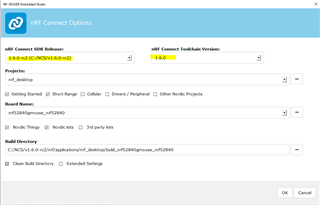
    Please delete the build_nrf52840gmouse_nrf52840 folder and open IDE from the Tool Manager. 

    Open nRF Connect project and set as the following figure:

    Please let me know this can help or not. Thanks. 

    -Amanda H.

Related