This post is older than 2 years and might not be relevant anymore
More Info: Consider searching for newer posts
This discussion has been locked.
You can no longer post new replies to this discussion. If you have a question you can start a new discussion

Creating and sending messages to group in mesh using Serial Example (nRF Mesh v5.0.0)

Hardware: 

  • Raspberry Pi Zero W
  • nRF52840 DK running Serial Example and connected to RPi via USB
  • Custom nRF52840 board acting as a Vendor Model Server x 2

Software:

  • nRF SDK for Mesh v5.0.0

I realise there are multiple tickets with the same topic but I'd like a response to a more recent version of the SDK. I have two provisioned vendor server models that I want to make a group of but no documentation is provided in the Interactive PyACI tutorial. I'd then like to send a message to this group and hopefully receive acknowledged replies. It is not exactly clear where to start. 

From what I understand I need to:

1) Create a group

2) Give it a group address id and get the address handle

3) Use the configuration client to make the Servers subscribe to messages from the group

4) Send the message to the group address handle

How do I do this using interactive_pyaci and the serial example?

Parents
  • Hi again

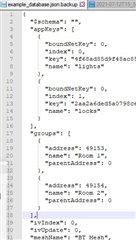
    The PyACI seems to have a group definition where they are predefined in a .JSON file. You can edit the .json file to add groups, but it doesn't seem like there is an API in PyACI to add groups during runtime, so the group must be pre-defined. Then you can follow the Publishing and subscribing section of the PyACI documentation to make devices subscribe to it.

    Best regards,

    Simon

  • Hi,

    When I try to set the publication of my server device to one of the predefined groups in example_database.json, I get this error:

    In [37]: cc.model_publication_set(db.nodes[2].unicast_address, mt.ModelId(0xc000, company_id=0x0493), mt.Publish(db.groups[0].address, index=0, ttl=4))
    
    2021-08-24 08:26:59,748 - INFO - ttyACM0: PacketSend: {'token': 22}
    In [38]: 2021-08-24 08:26:59,909 - INFO - ttyACM0: {event: MeshTxComplete, data: {'token': 22}}
    2021-08-24 08:27:00,630 - INFO - ttyACM0.ConfigurationClient: Model publication status: AccessStatus.SUCCESS
    2021-08-24 08:27:00,721 - INFO - ttyACM0.ConfigurationClient: Publication status for model 0493c000 at element 18 to {'address': c001, 'index': 0, 'ttl': 4, 'period': 0, 'retransmit': {redentials': <FriendshipCredentials.DISABLED: 0>}
    
    In [38]: cc.model_publication_get(db.nodes[2].unicast_address, mt.ModelId(0xc000, company_id=0x0493))
    
    2021-08-24 08:27:07,614 - INFO - ttyACM0: PacketSend: {'token': 23}
    2021-08-24 08:27:07,640 - INFO - ttyACM0: {event: MeshTxComplete, data: {'token': 23}}
    In [39]: cc.model_publication_get(db.nodes[2].unicast_address, mt.ModelId(0xc000, company_id=0x0493))
    
    2021-08-24 08:27:15,815 - INFO - ttyACM0: PacketSend: {'token': 24}
    2021-08-24 08:27:15,834 - INFO - ttyACM0: {event: MeshTxComplete, data: {'token': 24}}
    In [40]: 2021-08-24 08:27:16,623 - INFO - ttyACM0.ConfigurationClient: Model publication status: AccessStatus.SUCCESS
    2021-08-24 08:27:16,630 - ERROR - ttyACM0: Exception in pkt handler <bound method Access.__event_handler of <mesh.access.Access object at 0xb5219390>>
    2021-08-24 08:27:16,641 - ERROR - ttyACM0: traceback: Traceback (most recent call last):
      File "/home/user/nrf5_sdk_for_mesh/scripts/interactive_pyaci/aci/aci_uart.py", line 89, in process_packet
        fun(packet)
      File "/home/user/nrf5_sdk_for_mesh/scripts/interactive_pyaci/mesh/access.py", line 218, in __event_handler
        handler(opcode, message)
      File "/home/user/nrf5_sdk_for_mesh/scripts/interactive_pyaci/models/config.py", line 582, in __model_publication_status_handler
        publish = mt.Publish.unpack(message.data[3:10])
      File "/home/user/nrf5_sdk_for_mesh/scripts/interactive_pyaci/mesh/types.py", line 413, in unpack
        return cls(address, index, ttl, PublishPeriod.unpack(period),
      File "/home/user/nrf5_sdk_for_mesh/scripts/interactive_pyaci/mesh/types.py", line 323, in unpack
        return cls(step_count * cls.resolution_multiplier(step_resolution))
      File "/home/user/nrf5_sdk_for_mesh/scripts/interactive_pyaci/mesh/types.py", line 91, in __new__
        cls.__name__, value, cls.MIN, cls.MAX))
    ValueError: Invalid PublishPeriod: 31800000 not in range [0, 3780000]
    

    Is something wrong with the publishPeriod value?

  • Yes, there seems to be one 0 too many in your PublishPeriod.

    Best regards,

    Simon

  • When I called 

    cc.model_publication_set(db.nodes[2].unicast_address, mt.ModelId(0xc000, company_id=0x0493), mt.Publish(db.groups[0].address, index=0, ttl=4))

    PublishPeriod should be set to a default zero value. It should be automatically handled and stored by the Configuration Server on the server side, right?

Reply
  • When I called 

    cc.model_publication_set(db.nodes[2].unicast_address, mt.ModelId(0xc000, company_id=0x0493), mt.Publish(db.groups[0].address, index=0, ttl=4))

    PublishPeriod should be set to a default zero value. It should be automatically handled and stored by the Configuration Server on the server side, right?

Children
No Data
Related