

I'm using the online example "switch power on/off" code as below on my nRF52 DK
/**
 * This example demonstrates a way to enter system-off by pressing BUTTON_1 on the nRF5x-DK,
 * and how to wake up again from system off pressing BUTTON_2. LED_1 on nRF5x-DK boards is
 * lid when nRF5x is in System-On idle mode. LED_1 is turned off when nRF5x enters
 * System-off mode.
 */

#include <stdbool.h>
#include "nrf.h"
#include "nrf_drv_gpiote.h"
#include "app_error.h"
#include "boards.h"
#include "nrf_delay.h"

#define SWITCH_PIN    16
#define PIN_OUT       BSP_LED_3

/**
 * @brief Interrupt handler for wakeup pins
 */
void in_pin_handler(nrf_drv_gpiote_pin_t pin, nrf_gpiote_polarity_t action)
{
    ret_code_t err_code;

    if (pin == SWITCH_PIN)
    {
        //Turn off LED to indicate the nRF5x is in System-off mode
        //NRF_LOG_INFO("Turn off LED to indicate the nRF5x is in System-off mode");
        nrf_drv_gpiote_out_set(PIN_OUT);

        //Disable power-down button to prevent System-off wakeup
        //NRF_LOG_INFO("Disable power-down button to prevent System-off wakeup");
        nrf_drv_gpiote_in_uninit(SWITCH_PIN);
        nrf_drv_gpiote_in_event_disable(SWITCH_PIN);

        //Configure wake-up button
        //NRF_LOG_INFO("Configure switch to wake-up");
        nrf_drv_gpiote_in_config_t in_config = GPIOTE_CONFIG_IN_SENSE_HITOLO(false);     //Configure to generate interrupt and wakeup on pin signal low. "false" means that gpiote will use the PORT event, which is low power, i.e. does not add any noticable current consumption (<<1uA). Setting this to "true" will make the gpiote module use GPIOTE->IN events which add ~8uA for nRF52 and ~1mA for nRF51.
        in_config.pull = NRF_GPIO_PIN_PULLUP;                                            //Configure pullup for input pin to prevent it from floting. Pin is pulled down when button is pressed on nRF5x-DK boards, see figure two in http://infocenter.nordicsemi.com/topic/com.nordic.infocenter.nrf52/dita/nrf52/development/dev_kit_v1.1.0/hw_btns_leds.html?cp=2_0_0_1_4
        err_code = nrf_drv_gpiote_in_init(SWITCH_PIN, &in_config, NULL);            	 //Initialize the wake-up pin
        APP_ERROR_CHECK(err_code);                                                       //Check error code returned
        nrf_drv_gpiote_in_event_enable(SWITCH_PIN, true);                            	 //Enable event and interrupt for the wakeup pin

        //Enter System-off
        NRF_POWER->SYSTEMOFF = 1;

    }
}


/**
 * @brief Function for configuring: SWITCH_PIN (BUTTON_1) to enter System-off,
 * SWITCH_PIN pin (BUTTON_2) to wake up from System-off, and PIN_OUT pin for LED_1 output
 */
static void gpio_init(void)
{
    ret_code_t err_code;

    //Initialize gpiote module
    err_code = nrf_drv_gpiote_init();
    APP_ERROR_CHECK(err_code);

    //Initialize output pin, and Turn on LED 4
    nrf_drv_gpiote_out_config_t out_config = GPIOTE_CONFIG_OUT_SIMPLE(false);        	//Configure output button
    err_code = nrf_drv_gpiote_out_init(PIN_OUT, &out_config);                        	//Initialize output button
    APP_ERROR_CHECK(err_code);                                                     	//Check potential error
    nrf_drv_gpiote_out_clear(PIN_OUT);                                               	//Turn on LED to indicate that nRF5x is not in System-off mode

    //Configure sense input pin to enable wakeup and interrupt on button press.
    nrf_drv_gpiote_in_config_t in_config = GPIOTE_CONFIG_IN_SENSE_LOTOHI(false);        //Configure to generate interrupt and go to system_off on pin signal high. "false" means that gpiote will use the PORT event, which is low power, i.e. does not add any noticable current consumption (<<1uA). Setting this to "true" will make the gpiote module use GPIOTE->IN events which add ~8uA for nRF52 and ~1mA for nRF51.
    in_config.pull = NRF_GPIO_PIN_PULLUP;                                             	//Configure pullup for input pin to prevent it from floting. Pin is pulled down when button is pressed on nRF5x-DK boards, see figure two in http://infocenter.nordicsemi.com/topic/com.nordic.infocenter.nrf52/dita/nrf52/development/dev_kit_v1.1.0/hw_btns_leds.html?cp=2_0_0_1_4
    err_code = nrf_drv_gpiote_in_init(SWITCH_PIN, &in_config, in_pin_handler);          //Initialize the pin with interrupt handler in_pin_handler
    APP_ERROR_CHECK(err_code);                                                          //Check potential error
    nrf_drv_gpiote_in_event_enable(SWITCH_PIN, true);                            	//Enable event and interrupt for the wakeup pin
}


/**@brief Function for application main entry.
 */
int main(void)
{
    gpio_init();

    while (true)
    {
        //Enter System-on idle mode
        __WFE();
        __SEV();
        __WFE();
    }
}
However, it shows me an error:
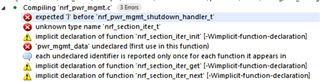
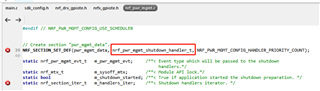
Any idea, please? Thank you!
