This post is older than 2 years and might not be relevant anymore
More Info: Consider searching for newer posts

Asset Tracker V2 does not get GPS Fix when A-GPS is disabled

When default configuration is used (so A-GPS is enabled, nRF Cloud is used) with asset_tracker_v2 (https://github.com/nrfconnect/sdk-nrf/tree/master/applications/asset_tracker_v2), then getting GPS gets fix after 1 to maybe 20 minutes (it is random). When A-GPS is disabled (all CONFIG.*AGPS.* are set to 'n'), then GPS never gets fix. The default GPS timeout is quite short (60s), so it was extended to 300s. Unfortunately, this change didn't help.

When GPS sample (https://github.com/nrfconnect/sdk-nrf/tree/master/samples/nrf9160/gps) is used with default configuration (which is without A-GPS), then GPS gets fix within 15-60s after reboot and this is reproducible. I would expect the same (or slightly worse, but at least reproducible/deterministic) behavior with asset_tracker_v2 application and disabled A-GPS.

Parents
  • Hi,

    Are you testing the sample indoors or outdoors with a clear view of the sky?

    Are you testing in a custom device or a device with only one antenna? Is the GPS and LTE antenna shared?

    What NCS version are you using? I see you linked to master but that might not be the case?

    What modem firmware do you have on the nRF9160 SiP?

    On possibility is that something is occupying the antenna for LTE use or you might be in a area with bad reception causing issues.

    Best regards,

    Marjeris

Reply
  • Hi,

    Are you testing the sample indoors or outdoors with a clear view of the sky?

    Are you testing in a custom device or a device with only one antenna? Is the GPS and LTE antenna shared?

    What NCS version are you using? I see you linked to master but that might not be the case?

    What modem firmware do you have on the nRF9160 SiP?

    On possibility is that something is occupying the antenna for LTE use or you might be in a area with bad reception causing issues.

    Best regards,

    Marjeris

Children
  • Hi Marjeris,

    >Are you testing the sample indoors or outdoors with a clear view of the sky?

    Outdoors with clear view of the sky.

    >Are you testing in a custom device or a device with only one antenna? Is the GPS and LTE antenna shared

    With nRF91 DK with default configuration.

    >What modem firmware do you have on the nRF9160 SiP?

    mfw_nrf9160_1.2.3

    >On possibility is that something is occupying the antenna for LTE use or you might be in a area with bad reception causing issues.

    The first possibility is still valid with nRF91 DK? I see that there are 2 separate antennas on PCB. You mean "bad reception" of LTE or GPS?

    Best regards,
    Marcin

  • Hi,


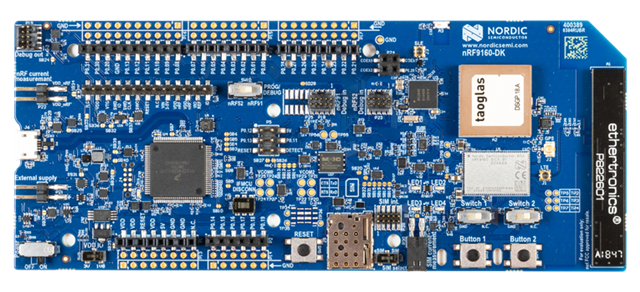
    We recommend that you test with the external antenna, which is supplied with the nRF9160-DK, or the larger taoglas antenna on newer DK versions:

     Which version of the DK are you using?


    Kind regards,

    Håkon

  • I have tested with external antenna and the results are the same - no GPS fix. GPS satellites visibility is very good in my test environment, which is proven by running `samples/nrf9160/gnss` sample using nRF9160-DK, when there is no LTE-M communication involved.

     Which version of the DK are you using?

    PCA10090
    1.0.0
    2021.6

    Below are my new findings

    I have been investigating this issue (no luck with getting GPS fix) using GNSS sample application (samples/nrf9160/gnss) as well. It seems that everything is fine when LTE-M is not involved. If LTE-M is used in parallel with GNSS, then GNSS module cannot get a valid position. Logs show that modem is tracking several satellites, but none of them are used to get a fix. I also get lots of "Deadline missed" (NRF_MODEM_GNSS_PVT_FLAG_DEADLINE_MISSED) events as well as "Insuf. time window" (NRF_MODEM_GNSS_PVT_FLAG_NOT_ENOUGH_WINDOW_TIME).

    I have noticed that "PSM active timer" is deactivated, by seeing "TAU: 10800 sec, active time: -1 sec"`messages coming out from the end of lte_lc_psm_get() function:

        *tau = psm_cfg.tau;
        *active_time = psm_cfg.active_time;
    
        LOG_DBG("TAU: %d sec, active time: %d sec\n", *tau, *active_time);
    
        return 0;
    }

    I have also used nRF-PPK2 to measure current consumption. It seems that PSM is not enabled (which is also what "active timer -1 value" suggests. Radio is active every 320ms, which seems to be the configuration of DRX. I also tried to request higher eDRX intervals, but that didn't seem to work either. This radio activity every 320ms seems to be the reason why GPS cannot get a fix.

    One workaround is to disable LTE-M in runtime, so that modem is not occupied only by LTE-M signals. Doing this results in getting GNSS fix within seconds (about half a minute for cold start GNSS fix). Another

    I have questions related to findings above:

    • How can application get notified about "iDRX interval"?
    • What if eDRX is not negotiated (not agreed to by network), how can application find out about that? For the context, enabling eDRX in application configuration does not trigger any LTE_LC_EVT_EDRX_UPDATE events in my case (should this be the case or not?).
    • What is the reliable way of finding out whether PSM is active or not? Is checking LTE_LC_EVT_PSM_UPDATE event params (evt->psm_cfg.tau, evt->psm_cfg.active_time) the right way? Which values define "disabled PSM"? Does 'evt->psm_cfg.active_time == -1' already mean that PSM is disabled?
    • Is support for networks without PSM and eDRX capabilities on the roadmap of `samples/nrf9160/gnss` and `applications/asset_tracker_v2`? Currently the code seems to assume PSM to be negotiated and only then GNSS module can properly obtain location.
    • What is the recommended (and tested) network operator and SIM card to use in Poland for testing LTE-M PSM and/or eDRX capabilities? (I can provide more information in private message about my detailed location).
  • Hi,


    It looks like the GNSS is blocked due to network paging (which occurs prior to entering PSM/eDRX). Could you share the output of AT command XMONITOR? 

    (https://infocenter.nordicsemi.com/topic/ref_at_commands/REF/at_commands/nw_service/xmonitor_set.html?cp=2_1_7_11_0)

    mniestroj said:
    How can application get notified about "iDRX interval"?

    You cannot directly, but CSCON will give you notifications on when the link has entered an idle state: https://infocenter.nordicsemi.com/topic/ref_at_commands/REF/at_commands/packet_domain/cscon_set.html?cp=2_1_6_16_0

    mniestroj said:
    • What if eDRX is not negotiated (not agreed to by network), how can application find out about that? For the context, enabling eDRX in application configuration does not trigger any LTE_LC_EVT_EDRX_UPDATE events in my case (should this be the case or not?).
    • What is the reliable way of finding out whether PSM is active or not? Is checking LTE_LC_EVT_PSM_UPDATE event params (evt->psm_cfg.tau, evt->psm_cfg.active_time) the right way? Which values define "disabled PSM"? Does 'evt->psm_cfg.active_time == -1' already mean that PSM is disabled?

    If the active_time is reported back as -1, PSM is not enabled by the network you're connected to.

    The XMODEMSLEEP at command can help you with verifying if your link is in sleep:

    https://infocenter.nordicsemi.com/topic/ref_at_commands/REF/at_commands/mob_termination_ctrl_status/xmodemsleep.html?cp=2_1_4_32

    For PSM, you can also see the XMONITOR at command.

    mniestroj said:
    Is support for networks without PSM and eDRX capabilities on the roadmap of `samples/nrf9160/gnss` and `applications/asset_tracker_v2`? Currently the code seems to assume PSM to be negotiated and only then GNSS module can properly obtain location.

    This is not a power-optimized solution.

    If your provided network does not allow the UE to enter eDRX or PSM, you should consider disabling the LTE to use the GNSS.

    mniestroj said:
    What is the recommended (and tested) network operator and SIM card to use in Poland for testing LTE-M PSM and/or eDRX capabilities? (I can provide more information in private message about my detailed location).

    Roaming SIMs can have issues obtaining PSM/eDRX in certain networks, it highly depends on what agreement the roaming SIM has with the networks available in your area.

    A home registered SIM, provided that LTE M1 support is available, usually has PSM capabilities atleast. I would recommend that you reach out to the LTE network providers in your area and ask.


    Kind regards,

    Håkon

  • Could you share the output of AT command XMONITOR? 

    XMONITOR: %XMONITOR: 5,"Orange","Orange","26003","D1F5",7,20,"0219BA11",484,6200,43,30,"","11100000","11100000","01011110"

    This is not a power-optimized solution.

    If your provided network does not allow the UE to enter eDRX or PSM, you should consider disabling the LTE to use the GNSS.

    Not doing anything about disabled PSM breaks main application functionality and consumes even more power, as GNSS reaches a timeout trying to obtain fix, resulting in maximum time spent in "GNSS listen" mode.

    Roaming SIMs can have issues obtaining PSM/eDRX in certain networks, it highly depends on what agreement the roaming SIM has with the networks available in your area.

    A home registered SIM, provided that LTE M1 support is available, usually has PSM capabilities atleast. I would recommend that you reach out to the LTE network providers in your area and ask.

    Thanks for clarification.

Related