This post is older than 2 years and might not be relevant anymore
More Info: Consider searching for newer posts

Very poor communication when using NRF52840 in u-blox BMD-340 modules.

Hello. I am conducting experiments with data transmission via the Enhanced ShockBurst protocol with BMD-340 modules. Transmission parameters: 2 Mbit radio channel speed, 512 kbit data stream, 252 byte packets, transmitter power +8 dB, transmission with confirmation (ACK), 2 resendings and 900 ms confirmation waiting time. The transmitter sends a packet 1 time in 3 milliseconds accumulates data from PDM microphones and sends it to the receiver that receives it and then transmits it via the USB interface to the PC. Power supply via a 3.3 V linear stabilizer, 300 mA. by VCC without using internal LDO and DC/DC NRF52840. If I use the nrf52840 Dongle as a receiver and the nrf52840 DK as a transmitter, then the transmission is normal within a radius of 10 meters, there are almost no packet misses. If I use my own boards (small sizes 17 * 26 mm) with BMD-340 installed on them (the modules are installed in accordance with all the requirements for placement on the board from the BDM-340 documentation) both as a receiver and as a transmitter, the connection is very bad, there is a strong dependence on the orientation of the receiver (or transmitter) in space, even at a distance of 1 meter, you can turn the board with the transmitter so that the connection is completely cut off, as if in the BMD-340 strongly directional antennas, although the documentation describes that they are omnidirectional. What could be the reason for this behavior of the BMD-340?

Parents
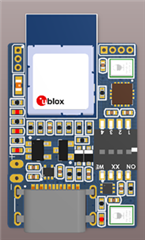
  • Can you post a picture of the board with the module? Are the board inside an enclosure? Any metal near the module's antenna?

  • We use the ESB protocol.
    Transmission Settings:
    - frequency 2402 MHz (experimented with different frequencies, does not affect significantly)
    - channel speed 2 Mbit
    - transmitter power 8dBm
    -packet length 252 (experimented with different lengths, does not affect the result)
    - data flow rate ~512 kBit/s
    -transmission with confirmation and 2 resendings (we also tried different options here)
    - the waiting time for confirmation is 900 microseconds.
    - it turns out that one packet of 252 bytes is sent 1 time in 3 ms.

    The receiver is powered by USB, the transmitter is powered by a battery.

    Ongoing experiments:

    1. The nRF52840 Dongle is used as a receiver (inserted into a PC), and the nRF52840 DK is used as a transmitter (battery powered, and microphones are also connected).
    - in this form, the connection is normal within a radius of 10 meters (without obstacles).

    2. The nRF52840 Dongle is used as a receiver (inserted into the PC), and the BMD-340 as a transmitter.
    - in this form, the connection is normal within a radius of 2 meters, but it may break completely at a certain position of the transmitter in space. With increasing distance, the connection is sharply tightened
    (frequent packet skips, strong dependence on the transmitter's continuity, the connection is completely cut off at a certain position of the transmitter in space).

    3. The BMD-340 is used as a receiver, and the BMD-340 is used as a transmitter. The quality of communication as item 2

    4. The BMD-340 is used as a receiver, and the nRF52840 DK is used as a transmitter. The quality of communication as item 2

    In total, in all cases, when using BMD340, the communication quality is much worse than when using a debugging complement.

Reply
  • We use the ESB protocol.
    Transmission Settings:
    - frequency 2402 MHz (experimented with different frequencies, does not affect significantly)
    - channel speed 2 Mbit
    - transmitter power 8dBm
    -packet length 252 (experimented with different lengths, does not affect the result)
    - data flow rate ~512 kBit/s
    -transmission with confirmation and 2 resendings (we also tried different options here)
    - the waiting time for confirmation is 900 microseconds.
    - it turns out that one packet of 252 bytes is sent 1 time in 3 ms.

    The receiver is powered by USB, the transmitter is powered by a battery.

    Ongoing experiments:

    1. The nRF52840 Dongle is used as a receiver (inserted into a PC), and the nRF52840 DK is used as a transmitter (battery powered, and microphones are also connected).
    - in this form, the connection is normal within a radius of 10 meters (without obstacles).

    2. The nRF52840 Dongle is used as a receiver (inserted into the PC), and the BMD-340 as a transmitter.
    - in this form, the connection is normal within a radius of 2 meters, but it may break completely at a certain position of the transmitter in space. With increasing distance, the connection is sharply tightened
    (frequent packet skips, strong dependence on the transmitter's continuity, the connection is completely cut off at a certain position of the transmitter in space).

    3. The BMD-340 is used as a receiver, and the BMD-340 is used as a transmitter. The quality of communication as item 2

    4. The BMD-340 is used as a receiver, and the nRF52840 DK is used as a transmitter. The quality of communication as item 2

    In total, in all cases, when using BMD340, the communication quality is much worse than when using a debugging complement.

Children
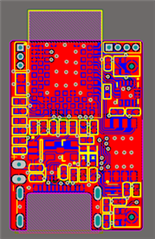
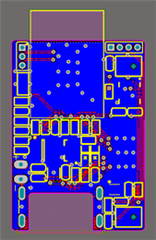
  • Ok, the HW looks ok, albeit somewhat small. A smaller PCB will always have less antenna gain than a larger one due to the smaller ground plane. A module can sometimes be a compromise since the antenna is optimized for a certain ground plane size. Something to ask the module manufacturer about.

    Can you read the RSSI value of the packet to see if the value matches the performance you see, I.E lower RSSI values with the modules than with the dongle/DK? Do you have a WLAN nearby on the same channel? Using only one channel will make you system very vulnerable to disturbance. 

  • Thank you for your feedback.

    I will be able to conduct and compare RSSI levels only in 4-5 days, once I do this I will provide the results.

    Receivers and transmitters are used in a normal office space, in which WiFi networks and possibly some wireless devices, such as keyboards, etc. operate at a frequency of 2.4.

    I did not quite understand your idea about one frequency, how when using the ESB protocol dynamically during operation, you can consistently change the frequency on the receiver and transmitter, even if you find out during transmission that the working channel has become with interference?

    I would like the problem to be in my program or frequencies, but the main conclusion of my experiments is that when working in the same conditions and at the same frequency, the same program works well with dongle+DK and poorly with my boards (or with my one board and DK or dogle).

    For this reason, I have now started designing a new board using a nrf52833 chip (because it has a QFN40 case) and a ceramic antenna chip on the board. I have no experience in designing devices with antennas, and the information about different types antennas is rather inaccurate, so I would also like to ask the question what is better to use in my case: a monopole (for example, a model with a length of 7 mm) or a PIFA (for example, a model with a length of 3.2 mm). In most real designs, I see that monopoles are used, but technical articles say that PIFA works better than monopoles?

  • ESB doesn't change frequency by it self, you need a protocol on top to handle that part. Maybe you're thinking about Gazel? https://infocenter.nordicsemi.com/topic/sdk_nrf5_v17.0.2/examples_gzll.html

    A monopole antenna needs to be ~17 mm and more or less the same for a PIFA. Both will have the same performance if designed correctly. The PIFA antenna is just using a trick to make the impedance 50 ohm. A monopole needs matching components. 

    If you can't to this, you have to look into ceramic or chip antennas. But note that the overall size of the ground plane plays a major role in the efficiency of the antenna. The later the better, to a certain extent. 

Related