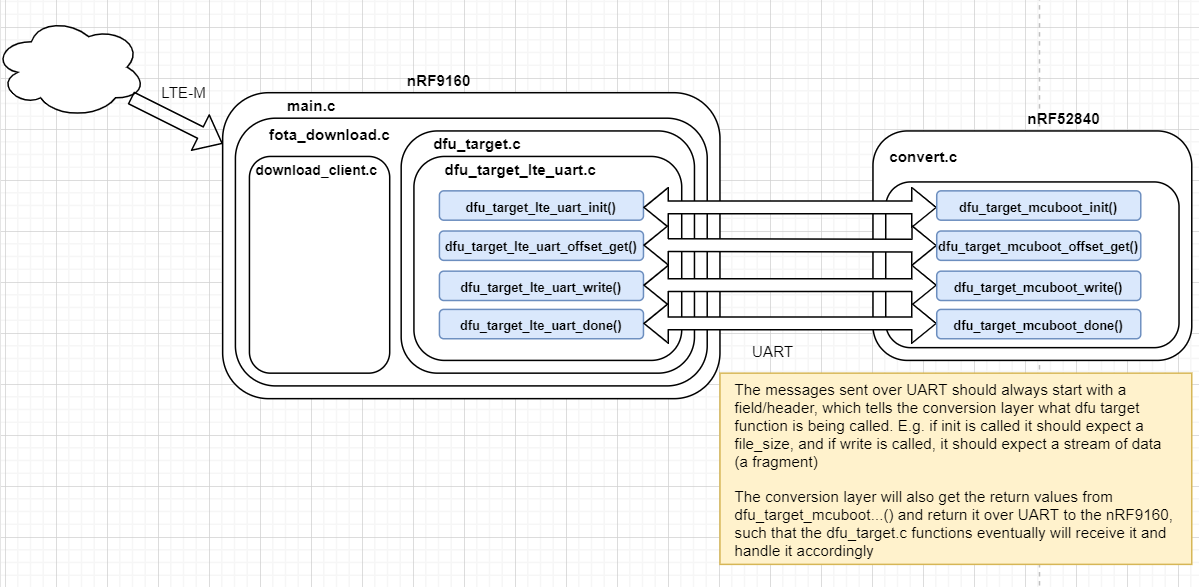
I'm downloading a firmware image from AWS via cell onto the nRF9160. I want to perform a serial DFU over UART. The DFU target is the nRF52840. Are there any existing samples outlining this process?
Hi Ethan,
Could you let me know more about what firmware running on the nRF52840 ?
If it's running NCS , please have a look at this case: https://devzone.nordicsemi.com/support-private/support/269959
ould you try to test using the repo that Simon pointed to in the case.
Simon is on vacation but here is the instruction I got from him:
*** Booting Zephyr OS build v2.1.99-ncs1 **
[00:00:00.120,208] [1B][0m<inf> mcuboot: Starting bootloader[1B][0m
[00:00:00.126,312] [1B][0m<inf> mcuboot: Primary image: magic=unset, swap_type=0x1, copy_done=0x3, image_ok=0x3[1B][0m
[00:00:00.136,108] [1B][0m<inf> mcuboot: Boot source: none[1B][0m[00:00:00.141,479] [1B][0m<inf> mcuboot: Swap type: test[1B][0m
[00:00:02.377,655] [1B][0m<inf> mcuboot: Bootloader chainload address offset: 0xc000[1B][0m
[00:00:02.385,162] [1B][0m<inf> mcuboot: Jumping to the first image slot[1B][0m
** Booting Zephyr OS build v2.1.99-ncs1 ***Hello world! nrf52840_pca10090

Hey Hung, I am downloading the image and sending it over UART successfully; however, the image does not seem to be loaded correctly on reboot. I changed the labels in my board file as described here: Building and using MCUboot with Zephyr — MCUboot 1.7.99 documentation (nordicsemi.com) Is there something obvious I'm missing?
Both your original firmware, and the "app_update.bin" firmware must share the exact same partition layout.
You can find this in the build folder of your original project under application-v1/build/partitions.yml. Copy this to application-v2/pm_static.yml and rebuild.
Kind regards,
Håkon
Both your original firmware, and the "app_update.bin" firmware must share the exact same partition layout.
You can find this in the build folder of your original project under application-v1/build/partitions.yml. Copy this to application-v2/pm_static.yml and rebuild.
Kind regards,
Håkon
Hey Håkon,
Thanks for your response. Followed your instructions and still not updating. Any other common issues that I'm missing?
Hi,
Try flashing the build/zephyr/app_test_update.hex directly to the device you're updating. This will show if the configuration that mcuboot expects is followed in the new application image.
Kind regards,
Håkon
I flashed it directly and the update worked as expected
What is the error message that you get? Do you have a debug trace or similar?
Is your new update image calling "boot_write_img_confirmed()" ?
Kind regards,
Håkon
The strange thing is I get no error message. No I don't have a trace, but whenever I print the error messages from dfu_target_mcuboot library functions, I get 0s. Yes I'm calling boot_write_img_confirmed(). EDIT: Ok double checked and I am not getting any errors from dfu_target_mcuboot functions but I am getting -5 as an error from boot_write_img_confirmed() on reboot. EDIT 2: printed the value returned by boot_set_confirmed() and it is -4 which stands for BOOT_MAGIC_BAD