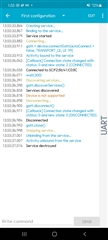
I'm a beginner in BLE applications, and I'm having trouble with connecting nRF toolbox application
I wanted to use UART function provided in nRF toolbox.
But, an error message "The device has not have required services" is shown, when I try to make connection with nRF toolbox
The device is well connected with nRF connect app, and scanning the BLE signal is fine
I tried several methods to solve the issues:
1. Modified service UUID in nrf toolbox source code
I changed UUID information, after checking the device service ID in nrf connect
I referred to the provided source code of nrf toolbox in github, and changed the UUID information in "app - java - UART - UARTManager" part.
(https://github.com/NordicSemiconductor/Android-nRF-Toolbox)
2. Used android version 9 for compatibility
I found nrf toolbox may not work in the recent version of android.
So I tried with my old smartphone having android version 9.
But, it still doesn't work. and please see the attached image of error msg on my smartphone
It would be very helpful if you let me know something to try to solve this issue