Hello
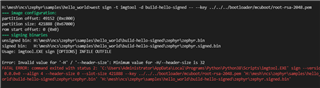
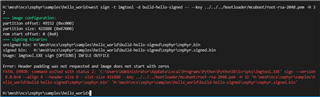
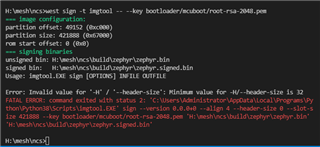
I am test the SMP Server Sample,but image signed error.
ncs1.6.0
board:nrf52840

Hi
Is your project located in the H:\mesh\ncs\ folder?
Normally this would be the base folder for NCS, and not the project folder itself.
Best regards
Torbjørn
Hi
Thank you for your quick response.
Is your project located in the H:\mesh\ncs\ folder?
Yes.
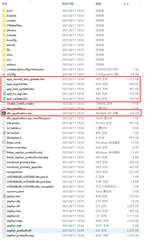
When I used this command, the build folder appeared here.
west build -b nrf52840dk_nrf52840 zephyr/samples/subsys/mgmt/mcumgr/smp_svr -p -- -DOVERLAY_CONFIG=overlay-bt.conf
Hi
I would recommend navigating to the project folder before you run west build, so that all the build files end up in the project directory itself, rather than directly under the NCS main directory.
For signing the binaries it is recommended simply to do this as part of the build command, as shown here.
Then all you have to do is to add the following to your build command, and the signed binaries will be created automatically:
-DCONFIG_MCUBOOT_SIGNATURE_KEY_FILE=\"bootloader/mcuboot/root-rsa-2048.pem\"
Best regards
Torbjørn
Hi
I would recommend navigating to the project folder before you run west build, so that all the build files end up in the project directory itself, rather than directly under the NCS main directory.
For signing the binaries it is recommended simply to do this as part of the build command, as shown here.
Then all you have to do is to add the following to your build command, and the signed binaries will be created automatically:
-DCONFIG_MCUBOOT_SIGNATURE_KEY_FILE=\"bootloader/mcuboot/root-rsa-2048.pem\"
Best regards
Torbjørn
Hi,
Thank you. It works well,but I don't know the meaning of these output files.

I also can't use this command at "/h/mesh/ncs/zephyr/samples/hello_world"


Hi
Август said:Thank you. It works well,but I don't know the meaning of these output files.
These files are documented here.
Август said:I also can't use this command at "/h/mesh/ncs/zephyr/samples/hello_world"
What if you try to use the build command instead of the sign command, and provide the signature key file in the build command as I described earlier?
Best regards
Torbjørn