Excuse me
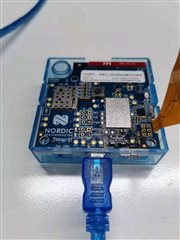
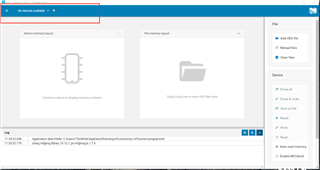
Prorammmer app in nrf connect for desktop Prompt no device available when I connect thingy91 to PC with mirco-usb cable,I want to update modem,certificate and application of thingy91.
Excuse me
Prorammmer app in nrf connect for desktop Prompt no device available when I connect thingy91 to PC with mirco-usb cable,I want to update modem,certificate and application of thingy91.


Hello,
Has this worked before? Has the nRF52840 on the Thingy:91 been reprogrammed? Following this guide, you should hold SW4 (small button to the right of nRF9160 SiP) and power on the device. This should put the nRF52840 in MCUboot mode, and should appear in the programmer app. Once it does please reprogram the Connectivity Bridge. In the precompiled FW package, found in Thingy:91 download page, you will find the latest version of the Connectivity Bridge (NCS v1.6.0).
Please use img_app_bl/thingy91_nrf52_connectivity_bridge_2021-06-28_7a076c22.hex.
Once this is done, please program the modem FW first, as this will erase the application area. Then reprogram the wanted application.
Let me know how it works for you.
Kind regards,
Øyvind
Hello,
Has this worked before? Has the nRF52840 on the Thingy:91 been reprogrammed? Following this guide, you should hold SW4 (small button to the right of nRF9160 SiP) and power on the device. This should put the nRF52840 in MCUboot mode, and should appear in the programmer app. Once it does please reprogram the Connectivity Bridge. In the precompiled FW package, found in Thingy:91 download page, you will find the latest version of the Connectivity Bridge (NCS v1.6.0).
Please use img_app_bl/thingy91_nrf52_connectivity_bridge_2021-06-28_7a076c22.hex.
Once this is done, please program the modem FW first, as this will erase the application area. Then reprogram the wanted application.
Let me know how it works for you.
Kind regards,
Øyvind