This post is older than 2 years and might not be relevant anymore
More Info: Consider searching for newer posts
This discussion has been locked.
You can no longer post new replies to this discussion. If you have a question you can start a new discussion

bsp_init() issue on nRF52805

Hi, my 1-button system off/on example works perfectly fine on nRF52 DK. However, when I move the exact same code to nRF52805, there are some errors.

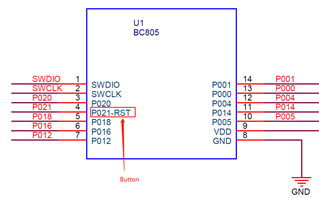
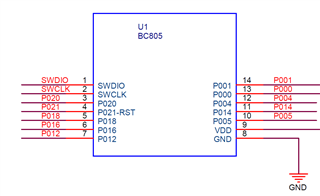
I choose pin 21 as the system off/on pin. By default, pin 21 is a reset pin. So firstly, according to this link (see the verified answer), I removed the default reset pin function. Then, I build & run the application code to nRF52805.

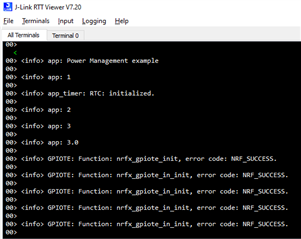
By using RTT viewer, I found that the code doesn't execute bsp_init(BSP_INIT_BUTTONS, bsp_evt_handler). It's NOT an issue on nRF52 DK. But nRF52805 has this issue. 

I attached my entire project code here in a ZIP file. Thanks in advance! 

#include <stdbool.h>
#include <stdint.h>
#include "boards.h"
#include "bsp.h"
#include "bsp_nfc.h"
#include "app_timer.h"
#include "nordic_common.h"
#include "app_error.h"
#include "nrf_drv_clock.h"
#include "nrf_pwr_mgmt.h"

#include "nrf_log.h"
#include "nrf_log_ctrl.h"
#include "nrf_log_default_backends.h"

#if NRF_PWR_MGMT_CONFIG_USE_SCHEDULER
#include "app_scheduler.h"
#define APP_SCHED_MAX_EVENT_SIZE    0   /**< Maximum size of scheduler events. */
#define APP_SCHED_QUEUE_SIZE        4   /**< Maximum number of events in the scheduler queue. */
#endif // NRF_PWR_MGMT_CONFIG_USE_SCHEDULER

#define BTN_ID                20


/**@brief Handler for shutdown preparation.
 */
bool shutdown_handler(nrf_pwr_mgmt_evt_t event)
{

    uint32_t err_code;

    switch (event)
    {
        case NRF_PWR_MGMT_EVT_PREPARE_WAKEUP:
            NRF_LOG_INFO("NRF_PWR_MGMT_EVT_PREPARE_WAKEUP");
            err_code = bsp_buttons_disable();
            // Suppress NRF_ERROR_NOT_SUPPORTED return code.
            UNUSED_VARIABLE(err_code);

            err_code = bsp_wakeup_button_enable(BTN_ID);
            // Suppress NRF_ERROR_NOT_SUPPORTED return code.
            UNUSED_VARIABLE(err_code);

            break;
    }

    err_code = app_timer_stop_all();
    APP_ERROR_CHECK(err_code);

    return true;
}


/**@brief Register application shutdown handler with priority 0. */
NRF_PWR_MGMT_HANDLER_REGISTER(shutdown_handler, 0);


/**@brief Function for handling BSP events.
 */
static void bsp_evt_handler(bsp_event_t evt)
{
#if NRF_PWR_MGMT_CONFIG_STANDBY_TIMEOUT_ENABLED
    nrf_pwr_mgmt_feed();
    NRF_LOG_INFO("Power management fed");
#endif // NRF_PWR_MGMT_CONFIG_STANDBY_TIMEOUT_ENABLED

    switch (evt)
    {
        
        case BSP_EVENT_DEFAULT:
            
            break;

        case BSP_EVENT_SYSOFF:

                // Application will prepare the wakeup mechanism: NRF_PWR_MGMT_EVT_PREPARE_WAKEUP
                /**@brief Function for shutting down the system.
                 * @param[in] shutdown_type     Type of operation.
                 * @details All callbacks will be executed prior to shutdown.
                 */
                nrf_pwr_mgmt_shutdown(NRF_PWR_MGMT_SHUTDOWN_GOTO_SYSOFF);
                // NRF_LOG_INFO("2) System OFF is entered\r\n");
                // NRF_POWER->SYSTEMOFF = 1;
            
            break;


        default:
            return; // no implementation needed
    }
}


/**@brief Function for initializing low-frequency clock.
 */
static void lfclk_config(void)
{
    ret_code_t err_code = nrf_drv_clock_init();
    APP_ERROR_CHECK(err_code);

    nrf_drv_clock_lfclk_request(NULL);
}


/**@brief Function for initializing the BSP module.
 */
static void bsp_configuration()
{
    NRF_LOG_INFO("3.0")
    uint32_t err_code;

    err_code = bsp_init(BSP_INIT_BUTTONS, bsp_evt_handler);
    APP_ERROR_CHECK(err_code);
    NRF_LOG_INFO("3.1");
    err_code = bsp_event_to_button_action_assign(BTN_ID,
                                                 BSP_BUTTON_ACTION_LONG_PUSH,
                                                 BSP_EVENT_DEFAULT);
    APP_ERROR_CHECK(err_code);
    NRF_LOG_INFO("3.2")

    err_code = bsp_event_to_button_action_assign(BTN_ID,
                                                 BSP_BUTTON_ACTION_RELEASE,
                                                 BSP_EVENT_SYSOFF);
    APP_ERROR_CHECK(err_code);
    NRF_LOG_INFO("3.3")
}


/**
 * @brief Function for application main entry.
 */
int main(void)
{
    
    APP_ERROR_CHECK(NRF_LOG_INIT(NULL));
    NRF_LOG_DEFAULT_BACKENDS_INIT();

    NRF_LOG_INFO("Power Management example");

    lfclk_config();
    NRF_LOG_INFO("1");

    uint32_t err_code = app_timer_init();
    APP_ERROR_CHECK(err_code);
    NRF_LOG_INFO("2");

#if NRF_PWR_MGMT_CONFIG_USE_SCHEDULER
    APP_SCHED_INIT(APP_SCHED_MAX_EVENT_SIZE, APP_SCHED_QUEUE_SIZE);
#endif // NRF_PWR_MGMT_CONFIG_USE_SCHEDULER
    NRF_LOG_INFO("3");
    bsp_configuration();
    NRF_LOG_INFO("4");

    ret_code_t ret_code = nrf_pwr_mgmt_init();
    APP_ERROR_CHECK(ret_code);
    NRF_LOG_INFO("5");

    while (true)
    {
#if NRF_PWR_MGMT_CONFIG_USE_SCHEDULER
        app_sched_execute();
#endif // NRF_PWR_MGMT_CONFIG_USE_SCHEDULER

        if (NRF_LOG_PROCESS() == false)
        {
            nrf_pwr_mgmt_run();
        }
    }
}


20210811 BC805M 1 button ONOFF.zip
  • Hi

    Have you checked out our "Developing for nRF52805" blog post here on DevZone. It should go cover all the changes necessary to make an nRF52832 project run on an nRF52805. As it is a considerably smaller chip with less peripheral channels and GPIOs, I'm guessing that you're trying to use a GPIO that doesn't exist on the nRF52805.

    Best regards,

    Simon

  • Hi

    Thanks for your support. Yes, I have read and followed nRF52832-->nRF52805 steps. Also, I'm sure that Pin 21 exist on nRF52805 board (screenshot 1). 

    I have fixed some errors today, but the code still doesn't work on nRF52805. It works well on nRF52 DK. Here are the errors that I fixed: 

    1) Because I only have 1 button and 1 LED on my board (BC8005 EK), so I configured pca10040.h as below: 

    #define LEDS_NUMBER    1
    
    #define LED_START      20
    #define LED_1          20
    #define LED_STOP       20
    
    #define LEDS_ACTIVE_STATE 0
    
    #define LEDS_INV_MASK  LEDS_MASK
    
    #define LEDS_LIST { LED_1 }
    
    #define BSP_LED_0      LED_1
    
    
    #define BUTTONS_NUMBER 1
    
    #define BUTTON_START   21
    #define BUTTON_1       21
    #define BUTTON_STOP    21
    #define BUTTON_PULL    NRF_GPIO_PIN_PULLUP
    
    #define BUTTONS_ACTIVE_STATE 0
    
    #define BUTTONS_LIST { BUTTON_1 }
    
    #define BSP_BUTTON_0   BUTTON_1


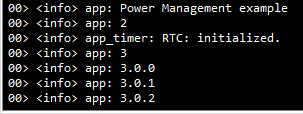
    2) By using NRF_LOG_INFO(), I located the error is inside bsp.c   bsp_init(). Screenshot 2 shows that in RTT viewer, the last printed value is NRF_LOG_INFO("3.0.2"). 

    uint32_t bsp_init(uint32_t type, bsp_event_callback_t callback)
    {
        NRF_LOG_INFO("3.0.0");
        uint32_t err_code = NRF_SUCCESS;
    
    #if LEDS_NUMBER > 0 && !(defined BSP_SIMPLE)
        m_indication_type     = type;
    #endif // LEDS_NUMBER > 0 && !(defined BSP_SIMPLE)
    
    #if (BUTTONS_NUMBER > 0) && !(defined BSP_SIMPLE)
        m_registered_callback = callback;
        NRF_LOG_INFO("3.0.1");
        // BSP will support buttons and generate events
        if (type & BSP_INIT_BUTTONS)
        {
            uint32_t num;
    
            for (num = 0; ((num < BUTTONS_NUMBER) && (err_code == NRF_SUCCESS)); num++)
            {
                err_code = bsp_event_to_button_action_assign(num, BSP_BUTTON_ACTION_PUSH, BSP_EVENT_DEFAULT);
                NRF_LOG_INFO("3.0.2");
            }
    
            if (err_code == NRF_SUCCESS)
            {
                err_code = app_button_init((app_button_cfg_t *)app_buttons,
                                           BUTTONS_NUMBER,
                                           APP_TIMER_TICKS(50));
                NRF_LOG_INFO("3.0.3");
            }
    
            if (err_code == NRF_SUCCESS)
            {
                err_code = app_button_enable();
            }
    
            if (err_code == NRF_SUCCESS)
            {
                err_code = app_timer_create(&m_bsp_button_tmr,
                                            APP_TIMER_MODE_SINGLE_SHOT,
                                            button_timer_handler);
                NRF_LOG_INFO("3.0.4");
            }
        }
    #elif (BUTTONS_NUMBER > 0) && (defined BSP_SIMPLE)
        bsp_board_init(type);
    #endif // (BUTTONS_NUMBER > 0) && !(defined BSP_SIMPLE)
    
    #if LEDS_NUMBER > 0 && !(defined BSP_SIMPLE)
        if (type & BSP_INIT_LEDS)
        {
          //handle LEDs only. Buttons are already handled.
          bsp_board_init(BSP_INIT_LEDS);
    
          // timers module must be already initialized!
          if (err_code == NRF_SUCCESS)
          {
              err_code =
                  app_timer_create(&m_bsp_leds_tmr, APP_TIMER_MODE_SINGLE_SHOT, leds_timer_handler);
          }
    
          if (err_code == NRF_SUCCESS)
          {
              err_code =
                  app_timer_create(&m_bsp_alert_tmr, APP_TIMER_MODE_REPEATED, alert_timer_handler);
          }
        }
    #endif // LEDS_NUMBER > 0 && !(defined BSP_SIMPLE)
        NRF_LOG_INFO("3.0.9");
        return err_code;
    }

    3) Because I don't have external clock, so I have also checked in sdk_config.h that

    LF_SRC = 0, 

    NRF_SDH_CLOCK_LF_RC_CTIV = 16, 

    NRF_SDH_CLOCK_LF_RC_TEMP_CTIV = 2

    4) I deleted some BLE files which are unnecessary. 

    Here is my new project code if you need it. Do you have any idea, please?

    Thank you very much! 

    20210812 BC805M 1 button ONOFF.zip

  • Hi

    Instead of just logging what functions are succeeding and not, you should be able to debug to see what exact function is returning what error in the logger by enabling debug in the preprocessor defines and adding an APP_ERROR_CHECK macro to check the returned error code.

    You can check out this post where how to do so is described in detail. That would give us a better idea of what exactly is failing in your bsp_init() function.

    Best regards,

    Simon

  • Problem solved. 

    Plz see the answer via this link

Related