This post is older than 2 years and might not be relevant anymore
More Info: Consider searching for newer posts

nRF52-DK Getting Started Trouble

I am following the Getting Started directions here:
https://www.nordicsemi.com/Products/Development-hardware/nrf52-dk/getting-started#infotabs

Steps 6 and 7 do not work.  There are no further instructions on what to do.

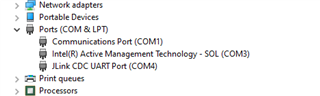
Step 6: No drive letter appears.  This is the most recent version Win10.  Disconnecting and reconnecting makes no difference

Step 7: The phone never prompts me to open a URL.  A list of nearby devices came up, but nothing sounded close to nRF52DK.  What name should it be?

Parents
  • Step 7 actually works.  I want to use this for Bluetooth, and I thought step 7 was about Bluetooth.  If I put the phone right on top of the antenna it works.   

    Step 6---   I installed the command line tool as suggested.   Here is the output:

    C:\de\nordic\nRF-Command-Line-Tools_10_13_0_WIN64>"\Program Files\Nordic Semiconductor\nrf-command-line-tools\bin\nrfjprog" -i
    682671648

Reply
  • Step 7 actually works.  I want to use this for Bluetooth, and I thought step 7 was about Bluetooth.  If I put the phone right on top of the antenna it works.   

    Step 6---   I installed the command line tool as suggested.   Here is the output:

    C:\de\nordic\nRF-Command-Line-Tools_10_13_0_WIN64>"\Program Files\Nordic Semiconductor\nrf-command-line-tools\bin\nrfjprog" -i
    682671648

Children
Related