This post is older than 2 years and might not be relevant anymore
More Info: Consider searching for newer posts

is that possible to lookup a bitmap table from Main Application code from Bootloader code?

Hi,

I am using nrf52840, need to modify the bootloader to lookup a big bitmap table.   But since the table is big, it cannot allocate within the bootloader Rom area.  

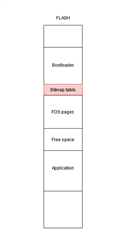
Is that possible to put this table in main Application area but let the bootloader look it up ?  

Or in other words, can we define a dedicated/constant Rom area for the bitmap table, then bootloader can lookup that table?

Thanks a lot!

Parents
  • Hi,

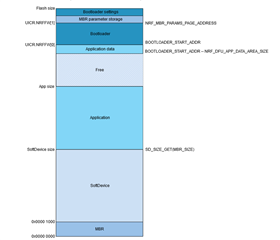
    There are probably several ways you can solve this. Are you using the FDS filesystem in your main application? The first solution that comes to mind is to simply reserve one or more flash pages in the application data region and place your table there. FDS includes a configuration setting which you can use to reserve the page : FDS_VIRTUAL_PAGES_RESERVED. If you choose this approach, just remember to adjust the NRF_DFU_APP_DATA_AREA_SIZE symbol in your bootloader accordingly as that will prevent the bootloader from overwriting app data during DFU.

    You can the use a harcoded pointer to reference the lookup table inside the app data region. Same as how the bootloader accesses the bootloader settings page.

    Best regards,

    Vidar

  • Dear Vidar,

    My bootlaoder need a size of 110k,  so can I set the starting address from 0xE3000?

    After I set to this start address, enable RTT viewer in Bootloader code, using NRFGo Studio to upload SottDevice, Main App code and also this bootloader, the RTT print out the following debug print

    00> <info> app: Inside main
    00> <info> nrf_dfu_settings: Backing up settings page to address 0xFE000.
    00> <info> app: No firmware to activate.
    00> <info> app: check if key press
    00> <info> app: Boot validation failed. No valid app to boot. 0
    00> <info> app: DFU mode because app is not valid.
    00> <info> nrf_bootloader_wdt: WDT is not enabled
    00> <info> app: Entering DFU mode.

    The s_dfu_settings.bank_0.bank_code  is 0, look like it cannot see the Main App code. 

    If only upload Softdevice and Main App, it can run normally.  But with Softdevice, it cannot jump to Main App. 

    Another question is where is the Main App starting address?   My Main App had Rom1 set to 0x27000.  ( it was came from an example code in the SDK ).

    Is this correct?

    I am using SDK 1702

    Thank you so much.

    Martin

  • Hi Martin,

     Yes, you can use this start address.

    DYNAMICTOYS said:
    The s_dfu_settings.bank_0.bank_code  is 0, look like it cannot see the Main App code.

     Yes, the bootloader does not that a valid application is present in bank 0. This is why when programming the application directly through the debug interface you also have to program the Bootloader settings page to "mark" the application as valid. Documentation on how to generate the settings page can be found here: Generating and displaying bootloader settings 

    e.g.

    // Generate the settings page
     nrfutil settings generate --family NRF52840^
     --application application.hex^
     --application-version-string "1.0.0"^
     --bootloader-version 1^
     --bl-settings-version 2^
     --app-boot-validation VALIDATE_GENERATED_CRC^
     settings.hex
     
     // Load the settings page to the device with jlink
     nrfjprog --program settings.hex --sectorerase --reset 

    DYNAMICTOYS said:
    Another question is where is the Main App starting address?   My Main App had Rom1 set to 0x27000.  ( it was came from an example code in the SDK ).

     The start address depends on the size of the Softdevice you use. S140 v.7.x.x is 0x27000 bytes, so 0x27000 is the correct start address as long as you're using this Softdevice.

  • Dear Vidar,

    Do we need to do a setting file for both Bootloader and Main App or just the Bootloader?

    For SDK 17, what version number should be used?  3 ? or 4? 

    in  

    https://infocenter.nordicsemi.com/index.jsp?topic=%2Fug_nrfutil%2FUG%2Fnrfutil%2Fnrfutil_settings_generate_display.html&cp=10_7_6

    it only mentioned 15.3 is 2. 

    Now I had created a setting file and merge with Bootloader file, then upload to development board.

    Now the waring message is 

     <warning> app: Boot validation failed. App is invalid.

    So what is missing by the App itself? 

    2) packed a zip and did one DFU loading.  It printed out following message

    00> <info> app: Entering DFU mode.
    00> <info> nrf_dfu_validation: Signature required. Checking signature.
    00> <info> nrf_dfu_validation: Calculating hash (len: 64)
    00> <info> nrf_dfu_validation: Verify signature
    00> <info> nrf_dfu_validation: Image verified
    00> <warning> nrf_dfu_ver_validation: FW version too low.
    00> <warning> nrf_dfu_validation: Prevalidation failed.
    00> <warning> nrf_dfu_ble: DFU request 4 failed with error: 0xB

    What is the minimum FW version?  

    Thanks again

    Regards,

    Martin

  • Dear Martin,

    This only for the bootloader, the application does not have its own settings page. And the bootloader settings version you mentioned  must be set to '2' when your are using SDK 17 (shall be version 2 for sdk 15.3.0 and later).

    DYNAMICTOYS said:

     <warning> app: Boot validation failed. App is invalid.

    So what is missing by the App itself? 

     Is the application programmed onto the device exactly the same as the .hex file you passed to --application when you generated the settings page? If not, the boot validation will fail because the the checksum stored in the bootloader settings page won't match the application image.

    It's also possible to turn off boot validation by setting --app-boot-validation to NO_VALIDATION instead of VALIDATE_GENERATED_CRC when you create the settings page.

    2) You need to make sure the new app in the DFU package has a higher version number than the one you currently have programmed on your device. The bootloader has NRF_DFU_APP_DOWNGRADE_PREVENTION enabled by default.

    Regards,

    Vidar

  • Dear Vidar,

    The App validation issue was fixed now after changing correct version.

    But now I found another issue when DFU bootloader.  ( note : dfu the same bootlaoder ) 

    the bl_size always has around 5 k over limit whateven I increase the total compiled size. 

    i.e. move down the starting address. 

    In Keil, iROM set start address from 0xE0000.  So from 0xE0000 to 0xFE000, it should have 122.88k.

    From Keil compiled result, I got

    Build target 'nrf52840_xxaa_s140'
    linking...
    Program Size: Code=32732 RO-data=53448 RW-data=300 ZI-data=32584
    FromELF: creating hex file...
    ".\_build\RemoteBootloader840.axf" - 0 Error(s), 0 Warning(s).
    Build Time Elapsed: 00:00:03

    After program Softdevice, Main App and Bootlaoder to development board, start DFU will get the following debug print from RTT Viewer.

    00> <info> app: Inside main
    00> <info> nrf_dfu_settings: Backing up settings page to address 0xFE000.
    00> <info> app: No firmware to activate.
    00> <info> app: check if key press
    00> <info> app: DFU mode requested via button.
    00> <info> nrf_bootloader_wdt: WDT is not enabled
    00> <info> app: Entering DFU mode.
    00> <info> nrf_dfu_validation: Signature required. Checking signature.
    00> <info> nrf_dfu_validation: Calculating hash (len: 64)
    00> <info> nrf_dfu_validation: Verify signature
    00> <info> nrf_dfu_validation: Image verified
    00> <error> nrf_dfu_validation: BL size (118876) over limit (114688)
    00> <error> nrf_dfu_validation: Init packet does not contain valid firmware size
    00> <warning> nrf_dfu_ble: DFU request 4 failed with error: 0x4
    00> <info> app: display LCD image
    00> <info> app: Inside main
    00> <info> nrf_dfu_settings: Backing up settings page to address 0xFE000.
    00> <info> app: No firmware to activate.

    Why the BL size is118876?  

    How this size calculated? 

    and why the limit is only 114688? 

    Then if I change the Starting address from 0xDE000,

    Keil result is

    Program Size: Code=32732 RO-data=53448 RW-data=300 ZI-data=32584  

    And debug printing become 

    00> <error> nrf_dfu_validation: BL size (135260) over limit (131072)

    Even adding all Code, Ro-data , Rw-data and Zi-data, it is still not meet 135k.  So how the bl_size is 135260? 

    Am I missing some compiler setting? 

    Although I should not do that :  in dfu_req_handling.c   If I change the line

    if (p_init->bl_size <= BOOTLOADER_SIZE)

    to 

    if (p_init->bl_size -5000 <= BOOTLOADER_SIZE)

    Then it can DFU without any problem.  After DFU, everything work. 

    Thanks again.

    Martin

Reply
  • Dear Vidar,

    The App validation issue was fixed now after changing correct version.

    But now I found another issue when DFU bootloader.  ( note : dfu the same bootlaoder ) 

    the bl_size always has around 5 k over limit whateven I increase the total compiled size. 

    i.e. move down the starting address. 

    In Keil, iROM set start address from 0xE0000.  So from 0xE0000 to 0xFE000, it should have 122.88k.

    From Keil compiled result, I got

    Build target 'nrf52840_xxaa_s140'
    linking...
    Program Size: Code=32732 RO-data=53448 RW-data=300 ZI-data=32584
    FromELF: creating hex file...
    ".\_build\RemoteBootloader840.axf" - 0 Error(s), 0 Warning(s).
    Build Time Elapsed: 00:00:03

    After program Softdevice, Main App and Bootlaoder to development board, start DFU will get the following debug print from RTT Viewer.

    00> <info> app: Inside main
    00> <info> nrf_dfu_settings: Backing up settings page to address 0xFE000.
    00> <info> app: No firmware to activate.
    00> <info> app: check if key press
    00> <info> app: DFU mode requested via button.
    00> <info> nrf_bootloader_wdt: WDT is not enabled
    00> <info> app: Entering DFU mode.
    00> <info> nrf_dfu_validation: Signature required. Checking signature.
    00> <info> nrf_dfu_validation: Calculating hash (len: 64)
    00> <info> nrf_dfu_validation: Verify signature
    00> <info> nrf_dfu_validation: Image verified
    00> <error> nrf_dfu_validation: BL size (118876) over limit (114688)
    00> <error> nrf_dfu_validation: Init packet does not contain valid firmware size
    00> <warning> nrf_dfu_ble: DFU request 4 failed with error: 0x4
    00> <info> app: display LCD image
    00> <info> app: Inside main
    00> <info> nrf_dfu_settings: Backing up settings page to address 0xFE000.
    00> <info> app: No firmware to activate.

    Why the BL size is118876?  

    How this size calculated? 

    and why the limit is only 114688? 

    Then if I change the Starting address from 0xDE000,

    Keil result is

    Program Size: Code=32732 RO-data=53448 RW-data=300 ZI-data=32584  

    And debug printing become 

    00> <error> nrf_dfu_validation: BL size (135260) over limit (131072)

    Even adding all Code, Ro-data , Rw-data and Zi-data, it is still not meet 135k.  So how the bl_size is 135260? 

    Am I missing some compiler setting? 

    Although I should not do that :  in dfu_req_handling.c   If I change the line

    if (p_init->bl_size <= BOOTLOADER_SIZE)

    to 

    if (p_init->bl_size -5000 <= BOOTLOADER_SIZE)

    Then it can DFU without any problem.  After DFU, everything work. 

    Thanks again.

    Martin

Children
Related