This post is older than 2 years and might not be relevant anymore
More Info: Consider searching for newer posts

Segger EMBEDDED STUDIO debugger breaks at random lines

Hello

I am running this version of SES

SEGGER Embedded Studio for ARM

Release 5.34a  Build 2021011401.44914

Nordic Edition

Windows x64

When I run my program in Segger it keeps stopping at these two particular lines. I do not understand why it is breaking because there are no breakpoints set. I deleted all of them.

It seems as if there are two 'hidden' breakpoints at these two lines. The Breakpoints window shows none.

Can someone please help?

Kind regards

Mohamed

Parents
  • Hello Mohamed,

    Could you specify which two lines you are referring to?
    Is it the NRF_BREAKPOINT_COND you are referring to?

    Could you also make sure to have DEBUG defined in your preprocessor defines, like shown in the included image?

    This will make the logger output a detailed error message whenever a non-NRF_SUCCESS error code is passed to an APP_ERROR_CHECK.

    Best regards,
    Karl

Reply
  • Hello Mohamed,

    Could you specify which two lines you are referring to?
    Is it the NRF_BREAKPOINT_COND you are referring to?

    Could you also make sure to have DEBUG defined in your preprocessor defines, like shown in the included image?

    This will make the logger output a detailed error message whenever a non-NRF_SUCCESS error code is passed to an APP_ERROR_CHECK.

    Best regards,
    Karl

Children
  • Hi Karl,

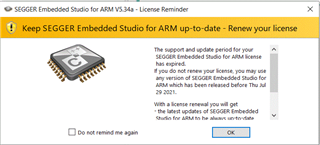
    Before I would like to update my SES to a more recent version. I have recently been getting this message every time I launch SES.

    How do I renew my licence?

    Thank you.

    Kind regards

    Mohamed Belaroussi

  • Hi Karl,

    I am not sure what NRF_BREAKPOINT_COND is. But just before this problem started showing up I tried to set a data breakpoint breaking when a variable is set to a particular value. I thought it di not work because I could not see any breakpoint in the Breakpoints window in SES. Could it be that this data breakpoint is actually set but not showing up?

    Kind regards

    Mohamed Belaroussi

  • Hello again Mohamed Belaroussi,

    Learner said:
    How do I renew my licence?

    Please see this ticket for further information on how to update your SES license.

    Learner said:
    But just before this problem started showing up I tried to set a data breakpoint breaking when a variable is set to a particular value. I thought it di not work because I could not see any breakpoint in the Breakpoints window in SES. Could it be that this data breakpoint is actually set but not showing up?

    If I recall correctly I think that Segger might have had some issues with data breakpoints earlier.
    Unfortunately, this is then an issue with Segger Embedded Studio and is not directly with any Nordic product, so you have to open a ticket with Segger directly to have this issue examined.

    Best regards,
    Karl

  • Hello Karl,

    Thank you. I am not sure about which MAC address to use.

    C:\WINDOWS\System32>ipconfig /all

    Windows IP Configuration

    Host Name . . . . . . . . . . . . : G4S-L0226
    Primary Dns Suffix . . . . . . . : g4smtl.com
    Node Type . . . . . . . . . . . . : Hybrid
    IP Routing Enabled. . . . . . . . : No
    WINS Proxy Enabled. . . . . . . . : No
    DNS Suffix Search List. . . . . . : g4smtl.com
    dev.g4smtl.com
    emsysdemo.local

    Ethernet adapter Ethernet:

    Media State . . . . . . . . . . . : Media disconnected
    Connection-specific DNS Suffix . :
    Description . . . . . . . . . . . : Intel(R) Ethernet Connection (7) I219-LM
    Physical Address. . . . . . . . . : F8-B4-6A-BB-CE-96
    DHCP Enabled. . . . . . . . . . . : Yes
    Autoconfiguration Enabled . . . . : Yes

    Wireless LAN adapter Local Area Connection* 1:

    Media State . . . . . . . . . . . : Media disconnected
    Connection-specific DNS Suffix . :
    Description . . . . . . . . . . . : Microsoft Wi-Fi Direct Virtual Adapter
    Physical Address. . . . . . . . . : 50-E0-85-76-3D-43
    DHCP Enabled. . . . . . . . . . . : Yes
    Autoconfiguration Enabled . . . . : Yes

    Wireless LAN adapter Local Area Connection* 2:

    Media State . . . . . . . . . . . : Media disconnected
    Connection-specific DNS Suffix . :
    Description . . . . . . . . . . . : Microsoft Wi-Fi Direct Virtual Adapter #2
    Physical Address. . . . . . . . . : 52-E0-85-76-3D-42
    DHCP Enabled. . . . . . . . . . . : Yes
    Autoconfiguration Enabled . . . . : Yes

    Ethernet adapter Ethernet 3:

    Media State . . . . . . . . . . . : Media disconnected
    Connection-specific DNS Suffix . : g4smtl.com
    Description . . . . . . . . . . . : TAP-Windows Adapter V9
    Physical Address. . . . . . . . . : 00-FF-E8-A6-9E-83
    DHCP Enabled. . . . . . . . . . . : Yes
    Autoconfiguration Enabled . . . . : Yes

    Wireless LAN adapter Wi-Fi:

    Connection-specific DNS Suffix . : g4smtl.com
    Description . . . . . . . . . . . : Intel(R) Wireless-AC 9560 160MHz
    Physical Address. . . . . . . . . : 50-E0-85-76-3D-42
    DHCP Enabled. . . . . . . . . . . : Yes
    Autoconfiguration Enabled . . . . : Yes
    Link-local IPv6 Address . . . . . : fe80::dde5:4c8a:668d:bff5%9(Preferred)
    IPv4 Address. . . . . . . . . . . : 10.20.10.75(Preferred)
    Subnet Mask . . . . . . . . . . . : 255.255.255.0
    Lease Obtained. . . . . . . . . . : 20 August 2021 08:59:04
    Lease Expires . . . . . . . . . . : 20 August 2021 17:02:03
    Default Gateway . . . . . . . . . : 10.20.10.1
    DHCP Server . . . . . . . . . . . : 10.20.20.18
    DHCPv6 IAID . . . . . . . . . . . : 156295301
    DHCPv6 Client DUID. . . . . . . . : 00-01-00-01-25-F9-7F-68-F8-B4-6A-BB-CE-96
    DNS Servers . . . . . . . . . . . : 10.20.20.20
    10.20.20.18
    10.140.0.3
    NetBIOS over Tcpip. . . . . . . . : Enabled

    Ethernet adapter Bluetooth Network Connection:

    Media State . . . . . . . . . . . : Media disconnected
    Connection-specific DNS Suffix . :
    Description . . . . . . . . . . . : Bluetooth Device (Personal Area Network)
    Physical Address. . . . . . . . . : 50-E0-85-76-3D-46
    DHCP Enabled. . . . . . . . . . . : Yes
    Autoconfiguration Enabled . . . . : Yes

    If I recall correctly I think that Segger might have had some issues with data breakpoints earlier.

    Does this mean that if I update to a more recent SES version the data breakpoints might work?

    Unfortunately, this is then an issue with Segger Embedded Studio and is not directly with any Nordic product, so you have to open a ticket with Segger directly

    I have tried to get help from Segger with a problem I had few months ago with SES Nordic Edition but they refused to help. They said Segger do not support SES Nordic Edition.

    Kind regards

    Mohamed Belaroussi

  • Hello again,

    Learner said:
    I am not sure about which MAC address to use.

    You should use your physical address of your Ethernet adapter for the MAC address field.

    Learner said:
    Does this mean that if I update to a more recent SES version the data breakpoints might work?

    You could try that, sure.

    Learner said:
    I have tried to get help from Segger with a problem I had few months ago with SES Nordic Edition but they refused to help. They said Segger do not support SES Nordic Edition.

    Aha, I understand. Could you show me the two lines which the program stops as - the ones you are referring to in your ticket description?

    Best regards,
    Karl

Related