Hello,
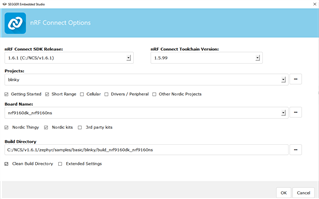
I’m currently trying to flash the blinky code (found in the ‘Getting Started’ section) onto the nordic nrf9160-dk.
The error I’m getting is :
“error: cmake failed
create_nordic_project.py failed (1)”
When I looked online for help/clarification I saw a post from the nordic devzone forums saying that the ‘create_nordic_project.py failed (1)’ error arises when the wrong board name is picked in SEGGER Embedded Studio (SES). I looked at this link from Nordic: https://developer.nordicsemi.com/nRF_Connect_SDK/doc/latest/nrf/app_boards.html and tried all the boards that correspond to the nRF9160-dk and I’m still receiving the same error message.
I also saw on the nordic dev zone forums that it could help to go to SES to navigate to Target >> Connect J-Link >> Erase All to clear the board. I tried that and it didn’t change anything.
Any ideas on how to fix this error? For context I was able to successfully flash all of the ‘Getting Started’ sample programs onto the nRF52-dk.
Lastly, even though uploading the blinky program onto the nRF9160-dk is giving me an error message, when I just click on the blinky project I created for the nRF52-dk, LED3 on the nrf9160-dk starts blinking without me needing to upload it at all.This could be because the nrf9160-dk includes a nrf52840 board controller, explaining why the program uploads. However, none of the other ‘Getting Started’ programs I loaded onto the nRF52-dk automatically upload onto the board so I’m not really sure why that’s happening.
Any help would be appreciated!