This post is older than 2 years and might not be relevant anymore
More Info: Consider searching for newer posts

Problem with APP_TIMER

Hi,

I run nRF5 SDK 15.3.0 with SES 4.30c on a PCA10040. Yesterday I upgraded to nRF5 SDK 17.0.2 and SES 5.60. When I connected PCA10040 I got a message that something wanted to be upgraded. I clicked Yes. Now when I run the debugger in SES I don't get interrupts om APP_TIMERs. When I turn off the debugger and run the board standalone, everything works fine.

I have three different PCA10040, and all behave the same. But I only got the message, that I mentioned above, once. I have tried to go back to 4.30c and 15.3.0, but the behaviour is the same. When I check the properties for the COM-port for each of the boards, all of them have notes that something around the UART has been upgraded. The driver is "JLink CDC UART Port (COMx)" from SEGGER, date 2019-06-06, version 1.34.0.44950. So the driver seems to be a couple of years old. But the notes still say that something has been upgraded.

I just connected my third board, and the first time I ran it I got interrupts on APP_TIMER when I ran the debuuger in SES. But when I restarted it, the interrupts stopped coming.

Do you have any idea of what might have happened? Can the boards have been upgraded in some way? Is it possible to go back to a previous version of some driver or firmware that is involved in this?

Best regards,
Lars

  • I can't think of anything.

    My recommendation is possible uninstall nrf command lines tools, SES and j-link installations you have, and try to install the lastest that is tested with for instance nRF5 SDKv17.0.2 release notes:

    https://infocenter.nordicsemi.com/topic/sdk_nrf5_v17.0.2/index.html

    The following toolchains/devices have been used for testing and verification:
     
     - ARM: MDK-ARM version 5.25   
     - GCC: GCC ARM Embedded 9.2019q4.major
     - IAR: IAR Workbench 7.80.4
     - SES: SES 4.50

    The latest nRF command line tools can be downloaded from:
    https://www.nordicsemi.com/Products/Development-tools/nrf-command-line-tools/download

    For instance it says that for nRF command line tools 10.13.0 that:
    - (Release) Update bundled Segger installers and tar balls to v7.50a

    Make sure that you don't have any newer Segger j-link installed than v7.50a in that case.

    Finally, take one of the default examples from nRF5 SDKv17.0.2 that use app_timer, and see if it run as expected. 

    If you want to use an older release of nRF5 SDKv17.0.2 then check the respective release notes for which version that is tested.

    Kenneth

  • Hi,

    I have tested a bit more with the installation I have. I'm really confused, and it's a bit hard to recapitulate the behaviour I see, but I'll try.

    It seems that this has to do with the watchdog (which also uses lfclk). If I don't use the watchdog, everything works fine. But using it causes APP_TIMER not to work.

    One strange thing is that if I have the watchdog enabled, then skip enabling it and remove the call to nrf_drv_wdt_channel_feed(), I will get a watchdog reset after 2 seconds. After restarting it everything (including APP_TIMER) works fine. And everythng works all the time after that.

    I see a similar behaviour when I enable the watchdog again. But this time APP_TIMER works the first run after watchdog is enabled again. After a restart, APP_TIMER doesn't work. And APP_TIMER doesn't work all the time after that.

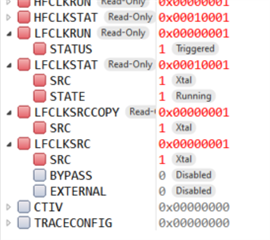
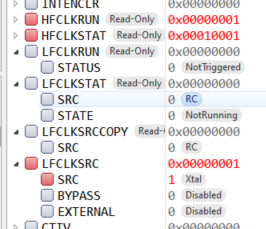
    I have checked the registers around LFCLK. The first picture shows the settings when everything works fine. The second when APP_TIMER doesn't work.


    And as I mentioned before, I only see this behaviour when I run the debugger, not if I just run my board. Then watchdog and APP_TIMER run smoothly together.

    Best regards,

    Lars

  • Do you start the LFCLK in your application at any time? Tyipically enabling the softdevice will do this for you, else you need to start it manually in start of main() for instance. It seems LFCLKRUN is 0, which means it's not started. If it's not started it may be that it works by almost pure luck here.

    Kenneth

  • I call these functions:

    nrf_drv_clock_init()
    nrf_drv_clock_lfclk_request(NULL)
    app_timer_init()

    After calling these functions I initialize the wdt and start it.

    In nrf_drv_clock_init() there is a check to see if the wdt is on:

    if (nrf_wdt_started())
    {
    	m_clock_cb.lfclk_on = true;
    }


    The register NRF_WDT->RUNSTATUS is checked in nrf_wdt_started(). If this register is set, the flag m_clock_cb.lfclk_on is marked true. In the next function, nrf_drv_clock_lfclk_request(), this flag is checked. If it is true, lfclk is not started since it is considered to already be running. So if NRF_WDT->RUNSTATUS is set at startup, lfclk is not started.

    The first time I have the wdt enabled, NRF_WDT->RUNSTATUS is false when the program starts, and lfclk is started. So that is the reason why APP_TIMER works the first time wdt is enabled. Restarting the debugger, NRF_WDT->RUNSTATUS is true at startup, and lfclk is not started.

    The same behaviour is repeated if I don't have the wdt enabled. Then NRF_WDT->RUNSTATUS is also true the first time the program starts. But restarting the debugger, NRF_WDT->RUNSTATUS is false, and lfclk is started.

    I have not found a way to explicitly turn off the wdt at power on. And starting lfclk in another way than by the function calls above doesn't feel correct. And everything works as it should when not running the debugger. How should I handle this?

    /Lars

Related