This post is older than 2 years and might not be relevant anymore
More Info: Consider searching for newer posts
This discussion has been locked.
You can no longer post new replies to this discussion. If you have a question you can start a new discussion

Pin 20 cannot pullup

Hi, I'm using the BC805M EK (nRF52805). I would like to pull up pin 20. Here is my configuration in pca10040.h. However, pin20 cannot be pulled up. It's always pulled down.

#define BUTTONS_NUMBER 1

#define BUTTON_START   20
#define BUTTON_1       20
#define BUTTON_STOP    20
#define BUTTON_PULL    NRF_GPIO_PIN_PULLUP

#define BUTTONS_ACTIVE_STATE 0

#define BUTTONS_LIST { BUTTON_1 }

#define BSP_BUTTON_0   BUTTON_1

If I delete all codes in the main loop, pin 20 is pulled up to 1.65V. Why 1.65V, not 3.3V, please?

If I keep all other codes in the main loop (includes SAADC with PPI interruption, TWI, UART, BLE), pin 20 is always pulled down (0V). So I guess some of my codes force to pull down the pin20 (button). None of SAADC/TWI uses pin20. 
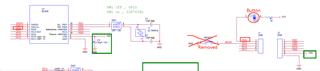
If l disabled the reset pin 21, pin 21 can be pulled up successfully. 

Does anyone know the issue, please? 

Thank you! 

Parents
  • Hi 

    It looks like P0.20 is connected to a LED in your schematic. 

    Why do you want to configure it as a button if it is connected to a LED?

    Can you confirm if this is correct?

    Best regards
    Torbjørn

  • Sorry for the confusion. Pin 21 actually connected with a button, NOT LED. I have fixed the wrong symbol image. 

  • Hi

    What if you just configure the pin through the nrf_gpio library, like this?

    nrf_gpio_cfg_input(20, NRF_GPIO_PIN_PULLUP);

    Will it still not be pulled up correctly?

    Can you show me the rest of the code where you initialize the button library?

    Best regards
    Torbjørn

  • Problem solved. 

    Because I added my custom functions to the nRF52805 board (e.g. power ON/OFF button) from one of BLE example projects, which is built for nRF52832. Some buttons were configured by BLE functions by default.

    Firstly, we need to change pca10040.h file. An example is: 

    // The code will save the following 2 buttons as an array
    // So button0 in the array is pin 20
    // and button1 in the array is pin 21
    
    #define BUTTONS_NUMBER 2
    
    #define BUTTON_START   20
    #define BUTTON_1       20
    #define BUTTON_1       21
    #define BUTTON_STOP    21
    #define BUTTON_PULL    NRF_GPIO_PIN_PULLUP

    Then, we need to read the bsp_btn_ble.c file. Some LEDs and buttons were configured in BLE functions by default (e.g. connect, disconnect BLE buttons). If you would like to use the button for custom functions, you might need to modifty/delete the button functions in bsp_btn_ble.c. For example, 

    #define BTN_ID_WAKEUP             1  /**< ID of button used to wake up the application. */
    #define BTN_ID_SLEEP              1  /**< ID of button used to put the application into sleep mode. */
    #define BTN_ID_DISCONNECT         1  /**< ID of button used to gracefully terminate a connection on long press. */
    #define BTN_ID_WAKEUP_BOND_DELETE 1  /**< ID of button used to wake up the application and delete all bonding information. */
    #define BTN_ID_WHITELIST_OFF      1  /**< ID of button used to turn off usage of the whitelist. */

    After doing the above 2 steps, my button pin is pulled to HIGH by default. The power ON/OFF button works well now.

    Also, plz Remember to add a debouncing capacitor for your button on PCB as well. 

Reply
  • Problem solved. 

    Because I added my custom functions to the nRF52805 board (e.g. power ON/OFF button) from one of BLE example projects, which is built for nRF52832. Some buttons were configured by BLE functions by default.

    Firstly, we need to change pca10040.h file. An example is: 

    // The code will save the following 2 buttons as an array
    // So button0 in the array is pin 20
    // and button1 in the array is pin 21
    
    #define BUTTONS_NUMBER 2
    
    #define BUTTON_START   20
    #define BUTTON_1       20
    #define BUTTON_1       21
    #define BUTTON_STOP    21
    #define BUTTON_PULL    NRF_GPIO_PIN_PULLUP

    Then, we need to read the bsp_btn_ble.c file. Some LEDs and buttons were configured in BLE functions by default (e.g. connect, disconnect BLE buttons). If you would like to use the button for custom functions, you might need to modifty/delete the button functions in bsp_btn_ble.c. For example, 

    #define BTN_ID_WAKEUP             1  /**< ID of button used to wake up the application. */
    #define BTN_ID_SLEEP              1  /**< ID of button used to put the application into sleep mode. */
    #define BTN_ID_DISCONNECT         1  /**< ID of button used to gracefully terminate a connection on long press. */
    #define BTN_ID_WAKEUP_BOND_DELETE 1  /**< ID of button used to wake up the application and delete all bonding information. */
    #define BTN_ID_WHITELIST_OFF      1  /**< ID of button used to turn off usage of the whitelist. */

    After doing the above 2 steps, my button pin is pulled to HIGH by default. The power ON/OFF button works well now.

    Also, plz Remember to add a debouncing capacitor for your button on PCB as well. 

Children
No Data
Related