hi, all:
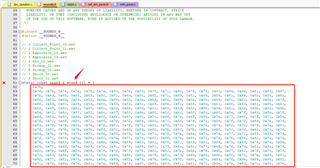
about Thingy sound, I want to produce audio file by myself to add data array sound_9, how to produce the data?
which tool? and I also want to add High-quality audio
hi, all:
about Thingy sound, I want to produce audio file by myself to add data array sound_9, how to produce the data?
which tool? and I also want to add High-quality audio
Hi
The Thingy:52 is not well suited for transmitting high-quality audio/music I'm afraid. It's sound capabilities are restricted to a speaker for playing prestored samples, tones, or 8-bit, 8kHz LoFi sound streamed, and microphone streaming (ADPCM compressed 16 bit, 16kHz.
What exactly is your end-goal for the Thingy you're using? For audio in BLE I would suggest checking out the Bluetooth LE Audio introduced in Bluetooth 5.2.
Best regards,
Simon
hi,
I see the sample code sound_1 to sound_8, I want to add sound_9, If I have a wav or MP3 file or other audio data, how to make this array ? which tool can produce the data ? I try the winhex tool to get the data array, but don't play the right voice

hi,
winhex + windows record tool , I produce 8bit 8khz sound stream, have sucessfully play, But the sound quality is really poor, is it possible to play better sound quality?
for example:
(1) sample, 44khz or 11khz
(2) 16 bit
Hi
The speaker on the Nordic Thingy:52 is a 15x11mm Rectangle mini speaker (Part No.: BMS1511F-11C-08H03P LF) from BeStar Technologies. Here is the link to the product page, and attached you can find the datasheet.
I think you should be able to play higher quality sounds, but not stream higher quality than 8-bit 8Hz. We have a python script for converting .wav files into output for .c/.h here. Please note that you need a mono .wav file with 16kHz sample. https://github.com/NordicPlayground/nRF52-teensy-sgtl5000-audio/blob/master/Convert%20Audio%20Sample/How%20To.txt
Best regards,
Simon