This post is older than 2 years and might not be relevant anymore
More Info: Consider searching for newer posts

How to use bluetooth mesh exported json from mobile app with pyaci

I want to use exported provision and  configuration data with PyACI.

I trired by copying all fileds one by one from exported json to example_database.json (which has already data for  one provisioned device).

But its not working.

Can i get details on this.

Also want to know about data storage in serial apllication on nrf52840. 

Thanks and Regards,
Mital

Parents
  • Hi Mital, 

    The format should be the same, so not sure what or why it is failing. Please elaborate in what way it is not working. What kind of data do you copy? 

    For an nRF5 SDK for Mesh application, you can use the Flash manager (for best compatibility with the mesh stack), although it should be possible to use fstorage / FDS from the nRF5 SDK as well (probably with some hit to performance.)

    Regards,
    Amanda

  • Hi Amanda,

    Exported Json from APP is not working with Pyaci.

    Please 
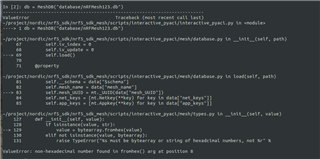
    Sharing with you Error  what I am getting while loading db with pyaci
    and exported  json file. Please check and confirm what could be wrong.
    I Using All Latest SDK for this,

    App version is 3.1.6.


    {
    "$schema": "">json-schema.org/.../schema
    "id": "">www.bluetooth.com/.../cdb-schema.json
    "version": "1.0.0",
    "meshUUID": "C6442C9F-A295-4159-8773-57705FA69580",
    "meshName": "nRF Mesh Network",
    "timestamp": "2021-09-14T12:01:58+05:30",
    "partial": false,
    "netKeys": [
    {
    "name": "Network Key 1",
    "index": 0,
    "key": "76C6C3DFB1F03E00B536B9DC78FDF19F",
    "phase": 0,
    "minSecurity": "insecure",
    "timestamp": "2021-09-14T11:59:10+05:30"
    }
    ],
    "appKeys": [
    {
    "name": "Application Key 1",
    "index": 0,
    "boundNetKey": 0,
    "key": "CE7BEA746775F593DD97D5C89B0A8615"
    },
    {
    "name": "Application Key 2",
    "index": 1,
    "boundNetKey": 0,
    "key": "6DC0EBA28D7A7F680646E11F64373C18"
    },
    {
    "name": "Application Key 3",
    "index": 2,
    "boundNetKey": 0,
    "key": "0B0FA81A41DDFF501817635AB2AE0E17"
    }
    ],
    "provisioners": [
    {
    "provisionerName": "nRF Mesh Provisioner",
    "UUID": "130268DF-091B-48E8-A5B2-6566AC912F61",
    "allocatedUnicastRange": [
    {
    "lowAddress": "0001",
    "highAddress": "199A"
    }
    ],
    "allocatedGroupRange": [
    {
    "lowAddress": "C000",
    "highAddress": "CC9A"
    }
    ],
    "allocatedSceneRange": [
    {
    "firstScene": "0001",
    "lastScene": "3333"
    }
    ]
    }
    ],
    "nodes": [
    {
    "UUID": "130268DF-091B-48E8-A5B2-6566AC912F61",
    "name": "nRF Mesh Provisioner",
    "deviceKey": "985A136DD5E768AB8B90E3E24DD5FA9D",
    "unicastAddress": "0001",
    "security": "insecure",
    "configComplete": true,
    "features": {
    "friend": 2,
    "lowPower": 2,
    "proxy": 2,
    "relay": 2
    },
    "defaultTTL": 5,
    "netKeys": [
    {
    "index": 0,
    "updated": false
    }
    ],
    "appKeys": [
    {
    "index": 0,
    "updated": false
    },
    {
    "index": 1,
    "updated": false
    },
    {
    "index": 2,
    "updated": false
    }
    ],
    "elements": [
    {
    "name": "Element: 0x0001",
    "index": 0,
    "location": "0000",
    "models": [
    {
    "modelId": "0001",
    "bind": [],
    "subscribe": []
    }
    ]
    }
    ],
    "excluded": false
    },
    {
    "UUID": "A8017100-0000-0000-0000-0000DE020000",
    "name": "MESH123",
    "deviceKey": "6A5F498951BCEEE8EE05BDC7E79853C3",
    "unicastAddress": "0002",
    "security": "insecure",
    "configComplete": false,
    "cid": "01A8",
    "pid": "0000",
    "vid": "0000",
    "crpl": "000A",
    "features": {
    "friend": 2,
    "lowPower": 2,
    "proxy": 1,
    "relay": 1
    },
    "defaultTTL": 7,
    "networkTransmit": {
    "count": 2,
    "interval": 20
    },
    "netKeys": [
    {
    "index": 0,
    "updated": false
    }
    ],
    "appKeys": [
    {
    "index": 0,
    "updated": false
    }
    ],
    "elements": [
    {
    "name": "Element: 0x0002",
    "index": 0,
    "location": "0000",
    "models": [
    {
    "modelId": "0000",
    "bind": [],
    "subscribe": []
    },
    {
    "modelId": "0002",
    "bind": [],
    "subscribe": []
    },
    {
    "modelId": "1000",
    "bind": [
    0
    ],
    "subscribe": []
    },
    {
    "modelId": "1300",
    "bind": [],
    "subscribe": []
    },
    {
    "modelId": "1301",
    "bind": [],
    "subscribe": []
    },
    {
    "modelId": "1307",
    "bind": [],
    "subscribe": []
    },
    {
    "modelId": "1308",
    "bind": [],
    "subscribe": []
    },
    {
    "modelId": "01A80000",
    "bind": [],
    "subscribe": []
    }
    ]
    },
    {
    "name": "Element: 0x0003",
    "index": 1,
    "location": "0000",
    "models": [
    {
    "modelId": "1000",
    "bind": [
    0
    ],
    "subscribe": []
    }
    ]
    },
    {
    "name": "Element: 0x0004",
    "index": 2,
    "location": "0000",
    "models": [
    {
    "modelId": "1000",
    "bind": [
    0
    ],
    "subscribe": []
    }
    ]
    }
    ],
    "excluded": false
    }
    ],
    "groups": [],
    "scenes": [],
    "networkExclusions": [
    {
    "ivIndex": 0,
    "addresses": []
    }
    ]
    }

  • Hi, 

    Our mesh team said this is expected. Implementation in nRF5 Mesh SDK v5.0.0 is fairly old and does not support all features of the configuration database and only has limited support.

    Moreover, Format of the configuration database has undergone some changes and the latest Android/iOS mesh apps have an updated implementation. The nRF5 Mesh SDK's implementation can be updated whenever there is a plan for the next release of this SDK, but I don't have the schedule. 

    Regards,
    Amanda

  • Hi, 

    I would suggest you to start looking at Mesh in nRF Connect SDK.

    There is no pyACI in nRF Connect. Instead there is a mesh shell that supports CDB to some extent. Details about this shell are provided here.
    https://developer.nordicsemi.com/nRF_Connect_SDK/doc/latest/zephyr/reference/bluetooth/mesh/shell.html?highlight=mesh%20shell

    This shell can be used with any serial terminal client such as putty. The configuration described in JSON will have to be manually entered into the CDB shell by using various available commands.

    -Amanda

Reply Children
No Data
Related