This post is older than 2 years and might not be relevant anymore
More Info: Consider searching for newer posts

Send message via UART without CLI overhead??

Hello,

I have been building an application using the CLI and I am thankful for the CLI example and how well it works.  I am wondering is it possible to use the CLI but then also just send messages via UART that don't contain all of the usual CLI overhead.  I ask because I have a C# test application that communicates with the our board and expects a specific response from the device.  My C# app was looking for a known beginning character (":G") to determine that a get response is being received. 

My test application captures in the incoming serial communication and stores it in receiveBuffer.  It then looks for the characters :G. 

I was using code that was if(receiveBuffer.StartsWith(":G") to determine that a get response message is being received.

I have figured out instead of using .StartsWith that if I change it to receiveBuffer.Contains(":G") seems to work to parse the messages. 

I am just wondering if it is possible to use the CLI as normal but then also send messages out the UART without the extra CLI starting text. 

Please see the attached images

Here is a serial interface tab in my C# app which shows the extra characters that are used by the CLI.
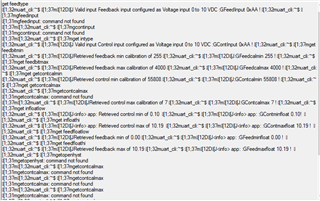
Here is a snippet from my C# app where it is possible to see the beginning characters as received by the app from the CLI message.
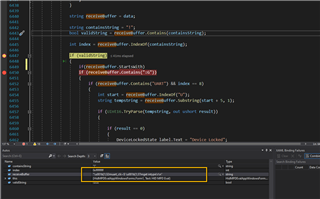
Here is an image of my code and how I am trying to send the messages to my C# app.
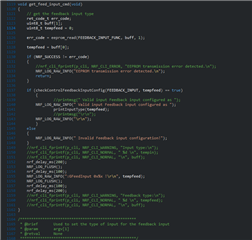
Thanks.

Parents
  • Hi!


    I am just wondering if it is possible to use the CLI as normal but then also send messages out the UART without the extra CLI starting text. 

     Yes, this is absolutely possible. If it's easy to implement depends on how it's configured now. 

    Could you point me to the CLI example you have based your application on?

    Best regards,

    Heidi

  • Hello,

    Can you please share what if all methods are available?  It would be great to know which different options are available for the different versions of the CLI.

    Thanks.

  • Hi!

    Just to make sure I understand your use-case: you want to keep the CLI-functionality in the application, but additionally you want UART communication without the CLI overhead information?

    You can either enable a second UART instance to use for communication. Or you can enable CLI over RTT, which the CLI sample already supports, and then use the available UART instance for direct communication.

    However, it sounds like you might just want to add new CLI commands, which you can do by modifying the CLI library. 

    I'm not that familiar with the nRF5 SDK CLI Library, but if you want assistance in adding new CLI commands, let me know and I will redirect you.

Reply
  • Hi!

    Just to make sure I understand your use-case: you want to keep the CLI-functionality in the application, but additionally you want UART communication without the CLI overhead information?

    You can either enable a second UART instance to use for communication. Or you can enable CLI over RTT, which the CLI sample already supports, and then use the available UART instance for direct communication.

    However, it sounds like you might just want to add new CLI commands, which you can do by modifying the CLI library. 

    I'm not that familiar with the nRF5 SDK CLI Library, but if you want assistance in adding new CLI commands, let me know and I will redirect you.

Children
No Data
Related