This post is older than 2 years and might not be relevant anymore
More Info: Consider searching for newer posts

In the ZigBee CLI example, obtaining the short address of the terminal fails

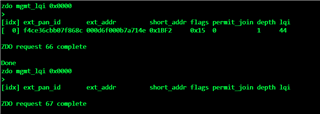
After the command "zdo mgmt_lqi 0x0000" is successfully used to obtain the short address of the terminal device, you cannot obtain the short address of the terminal device by running the command to query the short address again after a period of time. This is similar to the phenomenon that the device is automatically disconnected  

The command used:bdb role zc  

                                   bdb start

                                  zdo mgmt_lqi 0x0000

  • Official routine path:examples\zigbee\experimental\cli\cli_agent_router\pca10059\mbr

Parents
  • Hi,

    When the device joins the network you receive two device authorization events with different authorization types and statuses for the device. Only the first authorization event succeeds, as status 0 is authorization success, and status 1 is authorization failed. The successful authorization happens when the type is 0, which corresponds to ZB_ZDO_AUTHORIZATION_TYPE_LEGACY, so authorization for legacy devices. This leads me to believe that the device 0x1BF2 is a legacy device, and such devices will be removed from the network unless legacy mode is enabled. You can enable legacy mode with the command bdb legacy enable. Could you please try the following and see if the issue persists?

    bdb role zc

    bdb start

    bdb legacy enable

    zdo mgmt_lqi 0x0000

    Best regards,

    Marte

  • 你好,

    确实,进入BDB Legacy Enable后短地址不会消失,但也有一个问题,当我关闭终端时,仍然可以找到之前的短地址。设备上电时应该会发现,但设备断电后会消失。我对此有点困惑。 也希望你能为我解答,谢谢!  

    此致,

    陈玉鹏

Reply Children
  • Hi,

    Please write both tickets and comments in English.

    I have tried to translate your comment using Google Translate, so something might have been lost in translation. Am I understanding you correctly that you are issuing the command 'zdo mgmt_lqi 0x0000' to the coordinator, resulting in the neighbor table where the other device (0x1BF2) shows up. Then you turn off the other device (0x1BF2), and the next time you issue the command ''zdo mgmt_lqi 0x0000' the device does not show up? Or is the problem something else?

    Best regards,

    Marte

  • Hi,

    Now my problem is that I used the command 'bdb Legacy enable' you mentioned, I can find the short address when POWERING on the terminal device, but when I turn off the terminal device and run the command 'zdo mgmt_lqi 0x0000', I can still find the same short address.  In theory, the short address disappears when the device is turned off and the power goes off meaning the short address can't be found.  Whether my such understanding is correct, still ask you to give directions, thank!  

    Best regards,

    ChenYuPeng

  • Hi ChenYuPeng,

    Your understanding is correct in that when the terminal device is turned off it will eventually no longer be a neighbor of the coordinator, and should be marked as stale. Devices use link status commands to determine if a device is a neighbor. When not receiving a link status command for some time, specified by the age limit, the neighbor node shall be marked as stale. However, the node is not automatically removed, so it might still show up on mgmt_lqi responses. Please see my answer here in another case for more information about this, and for a code snippet showing how to determine if a node is stale.

    Best regards,

    Marte

Related