This post is older than 2 years and might not be relevant anymore
More Info: Consider searching for newer posts

nRF sniffer for nRF52840: Can not set filter

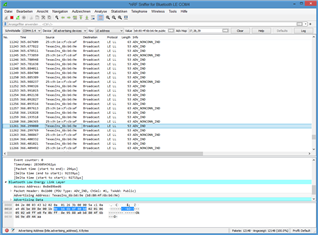
2. In the nRF sniffer software, the device I'm interested in does not show up in the "Source" column with its addess, b8:80:4f:6b:b6:9e, but as "TexasIns_6b:b6:9e". It seems this prevents me from filtering. If a filter is added for the device's address (eth.src == b8:80:4f:6b:b6:9e), all events disappear and no new events appear. I'm not allowed to enter "eth.src == TexasIns_6b:b6:90" as filter: "not a valid ethernet address". Is there a work-around?!

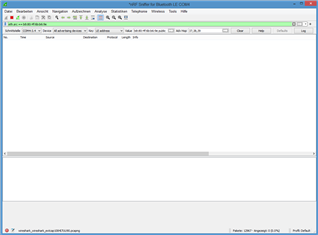
2. Another problem is that the drop-down devices list (inital content: "All advertising devices") is not populated. "All advertising devices" remains the only entry. It was populated when I used the program for the first time but not now (and it was only partially populated; my device was not in it). Windows 8.1

/resized-image/__size/320x236/__key/communityserver-discussions-components-files/4/Screenshot-1.PNG

/resized-image/__size/320x236/__key/communityserver-discussions-components-files/4/Screenshot-2.PNG

Parents
  • Hi, 

    1. Use btle.advertising_address == b8:80:4f:6b:b6:9e. Take a look at tips-for-filtering-ble-packets-using-wireshark-and-nordic-ble-sniffer 

    2. Not pretty understand the question. Isn't your device TexasIns_6b:b6:9e in scheenshot-2.png? 

    Regards,
    Amanda

  • Thanks for the reply. That doesn't work for me though. If I use btle.advertising_address == b8:80:4f:6b:b6:9e as filter, instead of using the devices drop-down list, the advertisements are filtered correctly but capture stops at the connect. After the connect, no more packets appear. Btw, is there no way for Nordic's installation to make the right-click-use-this-as-filter operation over a packet use the correct syntax for Bluetooth out of the box?

    The funny thing is sometimes the "All Advertising Devices" drop-down list gets populated. Most of the time not - even though the sniffer works fine (lots of advertisements scrolling through). I have found no rhyme or reason to it. I've tried: Waiting a long time. Restarting Wireshark. Turning capturing on/off. Resizing the window (in case it's a GUI bug). Nothing of this reliably gets that list filled. However, *IF* that drop-down-list gets populated, I can select the peripheral device I'm interested in and everything works, incuding sniffing packets after a connect (most of the time; some connects are missed and must be repeated).

Reply
  • Thanks for the reply. That doesn't work for me though. If I use btle.advertising_address == b8:80:4f:6b:b6:9e as filter, instead of using the devices drop-down list, the advertisements are filtered correctly but capture stops at the connect. After the connect, no more packets appear. Btw, is there no way for Nordic's installation to make the right-click-use-this-as-filter operation over a packet use the correct syntax for Bluetooth out of the box?

    The funny thing is sometimes the "All Advertising Devices" drop-down list gets populated. Most of the time not - even though the sniffer works fine (lots of advertisements scrolling through). I have found no rhyme or reason to it. I've tried: Waiting a long time. Restarting Wireshark. Turning capturing on/off. Resizing the window (in case it's a GUI bug). Nothing of this reliably gets that list filled. However, *IF* that drop-down-list gets populated, I can select the peripheral device I'm interested in and everything works, incuding sniffing packets after a connect (most of the time; some connects are missed and must be repeated).

Children
Related