This post is older than 2 years and might not be relevant anymore
More Info: Consider searching for newer posts

Power Profiler stops working

Hi,

I have nRF52840 DK with Power Profiler PPKI. It was working for long time, but now it suddenly stops working.

Screen saved:
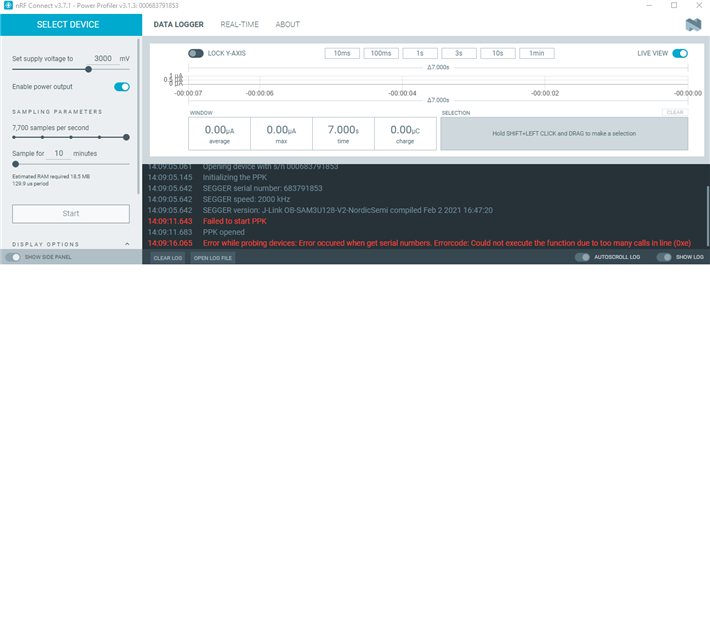
nRFConnect Dektop version 3.7.1, Power Profiler 3.1.3

// Log file:

2021-09-27T18:20:10.252Z INFO Application data folder: C:\Users\dzhou\AppData\Roaming\nrfconnect\pc-nrfconnect-ppk
2021-09-27T18:20:10.310Z DEBUG App pc-nrfconnect-ppk v3.1.3 official
2021-09-27T18:20:10.310Z DEBUG App path: C:\Users\dzhou\.nrfconnect-apps\node_modules\pc-nrfconnect-ppk
2021-09-27T18:20:10.310Z DEBUG nRFConnect 3.7.1 is not supported by the app (^3.6.1)
2021-09-27T18:20:10.310Z DEBUG nRFConnect path: C:\Users\dzhou\AppData\Local\Programs\nrfconnect\resources\app.asar
2021-09-27T18:20:10.310Z DEBUG HomeDir: C:\Users\dzhou
2021-09-27T18:20:10.310Z DEBUG TmpDir: C:\Users\dzhou\AppData\Local\Temp
2021-09-27T18:20:11.251Z VERBOSE Could not fetch serial number for serial port at COM1
2021-09-27T18:20:13.312Z INFO Validating firmware for device with s/n 000683791853
2021-09-27T18:20:13.884Z INFO Opening device with s/n 000683791853
2021-09-27T18:20:13.951Z INFO Initializing the PPK
2021-09-27T18:20:14.420Z INFO SEGGER serial number:  683791853
2021-09-27T18:20:14.420Z INFO SEGGER speed:  2000  kHz
2021-09-27T18:20:14.420Z INFO SEGGER version:  J-Link OB-SAM3U128-V2-NordicSemi compiled Feb  2 2021 16:47:20
2021-09-27T18:20:20.423Z ERROR Failed to start PPK
2021-09-27T18:20:20.423Z DEBUG Timed out in 6000 ms.
2021-09-27T18:20:20.451Z INFO PPK opened

//========nRFConnect System Report

# nRFConnect System Report - 2021-09-27T18-21-39.544Z

- System:     Dell Inc. Precision 3640 Tower
- BIOS:       Dell Inc. DELL   - 1072009
- CPU:        1 x IntelRegistered CoreTm i7-10700 2.9 GHz 16 cores (8 physical)
- Memory:     8.5 GB free of 15.7 GB total
- Filesystem: C: (NTFS) 237.1 GB 50.0% used

- OS:         Microsoft Windows 10 Pro (10.0.19043) win32 ia32

- Versions
    - kernel: 10.0.19043
    - git: 2.29.2.windows.2
    - node: 12.13.0
    - python: 3.9.6
    - python3:

- Connected devices:

I don't know what went wrong suddenly and how to fix it.

EDIT1:   I have noticed that the green led is lit when the PPKI is connected with power (usb). But now, it is off always. I have updated nrfConnect from 3.7.0 to 3.7.1. It still not working.

               Please help to debug the issue.

Thank you,

David Zhou

Parents
  • Hi David, 

    Do you set it up as the Quick start doc? 

    The power supply is selected using the power select switch (SW4). When the DK is selected as the power supply, the DK supplies the PPK circuitry, and the LED2 ( indicates the power on the PPK) is lit.

    Regards,
    Amanda

  • Hi Amanda,

    I have been using the PPKI and nRF52840, and it suddenly stopped working. I know the SW4 is set to DK and SW2 is also to DK. USB is plugged into DK board.

    It seems to me that the board (PPKI) was programmed with application firmware, (sometimes, the DK board is loaded app firmware through Segger IDE while PPKI is still connected.). But before, if I discoonnect PPKI from DK board, then reprogram DK board, removing the jumper for nRF Current Measurement, and reconnect PPKI back to DK board. Then nRFConnect - Power Profiler App will prompt to update firmware (for PPKI). But now it doesn't happen anymore. I believe the PPKI has no firmware right now, but don't how to flash it forcefully.

    Or the PPKI is bad.

    Thank you,

    David Zhou

  • Hi, LED2 is supposed to be lit when the PPK firmware is running. The LED is controlled by the firmware, so if the LED is not lit it could mean that the firmware did not start.

    The PPK application should ask you to flash a new firmware if the PPK does not contain a valid firmware, as you say. It seems to me that the application thinks the firmware is correct, while it is not. Not sure how this can happen, but maybe you can try to do a full erase of the PPK? Then the application should detect that the PPK firmware is not running.

    The easiest way to do this is to use the command line tools (nrfjprog). Please try the following command while the PPK is stacked on top of the DK, the USB cable is plugged into the DK, and all three switches (SW2, SW3 and SW4) are in the DK position:

    nrfjprog --recover

    Then, power cycle the DK, and open the PPK application and it should ask you to flash the new firmware.

  • Hi Stian,

    After recovered, it is working now.

    I would like to make a suggestion. If PPK is connected on DK, is it possible that Segger or other programmer will update firmware to DK first, then checks PPK firmware is ok, and if not, updates PPK firmware, too. That way, users don't have to disconnect the PPK from DK. It may not be possible to do so. Just my opinion. 

    Thank you very much!

    David Zhou

  • Hi David, 

    In that use case, the pc is connecting to PPK1 to measure power. That also means the segger is connecting PPK instead of DK. 

    -Amanda 

Reply Children
No Data
Related