ble app uart

Hi:

I use nrf52832 to connect to the sensor module through uart. When the sensor device is turned off, I can repeat the pairing and unpairing of the Ble module through the nRF Connect app. But after the Ble module pairing is completed and the sensor is turned on, when I cancel the Ble pairing and want to re-pair, I cannot scan the Ble device and cannot pair. How can I solve it

Parents
  • Hello,

    If the device does not show up again in the nRF Connect application scanner after a disconnect it is likely due to the device not advertising. 
    Could you make sure that your device restarts advertising when a connection is disconnected?

    Do I understand you correctly that you are working with the BLE UART example? If so, have you made any modifications to the example application?

    Best regards,
    Karl

  • Yes, I am using the ble_app_uart example. For the example, I only modify MIN_CONN_INTERVAL and MAX_CONN_INTERVAL.

    This problem only occurs when the sensor device is turned on, how can I modify it for the ble example?

  • Oh, my apologies - I meant to say that I would like to see the peripheral's side log.
    The UART example by default logs using the RTT backend, which you can see either in the debug terminal in Segger Embedded Studios, or in the standalone RTT Viewer application by SEGGER.
    Please instead show me this log for the scenario in which this behavior occurs.

    nicky_liu said:
    In the example of ble app uart, the code I modified is as follows:

    Thank you for specifying.

    Best regards,
    Karl

  • Do you want to confirm the operation of the sensor device?
    When the Ble is unpaired, the sensor will continue to send data to the BLE module through uart

  • No, I would like to see the loggers output from the nRF52832 that is connected to your sensor device.
    Are you using Segger Embedded studios to do your programming?
    If so, start a debugging session and click to view the debug terminal before you start the program - there should be a message reading "Debug logging for UART over RTT started." at the very start of the program, for instance.

    Best regards,
    Karl

  • Hi Karl:

      I restarted an unmodified uart_app_ble project and used bebug Treminal. The information I received when I want to re-pair the device is as follows

    <info> app_timer: RTC: initialized.
    <info> app: Debug logging for UART over RTT started.
    <info> app: Connected                                 
    <info> app: Data len is set to 0xB6(182)
    <info> app: Disconnected
    <info> app: Connected                       <========When I want to re-pair
    <info> app: Data len is set to 0xB6(182)
    <error> app: Fatal error

  • Hello again,

    nicky_liu said:
    I restarted an unmodified uart_app_ble project and used bebug Treminal. The information I received when I want to re-pair the device is as follows

    Thank you for testing this again with an unmodified version of the ble_app_uart example. My apologies for misunderstanding what you were seeking to achieve earlier, I now understand that you wish to allow for re-pairing of the connection specifically.
    Re-pairing is by default not enabled in any of our examples, since this reduces the security of the connection. Please have a look at the answer by my colleague Einar in this ticket for additional detail, it also includes the necessary code to allow re-pairing in your application.

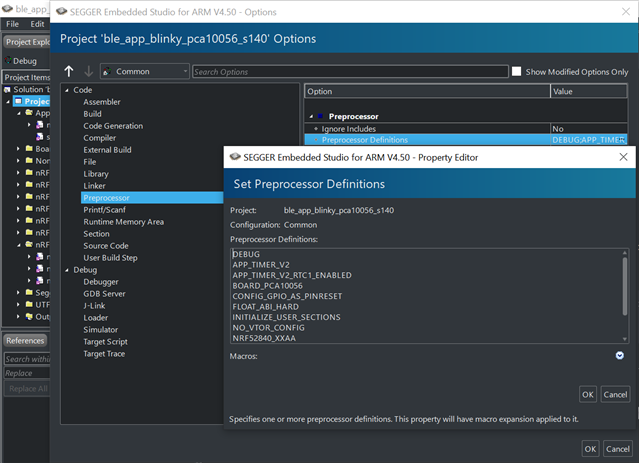
    For future reference, please make sure to have DEBUG defined in your preprocessor defines like shown in the included image:

    This will make a detailed error message be printed to your logger whenever a non-NRF_SUCCESS error is passed to an APP_ERROR_CHECK, instead of the shortform error message.

    Best regards,
    Karl

Reply
  • Hello again,

    nicky_liu said:
    I restarted an unmodified uart_app_ble project and used bebug Treminal. The information I received when I want to re-pair the device is as follows

    Thank you for testing this again with an unmodified version of the ble_app_uart example. My apologies for misunderstanding what you were seeking to achieve earlier, I now understand that you wish to allow for re-pairing of the connection specifically.
    Re-pairing is by default not enabled in any of our examples, since this reduces the security of the connection. Please have a look at the answer by my colleague Einar in this ticket for additional detail, it also includes the necessary code to allow re-pairing in your application.

    For future reference, please make sure to have DEBUG defined in your preprocessor defines like shown in the included image:

    This will make a detailed error message be printed to your logger whenever a non-NRF_SUCCESS error is passed to an APP_ERROR_CHECK, instead of the shortform error message.

    Best regards,
    Karl

Children
  • Thank you for your reply, but I can't find pm_evt_handler() in the ble app uart example. Is it set by ble_evt_handler (SDK 17.0.2)? Is there any relevant example?

  • nicky_liu said:
    Thank you for your reply

    No problem at all, I am happy to help!

    nicky_liu said:
    Is there any relevant example?

    You will need to add the peer manager to your application if you intend to support pairing, re-pairing and/or bonding. By default the ble_app_uart does not actually use any encryption / security as it is mainly meant as a demonstration of how to set up the most generic custom service.
    There is indeed a couple of examples demonstrating the use of the peer manager, such as the Blood pressure example and heart rate example - both of which require a higher security level for their services.
    You can also read more about the peer manager in general in its library documentation.

    Please do not hesitate to ask if any part of this still should be unclear, or if you have any other questions about this!

    Best regards,
    Karl

  • Hi Karl:

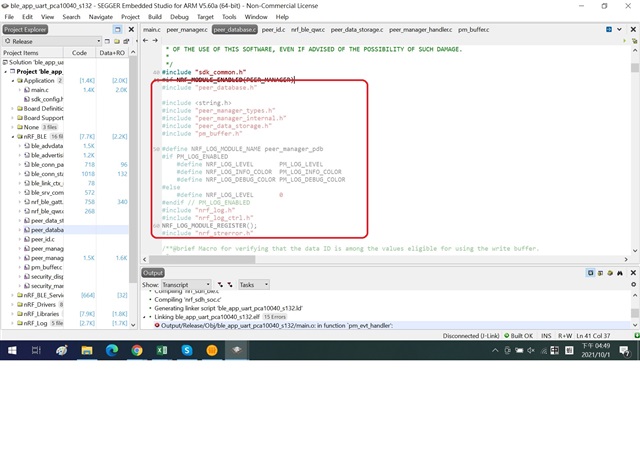
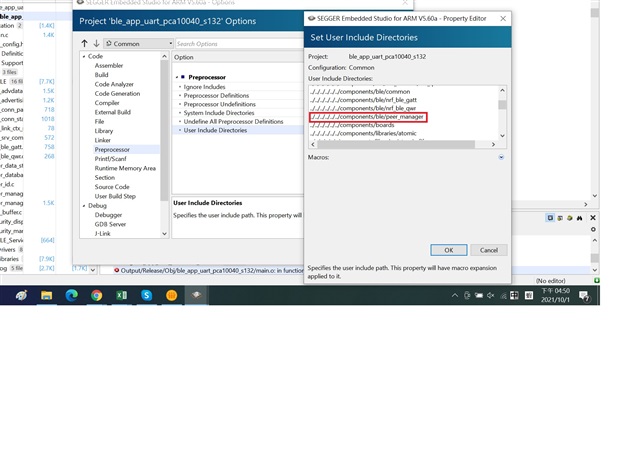
      I am trying to modify the project file, but there seems to be some problems with the header, how can I solve it?

  • Hello,

    It seems like you have not enabled the peer manager module in your sdk_config.
    Please check the sdk_config of the ble hrs example to see how this could be done.

    Best regards,
    Karl

  • I modified the code according to your suggestion, but the problem still exists. Can you check the modified part for me?

    /**@brief Function for handling Peer Manager events.
     *
     * @param[in] p_evt  Peer Manager event.
     */
    static void pm_evt_handler(pm_evt_t const * p_evt)
    {
        ret_code_t err_code;
        bool       is_indication_enabled;
    
        pm_handler_on_pm_evt(p_evt);
        pm_handler_flash_clean(p_evt);
    
        switch (p_evt->evt_id)
        {
            case PM_EVT_CONN_SEC_CONFIG_REQ:
            {
                // Allow or reject pairing request from an already bonded peer.
                pm_conn_sec_config_t conn_sec_config = {.allow_repairing = true};
                pm_conn_sec_config_reply(p_evt->conn_handle, &conn_sec_config);
            }
                break;
    
            case PM_EVT_PEERS_DELETE_SUCCEEDED:
            {
                advertising_start();
            }
                break;
    
            default:
                break;
        }
    }
    
    
    /**@brief Function for the Peer Manager initialization.
     */
    static void peer_manager_init(void)
    {
        ble_gap_sec_params_t sec_param;
        ret_code_t           err_code;
    
        err_code = pm_init();
        APP_ERROR_CHECK(err_code);
    
        memset(&sec_param, 0, sizeof(ble_gap_sec_params_t));
    
        // Security parameters to be used for all security procedures.
        sec_param.bond           = SEC_PARAM_BOND;
        sec_param.mitm           = SEC_PARAM_MITM;
        sec_param.lesc           = SEC_PARAM_LESC;
        sec_param.keypress       = SEC_PARAM_KEYPRESS;
        sec_param.io_caps        = SEC_PARAM_IO_CAPABILITIES;
        sec_param.oob            = SEC_PARAM_OOB;
        sec_param.min_key_size   = SEC_PARAM_MIN_KEY_SIZE;
        sec_param.max_key_size   = SEC_PARAM_MAX_KEY_SIZE;
        sec_param.kdist_own.enc  = 1;
        sec_param.kdist_own.id   = 1;
        sec_param.kdist_peer.enc = 1;
        sec_param.kdist_peer.id  = 1;
    
        err_code = pm_sec_params_set(&sec_param);
        APP_ERROR_CHECK(err_code);
    
        err_code = pm_register(pm_evt_handler);
        APP_ERROR_CHECK(err_code);
    }


    /**@brief Application main function.
     */
    int main(void)
    {
        bool erase_bonds;
    
        // Initialize.
        uart_init();
        log_init();
        timers_init();
        buttons_leds_init(&erase_bonds);
        power_management_init();
        ble_stack_init();
        gap_params_init();
        gatt_init();
        services_init();
        advertising_init();
        conn_params_init();
        peer_manager_init();
    
        // Start execution.
        printf("\r\nUART started.\r\n");
        NRF_LOG_INFO("Debug logging for UART over RTT started.");
        advertising_start();
    
        // Enter main loop.
        for (;;)
        {
            idle_state_handle();
        }
    }
    
    
    /**
     * @}
     */

Related