I am currently following the steps as detailed in the following documentation (SDK 11) specifically the graph in the "Transfer of an image to the DFU target"
I am currently able to do the first 2 steps without issue: Enable notification for DFU Control Point CCCD and Write (0x0104) to DFU Control Point
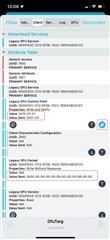
However, when I go to write the image size to the DFU Packet characteristic, the target device returns "10-01-03" to the DFU Control Point. According to this documentation this means that the device is returning a "Not Supported" error.
I've conducted the update using the nRF Connect Mobile app which resulted in the following (successful) output:
Connected to Modified_Device
Discovering services...
peripheral.discoverServices(nil)
Services discovered
Starting Legacy DFU...
Connected to Modified_Device
Services discovered
Legacy DFU Service found
Discovering characteristics in DFU Service...
peripheral.discoverCharacteristics(nil, for: 00001530-1212-EFDE-1523-785FEABCD123)
DFU characteristics discovered
Reading DFU Version number...
peripheral.readValue(00001534-1212-EFDE-1523-785FEABCD123)
Read Response received from 00001534-1212-EFDE-1523-785FEABCD123, value (0x): 0100
Version number read: 0.1
Enabling notifications for 00001531-1212-EFDE-1523-785FEABCD123...
peripheral.setNotifyValue(true, for: 00001531-1212-EFDE-1523-785FEABCD123)
Notifications enabled for 00001531-1212-EFDE-1523-785FEABCD123
DFU Control Point notifications enabled
Application with buttonless update found
Writing to characteristic 00001531-1212-EFDE-1523-785FEABCD123...
peripheral.writeValue(0x0104, for: 00001531-1212-EFDE-1523-785FEABCD123, type: .withResponse)
Data written to 00001531-1212-EFDE-1523-785FEABCD123
Jump to bootloader (Op Code = 1, Upload Mode = 4) request sent
[Callback] Central Manager did disconnect peripheral
Disconnected by the remote device
Connecting to Modified_Device...
centralManager.connect(peripheral, options: nil)
[Callback] Central Manager did connect peripheral
Connected to Modified_Device
Discovering services...
peripheral.discoverServices([00001530-1212-EFDE-1523-785FEABCD123])
Services discovered
Legacy DFU Service found
Discovering characteristics in DFU Service...
peripheral.discoverCharacteristics(nil, for: 00001530-1212-EFDE-1523-785FEABCD123)
DFU characteristics discovered
Reading DFU Version number...
peripheral.readValue(00001534-1212-EFDE-1523-785FEABCD123)
Read Response received from 00001534-1212-EFDE-1523-785FEABCD123, value (0x): 0800
Version number read: 0.8
Enabling notifications for 00001531-1212-EFDE-1523-785FEABCD123...
peripheral.setNotifyValue(true, for: 00001531-1212-EFDE-1523-785FEABCD123)
Notifications enabled for 00001531-1212-EFDE-1523-785FEABCD123
DFU Control Point notifications enabled
Writing to characteristic 00001531-1212-EFDE-1523-785FEABCD123...
peripheral.writeValue(0x0104, for: 00001531-1212-EFDE-1523-785FEABCD123, type: .withResponse)
Writing image sizes (0b, 0b, 23540b) to characteristic 00001532-1212-EFDE-1523-785FEABCD123...
peripheral.writeValue(0x0000000000000000f45b0000, for: 00001532-1212-EFDE-1523-785FEABCD123, type: .withoutResponse)
Data written to 00001531-1212-EFDE-1523-785FEABCD123
Start DFU (Op Code = 1, Upload Mode = 4) request sent
Notification received from 00001531-1212-EFDE-1523-785FEABCD123, value (0x): 100101
Response (Op Code = 1, Status = 1) received
Writing Initialize DFU Parameters...
Writing to characteristic 00001531-1212-EFDE-1523-785FEABCD123...
peripheral.writeValue(0x0200, for: 00001531-1212-EFDE-1523-785FEABCD123, type: .withResponse)
Writing to characteristic 00001532-1212-EFDE-1523-785FEABCD123...
peripheral.writeValue(0xffffffffffffffff0100feff0a06, for: 00001532-1212-EFDE-1523-785FEABCD123, type: .withoutResponse)
Writing to characteristic 00001531-1212-EFDE-1523-785FEABCD123...
peripheral.writeValue(0x0201, for: 00001531-1212-EFDE-1523-785FEABCD123, type: .withResponse)
Data written to 00001531-1212-EFDE-1523-785FEABCD123
Data written to 00001531-1212-EFDE-1523-785FEABCD123
Notification received from 00001531-1212-EFDE-1523-785FEABCD123, value (0x): 100201
Response (Op Code = 2, Status = 1) received
Initialize DFU Parameters completed
Writing to characteristic 00001531-1212-EFDE-1523-785FEABCD123...
peripheral.writeValue(0x080c00, for: 00001531-1212-EFDE-1523-785FEABCD123, type: .withResponse)
Data written to 00001531-1212-EFDE-1523-785FEABCD123
Packet Receipt Notif Req (Op Code = 8, Value = 12) request sent
Writing to characteristic 00001531-1212-EFDE-1523-785FEABCD123...
peripheral.writeValue(0x03, for: 00001531-1212-EFDE-1523-785FEABCD123, type: .withResponse)
Data written to 00001531-1212-EFDE-1523-785FEABCD123
Uploading firmware...
Sending firmware to DFU Packet characteristic...
Notification received from 00001531-1212-EFDE-1523-785FEABCD123, value (0x): 100301
Response (Op Code = 3, Status = 1) received
Upload completed in 10.44 seconds
Writing to characteristic 00001531-1212-EFDE-1523-785FEABCD123...
peripheral.writeValue(0x04, for: 00001531-1212-EFDE-1523-785FEABCD123, type: .withResponse)
Data written to 00001531-1212-EFDE-1523-785FEABCD123
Validate Firmware (Op Code = 4) request sent
Notification received from 00001531-1212-EFDE-1523-785FEABCD123, value (0x): 100401
Response (Op Code = 4, Status = 1) received
Writing to characteristic 00001531-1212-EFDE-1523-785FEABCD123...
peripheral.writeValue(0x05, for: 00001531-1212-EFDE-1523-785FEABCD123, type: .withResponse)
Data written to 00001531-1212-EFDE-1523-785FEABCD123
Activate and Reset (Op Code = 5) request sent
[Callback] Central Manager did disconnect peripheral
Disconnected by the remote device
In this output, it's obvious to see that writing the image size results in the value "10-01-01". However, when I try to replicate these steps manually on the nRF Connect app using the exact same inputs and actions, I receive a "10-01-03" return value upon entering the image size (0x0000000000000000f45b0000).
I just can't seem to understand why the steps work during the automated process, but not during the manual process.
I have also created my own script using the blatann library. Here is the code for it:
def handler(gattc, event):
    print("EVENT: ", event)

def main(serial_port):
    # Create and open the device
    ble_device = BleDevice(serial_port)
    ble_device.open()

    target_device = "Succ_Hack"

    # Scan and connect to the target device.
    ble_device.scanner.set_default_scan_params(timeout_seconds=4)
    print("Scanning...")
    target_address = example_utils.find_target_device(ble_device, target_device)
    if not target_address:
        print("Device not found...")
        ble_device.close()
        quit()
    peer =  ble_device.connect(target_address).wait()
    if not peer:
        print("Connection to Target Device timed out...")

    # Wait up to 10 seconds for service discovery to complete
    _, event_args = peer.discover_services().wait(10, exception_on_timeout=False)
    print("Service discovery complete!")

    ## SECURITY PARAMS SETUP. SKIPPING TO CONSERVE SPACE ##

    # Get the necessary service characteristics
    DFU_Control_Point = Uuid128("00001531-1212-efde-1523-785feabcd123")
    DFU_Control_Point = peer.database.find_characteristic(DFU_Control_Point)
    DFU_Packet = Uuid128("00001532-1212-efde-1523-785feabcd123")
    DFU_Packet = peer.database.find_characteristic(DFU_Packet)
    DFU_Version = Uuid128("00001534-1212-efde-1523-785feabcd123")
    DFU_Version = peer.database.find_characteristic(DFU_Version)

    _, event_args = DFU_Version.read().wait(10, exception_on_timeout=True)
    print(event_args.value)

    DFU_Control_Point.subscribe(handler, False)
    sleep(3)
    DFU_Control_Point.write(0x0104)
    sleep(3)

    DFU_Packet.write_without_response("f45b0000")
    sleep(3)

    ble_device.close()

if __name__ == '__main__':
    main("COM7")
The above code is able to subscribe to and write to DFU Control Point, however when doing a write without response of the image size to the DFU Packet characteristic, 10-01-03 is always returned. This is the case even if the value written is a hex value, string value, or byte value.
My current setup:
1) nRF52 DK. Central device is used as a connector / sniffer
2) nRF52 DK. Peripheral device. Flashed with a legacy compatible DFU service.
Please let me know if there is anymore information I need to provide in order to fix this issue. Any help would be greatly appreciated.