This discussion has been locked.
You can no longer post new replies to this discussion. If you have a question you can start a new discussion

Secure DFU stuck in Bootloader

Hi,

  I'm using the nRF52840-DK with SDK 17.0.2.  I've developed part of my app, and would like to integrate secure OTA reflash for it.  I've copied the code at examples/dfu/secure_bootloader into my project, generated keys, and have flashed the bootloader onto the DK.  I'm using the S140 SD, and have flashed that, my app, and the bootloader_settings.hex file also onto the DK. I use the Windows version of nRF Connect to flash all of the files. Everything seems to work fine on a "normal" boot.  My application runs fine.

  Then I change the advertising name on my app, build it, build a new bootloader_settings.hex, and build an app_packet.  I copy the app_packet to my Android phone, open up nRF Connect, connect to my app, hit the DFU icon, and select the app_packet I just built.  I see "Starting DFU...", then "Starting Bootloader...", followed by a brief "Connecting..." message.  Then the connection drops.  I see the DFU advertising until it times out 3 minutes later, at which time my app starts.

  I've stepped into the bootloader with Ozone, and see that nrf_bootloader_fw_activate() looks at p_bank->bank_code, which is a 0.  This seems to be the problem, but not sure why.

  I've also repeated this same sequence by powering up with Button4 pressed to enter the bootloader.  I get the same results.

  I've also re-created my private/public keys, but get the same results.

  My bootloader code is the same as the example, with the exception of changing the advertising name, and enabling NRF_BL_DFU_ENTER_METHOD_BUTTONLESS in sdk_config.h.

  In my app code, I've added code to support buttonless DFU, although I can bypass all of this by going into the bootloader on power-up with Button4, so I don't think this is the culprit.

  I created my bootloader_settings.hex file with this command -

nrfutil settings generate --family NRF52840 --application obj_app/app.hex --application-version 1 --bootloader-version 1 --bl-settings-version 2 --key-file ../dfu/priv.pem obj_app/bootloader_settings.hex > bootloader_settings.log

  I created the app_packet with this command - 

nrfutil pkg generate --hw-version 52 --application-version 1 --application obj_app/app.hex --sd-req 0xCA --key-file ../dfu/priv.pem obj_app/app_package.zip
Zip created at obj_app/app_package.zip

  I made the following changes to my app version of sdk_config.h -

#define BLE_DFU_ENABLED                         1
#define NRF_SDH_BLE_VS_UUID_COUNT               2
#define NRF_PWR_MGMT_CONFIG_AUTO_SHUTDOWN_RETRY 1
#define NRF_SDH_BLE_SERVICE_CHANGED             1
  In serval posts, I saw a recommendation to install and use micro-ecc.  I have not done that, as it appears the example bootloader is using cc310_bl.  Do I need to use micro-ecc to get this to work?
  Any thoughts on what I'm doing wrong here?
  Thanks...
Brian
Parents
  • Hi,

      I just loaded the debug version of secure_bootloader using my version of dfu_public_key.c.  When I re-attempted the DFU, I get the following RTT output - 

    <info> app: Inside main
    <debug> app: In nrf_bootloader_init
    <info> app: Inside main
    <debug> app: In nrf_bootloader_init
    <debug> nrf_dfu_settings: Calling nrf_dfu_settings_init()...
    <debug> nrf_dfu_flash: Initializing nrf_fstorage_nvmc backend.
    <debug> nrf_dfu_settings: Using settings page.
    <debug> nrf_dfu_settings: Copying forbidden parts from backup page.
    <debug> nrf_dfu_settings: Destination settings are identical to source, write not needed. Skipping.
    <info> nrf_dfu_settings: Backing up settings page to address 0xFE000.
    <debug> nrf_dfu_settings: Destination settings are identical to source, write not needed. Skipping.
    <debug> app: Enter nrf_bootloader_fw_activate
    <info> app: No firmware to activate.
    <debug> app: App is valid
    <debug> app: DFU mode requested via GPREGRET.
    <info> nrf_bootloader_wdt: WDT is not enabled
    <debug> app: in weak nrf_dfu_init_user
    <debug> app: timer_stop (0x20005984)
    <debug> app: timer_activate (0x20005984)
    <info> app: Entering DFU mode.
    <debug> app: Initializing transports (found: 1)
    <debug> nrf_dfu_ble: Initializing BLE DFU transport
    <debug> nrf_dfu_ble: Setting up vector table: 0x000F1000
    <debug> nrf_dfu_ble: Enabling SoftDevice.
    <debug> nrf_dfu_ble: Configuring BLE stack.
    <debug> nrf_dfu_ble: Enabling the BLE stack.
    <debug> nrf_dfu_ble: No advertising name found
    <debug> nrf_dfu_ble: Using default advertising name
    <debug> nrf_dfu_ble: Advertising...
    <debug> nrf_dfu_ble: BLE DFU transport initialized.
    <debug> nrf_dfu_flash: Initializing nrf_fstorage_sd backend.
    <debug> app: Enter main loop
    <debug> nrf_dfu_ble: Connected
    <debug> nrf_dfu_ble: Received BLE_GAP_EVT_DATA_LENGTH_UPDATE_REQUEST.
    <debug> nrf_dfu_ble: Received BLE_GAP_EVT_DATA_LENGTH_UPDATE (27, max_rx_time 328).
    <debug> nrf_dfu_ble: Received BLE_GAP_EVT_CONN_PARAM_UPDATE
    <debug> nrf_dfu_ble: max_conn_interval: 12
    <debug> nrf_dfu_ble: min_conn_interval: 12
    <debug> nrf_dfu_ble: slave_latency: 0
    <debug> nrf_dfu_ble: conn_sup_timeout: 600
    <debug> nrf_dfu_ble: Received BLE_GAP_EVT_CONN_PARAM_UPDATE
    <debug> nrf_dfu_ble: max_conn_interval: 6
    <debug> nrf_dfu_ble: min_conn_interval: 6
    <debug> nrf_dfu_ble: slave_latency: 0
    <debug> nrf_dfu_ble: conn_sup_timeout: 500
    <debug> nrf_dfu_ble: Received BLE_GAP_EVT_CONN_PARAM_UPDATE
    <debug> nrf_dfu_ble: max_conn_interval: 12
    <debug> nrf_dfu_ble: min_conn_interval: 12
    <debug> nrf_dfu_ble: slave_latency: 0
    <debug> nrf_dfu_ble: conn_sup_timeout: 600
    <debug> nrf_dfu_ble: Received BLE_GATTS_EVT_EXCHANGE_MTU_REQUEST (request: 517, reply: 247).
    <debug> nrf_dfu_ble: Received BLE_GAP_EVT_DATA_LENGTH_UPDATE_REQUEST.
    <debug> nrf_dfu_ble: Received BLE_GAP_EVT_DATA_LENGTH_UPDATE (251, max_rx_time 2120).
    <debug> nrf_dfu_req_handler: Handle NRF_DFU_OP_OBJECT_SELECT (command)
    <debug> nrf_dfu_req_handler: Request handling complete. Result: 0x1
    <debug> nrf_dfu_ble: Set receipt notif
    <debug> nrf_dfu_req_handler: Handle NRF_DFU_OP_RECEIPT_NOTIF_SET
    <debug> nrf_dfu_req_handler: Request handling complete. Result: 0x1
    <debug> app: Shutting down transports (found: 1)
    <debug> nrf_dfu_req_handler: Handle NRF_DFU_OP_OBJECT_CREATE (command)
    <debug> app: timer_stop (0x20005984)
    <debug> app: timer_activate (0x20005984)
    <debug> nrf_dfu_req_handler: Request handling complete. Result: 0x1
    <debug> nrf_dfu_ble: Buffer 0x200092B0 acquired, len 141 (244)
    <debug> nrf_dfu_req_handler: Handle NRF_DFU_OP_OBJECT_WRITE (command)
    <debug> nrf_dfu_ble: Freeing buffer 0x200092B0
    <debug> nrf_dfu_req_handler: Request handling complete. Result: 0x1
    <debug> nrf_dfu_req_handler: Handle NRF_DFU_OP_CRC_GET (command)
    <debug> nrf_dfu_req_handler: Request handling complete. Result: 0x1
    <debug> nrf_dfu_req_handler: Handle NRF_DFU_OP_OBJECT_EXECUTE (command)
    <debug> nrf_dfu_validation: PB: Init packet data len: 64
    <info> nrf_dfu_validation: Signature required. Checking signature.
    <info> nrf_dfu_validation: Calculating hash (len: 64)
    <info> nrf_dfu_validation: Verify signature
    <info> nrf_dfu_validation: Image verified
    <warning> nrf_dfu_ver_validation: SD req not met.
    <warning> nrf_dfu_validation: Prevalidation failed.
    <debug> nrf_dfu_validation: Init command:
    <debug> nrf_dfu_validation: 08 01 10 34 1A 02 CA 01|...4....
    <debug> nrf_dfu_validation: 20 00 28 00 30 00 38 84| .(.0.8.
    <debug> nrf_dfu_validation: BF 0E 42 24 08 03 12 20|..B$...
    <debug> nrf_dfu_validation: 78 87 9B 52 AE 45 EB CB|x..R.E..
    <debug> nrf_dfu_validation: BD 36 34 D5 A9 C4 7B 54|.64...{T
    <debug> nrf_dfu_validation: 6F 8A D0 0B C7 B6 0B A9|o.......
    <debug> nrf_dfu_validation: 5C 15 95 A4 BA F6 85 5C|\......\
    <debug> nrf_dfu_validation: 48 00 52 04 08 01 12 00|H.R.....
    <debug> nrf_dfu_req_handler: Request handling complete. Result: 0xB
    <warning> nrf_dfu_ble: DFU request 4 failed with error: 0xB
    <debug> nrf_dfu_ble: Received BLE_GAP_EVT_CONN_PARAM_UPDATE
    <debug> nrf_dfu_ble: max_conn_interval: 6
    <debug> nrf_dfu_ble: min_conn_interval: 6
    <debug> nrf_dfu_ble: slave_latency: 0
    <debug> nrf_dfu_ble: conn_sup_timeout: 500
    <debug> nrf_dfu_ble: Received BLE_GAP_EVT_DATA_LENGTH_UPDATE_REQUEST.
    <debug> nrf_dfu_ble: Received BLE_GAP_EVT_DATA_LENGTH_UPDATE (251, max_rx_time 2120).
    <debug> nrf_dfu_ble: Received BLE_GAP_EVT_CONN_PARAM_UPDATE
    <debug> nrf_dfu_ble: max_conn_interval: 12
    <debug> nrf_dfu_ble: min_conn_interval: 12
    <debug> nrf_dfu_ble: slave_latency: 0
    <debug> nrf_dfu_ble: conn_sup_timeout: 600
    <debug> nrf_dfu_ble: Received BLE_GAP_EVT_DATA_LENGTH_UPDATE_REQUEST.
    <debug> nrf_dfu_ble: Received BLE_GAP_EVT_DATA_LENGTH_UPDATE (251, max_rx_time 2120).
    <debug> nrf_dfu_ble: Advertising...
    <debug> nrf_dfu_settings: Using settings page.
    <debug> nrf_dfu_settings: Copying forbidden parts from backup page.
    <debug> app: timer_stop (0x20005984)
    <debug> app: timer_fire (

    I see the message "Prevalidation failed".  What causes this error?  Am I not generating the app_packet correctly?

    Thanks...

    Brian

  • Hi Brian,

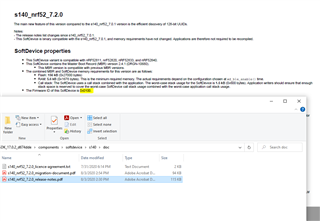
    Thanks for the posting the log. It shows the pre-validation step is failing because Softdevice FWID specified in the DFU init command (--sd-req 0xCA) does not match the FWID of the Softdevice present on your device.

    I assume you are using v.7.2.0 of the s140 SD as that is the default version used in this SDK release? In that case, you must set the FWID to 0x0100 instead of 0xCA which is the FWID for s140 v.7.0.1.

    e.g.

     > nrfutil pkg generate --hw-version 52 --application-version 1 --application obj_app/app.hex --sd-req 0x0100--key-file ../dfu/priv.pem obj_app/app_package.zip

    Note: the FWIDs can be found from the Softdevice release notes.

    Best regards,

    Vidar

    Edit: Forgot to comment on this:

    bootloader is using cc310_bl.  Do I need to use micro-ecc to get this to work?
      Any thoughts on what I'm doing wrong here?

    It's generally best to use the cc310_bl library. It enables HW acceleration for the crypto algorithms used by the bootloader.  micro-ecc is only used for the nRF52 variants that don't include the CRYPTOCELL — ARM TrustZone CryptoCell 310 module

Reply
  • Hi Brian,

    Thanks for the posting the log. It shows the pre-validation step is failing because Softdevice FWID specified in the DFU init command (--sd-req 0xCA) does not match the FWID of the Softdevice present on your device.

    I assume you are using v.7.2.0 of the s140 SD as that is the default version used in this SDK release? In that case, you must set the FWID to 0x0100 instead of 0xCA which is the FWID for s140 v.7.0.1.

    e.g.

     > nrfutil pkg generate --hw-version 52 --application-version 1 --application obj_app/app.hex --sd-req 0x0100--key-file ../dfu/priv.pem obj_app/app_package.zip

    Note: the FWIDs can be found from the Softdevice release notes.

    Best regards,

    Vidar

    Edit: Forgot to comment on this:

    bootloader is using cc310_bl.  Do I need to use micro-ecc to get this to work?
      Any thoughts on what I'm doing wrong here?

    It's generally best to use the cc310_bl library. It enables HW acceleration for the crypto algorithms used by the bootloader.  micro-ecc is only used for the nRF52 variants that don't include the CRYPTOCELL — ARM TrustZone CryptoCell 310 module

Children
No Data
Related