My current consumption vs online power profiler estimation

Hello, I am using nRF52832 dev kit. I am trying to get lower current consumption. I used ble_app_blinky example and disabled the NRF_LOG. My settings are below:

Role: Advertising (connectable)

Advertising interval: 250 ms

TX payload: 10 byte

Radio TX Power: 0dBm

DCDC regulator: ON

When I try this settings on online power profiler it estimates 44 uA and when I measure with PPK2 I see 73-75 uA current consumption. I disabled NRF_LOG, leds and buttons but I am missing something. What should I do to get estimated value?

Parents Reply Children
  • I see, that should be OK, then.

    Can you remove the BSP and app_button code? The LED's should not contribute much as they are only sinked through the nRF, but the button code with GPIO interrupts will contribute a bit to the current consumption. So you should get better numbers by commenting out all calls to app_button_* and bsp_*.

  • I commented out app_button library and everything about leds and buttons, it only changed 2 uA. I tested by connecting the board with nRF Connect and it doesnt react also current consumption doesnt increase when I press button so I am sure it disabled.  These are the steps:

    without modification         --> 1 mA
    disabling NRF_LOG            --> 540 uA
    adv interval 40 ms to 250 ms     --> 130 uA
    enabling dcdc converter        --> 80 uA
    disabling leds and button    --> 78 uA

    Actually I did these steps many times because in some attempts I saw 70 uA, when this happens it lasts for minutes and when I upload any code even same code with same settings it becomes 78-80 uA again. I couldnt understand what is happenning.

  • I see, that is odd. I tested with the ble_app_blinky with a few minor modifications to get the same configuration as you:

    diff --git a/examples/ble_peripheral/ble_app_blinky/main.c b/examples/ble_peripheral/ble_app_blinky/main.c
    index 8e26160..4a2aa10 100644
    --- a/examples/ble_peripheral/ble_app_blinky/main.c
    +++ b/examples/ble_peripheral/ble_app_blinky/main.c
    @@ -74,12 +74,12 @@
     #define LEDBUTTON_LED                   BSP_BOARD_LED_2                         /**< LED to be toggled with the help of the LED Button Service. */
     #define LEDBUTTON_BUTTON                BSP_BUTTON_0                            /**< Button that will trigger the notification event with the LED Button Service */
     
    -#define DEVICE_NAME                     "Nordic_Blinky"                         /**< Name of device. Will be included in the advertising data. */
    +#define DEVICE_NAME                     "Nordic12"                         /**< Name of device. Will be included in the advertising data. */
     
     #define APP_BLE_OBSERVER_PRIO           3                                       /**< Application's BLE observer priority. You shouldn't need to modify this value. */
     #define APP_BLE_CONN_CFG_TAG            1                                       /**< A tag identifying the SoftDevice BLE configuration. */
     
    -#define APP_ADV_INTERVAL                64                                      /**< The advertising interval (in units of 0.625 ms; this value corresponds to 40 ms). */
    +#define APP_ADV_INTERVAL                400                                     /**< The advertising interval (in units of 0.625 ms; this value corresponds to 40 ms). */
     #define APP_ADV_DURATION                BLE_GAP_ADV_TIMEOUT_GENERAL_UNLIMITED   /**< The advertising time-out (in units of seconds). When set to 0, we will never time out. */
     
     
    @@ -571,6 +571,7 @@ int main(void)
         buttons_init();
         power_management_init();
         ble_stack_init();
    +    sd_power_dcdc_mode_set(NRF_POWER_DCDC_ENABLE);
         gap_params_init();
         gatt_init();
         services_init();
    

    diff --git a/examples/ble_peripheral/ble_app_blinky/pca10040/s132/config/sdk_config.h b/examples/ble_peripheral/ble_app_blinky/pca10040/s132/config/sdk_config.h
    index fd9618f..3344e72 100644
    --- a/examples/ble_peripheral/ble_app_blinky/pca10040/s132/config/sdk_config.h
    +++ b/examples/ble_peripheral/ble_app_blinky/pca10040/s132/config/sdk_config.h
    @@ -7665,7 +7665,7 @@
     // <e> NRF_LOG_ENABLED - nrf_log - Logger
     //==========================================================
     #ifndef NRF_LOG_ENABLED
    -#define NRF_LOG_ENABLED 1
    +#define NRF_LOG_ENABLED 0
     #endif
     // <h> Log message pool - Configuration of log message pool


    I did not have a PPK2 right now so I tested with the original PPK, and got numbers around 40 uA.

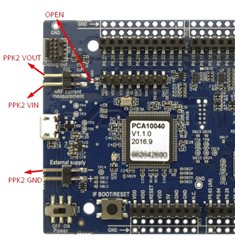
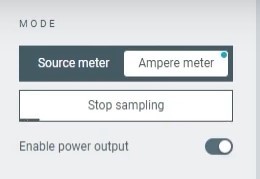
    Perhaps what you are seeing is due to the measurement setup. Can you explain your measuring setup with the PPK2, both how you have connected it to the DK and how you have configured the PPK2 in the Power Profiler software?

  • Thank you so much for your effort. Actually I tried to use external supply to get better solution so I tried to short SB12 which was so small. When I tried to do it I accidentally remove D1 diode and I couldn't put it back, now I cant program that dev kit. I have only one remaining kit so I didn't want to take risk that's why I am using USB as power supply. "Unless powered by USB, short solder bridge SB11 (if using coin cell battery) or SB12 (if using external power supply) to bypass the protection diode which would otherwise give a voltage drop."  This was from infocenter, I think there is no need to modify dev kit except cutting SB9. 

    (This picture is from old versions, newer versions have diodes near SB12-SB11)

    My connections are like that.

    Power profiler software settings are same with this picture.

  • I see. That looks OK to me. I will replicate your setup and test on my end on Monday.

Related