Serial Output from nRF9160

Hello, 

I am having an issue viewing serial communication from the nRF9160 on the LTE link monitor. I am able to view output when the code is compiled from a different computer. I am unable to view output when the code compiles from my compute (a MacOS Catalina). Are there particular settings that enable/disable serial communication on the nRF9160? 

Best regards, 

Thomas Talbot

Parents
  • Hi!

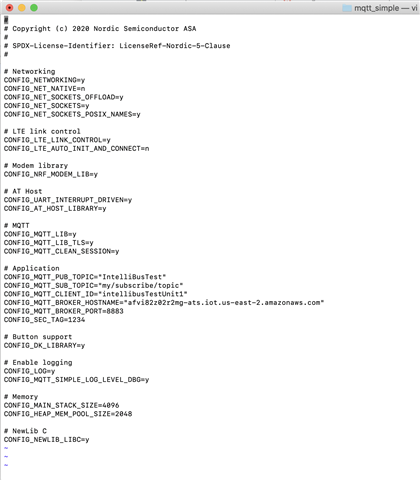
    Yes, there are settings to enable/disable serial output. Could you provide the prj.conf file of the application you are flashing and I will take a look. 

    The Zephyr Logging API provides numerous backends so it's easier for me to just take a look at what configurations you have currently enabled. 

    Best regards,

    Heidi

  • Hi

    I think I need to take a look at the resulting build configurations since this seems to be a dependency issue.

    Can you find the file <build_folder>/zephyr/.config when compiling with the computer where the resulting build is able to print to serial, and the file when the resulting build is not and attach them? Please attach files, and not screenshots.

    Best regards,

    Heidi

  • Hi Heidi, 

    I do not see a file named ".config" in the <build_folder>/zephyr directory. However, there is a filed named "Kconfig.zephyr" is this the file you are interested in? I am attaching the "Kconfig.zephyr" file to this email for the computer that compiles but does not run code on the nRF9160. 

    Also, to double check my steps when I Build and Run code: In the Segger Embedded Studio, I am selecting 1. Build> Build Solution, 2. Target > Download zephyr/merged.hex. Is this correct? 

    Kconfig.zephyr file from non-functional computer: 

    # General configuration options


    # Copyright (c) 2014-2015 Wind River Systems, Inc.
    
    # Copyright (c) 2016 Intel Corporation
    
    # SPDX-License-Identifier: Apache-2.0


    # Include Kconfig.defconfig files first so that they can override defaults and
    
    # other symbol/choice properties by adding extra symbol/choice definitions.
    
    # After merging all definitions for a symbol/choice, Kconfig picks the first
    
    # property (e.g. the first default) with a satisfied condition.
    
    #
    
    # Shield defaults should have precedence over board defaults, which should have
    
    # precedence over SoC defaults, so include them in that order.
    
    #
    
    # $ARCH and $BOARD_DIR will be glob patterns when building documentation.
    
    source "$(KCONFIG_BINARY_DIR)/Kconfig.shield.defconfig"
    
    source "$(BOARD_DIR)/Kconfig.defconfig"
    
    source "$(KCONFIG_BINARY_DIR)/Kconfig.soc.defconfig"


    menu "Modules"


    source "modules/Kconfig"


    endmenu


    source "boards/Kconfig"
    
    source "soc/Kconfig"
    
    source "arch/Kconfig"
    
    source "kernel/Kconfig"
    
    source "dts/Kconfig"
    
    source "drivers/Kconfig"
    
    source "lib/Kconfig"
    
    source "subsys/Kconfig"


    osource "$(TOOLCHAIN_KCONFIG_DIR)/Kconfig"


    menu "Build and Link Features"


    menu "Linker Options"


    choice
    
            prompt "Linker Orphan Section Handling"
    
            default LINKER_ORPHAN_SECTION_WARN


    config LINKER_ORPHAN_SECTION_PLACE
    
            bool "Place"
    
            help
    
              Linker puts orphan sections in place without warnings
    
              or errors.


  • No this is not the file I need. Please zip the whole working directory with your sample and attach it. 

Reply Children
No Data
Related