Open thread : Rx is always ON after communication is completed (Doesnt goes to sleep) - power consumption is high.

Using windows 10 OS, and SES v5.40.

I am using nRF52833 device in my project along with nRF5_SDK_for_Thread_and Zigbee_v4.1.0_32ce5f8 SDK.

I am using openthread protocol for radio communication and i also know that we can use the below function to know the radio state and also joiner state

otJoinerGetState(ot_instance) - Joiner state and otPlatRadioGetState(ot_instance) - Radio state.

But if i try to print the radio state : Observations

a. Before joining - the radio state is 1(radio sleep) - power consumption is around 15uA - expected to be that power consumption.

b. During joining - the radio state toggles between 1,2,3 (sleep, Rx and Tx) - power consumption is around 20mA - Expected this power consumption during pairing.

c. After joining - the radio state is 2(Rx) once pairing is completed, and it doesnt goes to sleep anymore - power consumption is around 11mA - Expected to be 15uA once the device is in sleep.

Questions :

1. I tried to put the radio to sleep manually once pairing is completed - Facing issues with communicating again once pairing is done. Also found that there is no requirement of manually switching sleep and receive states from this discussion - https://github.com/openthread/openthread/issues/1495 - Please suggest right way to handle this.

2. Also found the link mode configuration settings - otLinkModeConfig mode;
                                                                                 memset(&mode, 0, sizeof(mode));
                                                                                 mode.mRxOnWhenIdle = false;   

        We are making mode.mRxOnWhenIdle true during initialisation and again false during cyclic wakeup - is there anything wrong with this configuration setting.

Note : All i want to do is putting back the radio state to 1 (sleep) once it completes communication to reduce power to 15uA.

Parents
  • Adding the master key you posted in the sniffer trace you have uploaded did not "uncover" any extra information I'm afraid. Can you upload a new sniffer trace where this key is used to decode the packets?

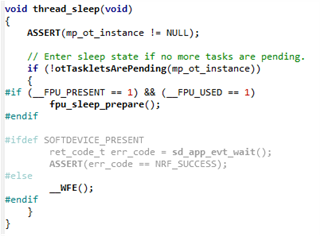
    Most of our Thread example projects I.E. the Thread CLI example uses the following check to check if there are no pending tasks or log processes ongoing before calling the thread_sleep(); function which will put the device to sleep along with any peripherals before going to sleep using __WFE();

    Best regards,

    Simon

  • Hi 

    I was just going through the thread examples in SDK we have.

    1. nRF5_SDK_for_Thread_and_Zigbee\examples\thread\simple_coap_server\pca10100\blank\ses

    2.nRF5_SDK_for_Thread_and_Zigbee\examples\thread\cli\mtd\usb\pca10100\blank\ses

    3. nRF5_SDK_for_Thread_and_Zigbee\examples\thread\cli\ftd\usb\pca10100\blank\ses

    I could see that the thread_sleep(); function which is called to go to sleep 

    The thing is i could not see the function which i expected the otPlatRadioSleep(ot_instance); how exactly does the device go to sleep and i dont think prepare sleep is no really relavent for us..?

    Regards

    Abhijith

Reply
  • Hi 

    I was just going through the thread examples in SDK we have.

    1. nRF5_SDK_for_Thread_and_Zigbee\examples\thread\simple_coap_server\pca10100\blank\ses

    2.nRF5_SDK_for_Thread_and_Zigbee\examples\thread\cli\mtd\usb\pca10100\blank\ses

    3. nRF5_SDK_for_Thread_and_Zigbee\examples\thread\cli\ftd\usb\pca10100\blank\ses

    I could see that the thread_sleep(); function which is called to go to sleep 

    The thing is i could not see the function which i expected the otPlatRadioSleep(ot_instance); how exactly does the device go to sleep and i dont think prepare sleep is no really relavent for us..?

    Regards

    Abhijith

Children
No Data
Related