Having trouble connecting nRF52832 to VS code and BLE

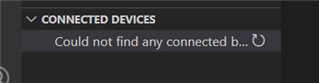
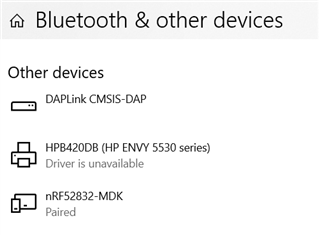
I had trouble connecting the device to the computer. My computer shows that it is connected, however, in VS code, it cannot find the device. Also, when I tried to use the BLE, it also gave me an error: "Error occured when opening port. Errorcode: NRF_ERROR_TIMEOUT". I want to know how to fix those. 

  • Hey,

    I suppose you are using windows. Have you installed nRF Command Line Tools?

    Regards,

    Swathy

  • Yes, I did but I don't know how I need to use that.

  • Hi,

    The command line tools are required for the development, programming and debugging of Nordic Semiconductor's nRF51, nRF52, nRF53 and nRF91 Series devices. Since you've installed it, then it should be fine.

    Did you try clicking on the refresh button next to 'CONNECTED DEVICES'. If the connected device still does not appear, VSCode probably does not see nrfjprog at the expected location. Generate support information command would list nrfjprog with a full path if found correctly.

    Also, could you check if the board works with SEGGER or west tool so as to confirm that the board is working properly?

    Regards,

    Swathy

  • I don't really understand the sentence: "Generate support information command would list nrfjprog with a full path if found correctly." Could you collaborate on that?

  • Hey,

    In Visual Studio Code, open the 'Command Palette' (ctrl+shift+P) and type in "nRF Connect:Generate Support Information". When you start this command, you will be able to see a JSON document in the OUTPUT panel. In that document there will be a list of tools that the extension checks for, one of them being nrfjprog. It is listed with the full path along with the version it reports about itself. In my case, it is shown as below

    "C:\\Program Files (x86)\\Nordic Semiconductor\\nrf-command-line-tools\\bin\\nrfjprog.exe": "10.11.0"
    If the device is not getting detected even after clicking on the refresh button, then it might be because VS code is unable to find nrfjprog at the expected location. So kindly verify.

    Regards,

    Swathy

Related