This discussion has been locked.
You can no longer post new replies to this discussion. If you have a question you can start a new discussion

[nRF52811] two way UART connection

Hello,

I am currently using the logger backend to send information via UART from the nRF52811 to a PC. This works well, but only for one way communication. I would like to send some instructions from the PC to the nRF52811, which means having a two way communication via UART. Is this even possible?

Thanks in advance.
David

Parents
  • Hi David,

    Are you using the logger module in the nRF5 SDK? If using a recent nRF5 SDK versions and the logger module, you can consider the CLI interface. Older nRF5 SDK versions also had a method for reading back simple characters without using the CLI (using NRF_LOG_GETCHAR()), but that was removed in SDK 15.0.0.

    Einar

  • From what I can understand, CLI Interface allows to control logger parameters, but what if I want to control radio features, e.g stop transmission, or change gpio pins?

  • Just to clarify, I really just want to be able to send bytes via UART and have them be read by the nRF52811. With that working, I can then design my own protocol that interprets the command bytes

  • Hi,

    The CLI interface can be used for anything, not just control logging (see for instance the crypto CLI example). It is a bit complex though, so an alternative could be to skip the logger module altogether (including CLI) and use a simpler UART library for your UART communication. See for instance how physical UART is used in the NUS example.

  • Hi,

    Thanks for the tip, but that example is for UART over BLE, which is not exactly what I'm looking for. Actually, the nRF52811 is connected to an nRF52840 that is used as a bridge (for flashing the code and reading data), which is turn is connected to the PC via a usb cable. When I plug in the usb cable, a serial port is opened and I am reading that port. So, I am already receiving data from the nRF52811, but I would like to just send data through that serial port from the PC to the nRF52811.

  • Hi,

    slid_daaviet said:
    Thanks for the tip, but that example is for UART over BLE, which is not exactly what I'm looking for.

    Yes, but the thing is that the example implements UART bridging over BLE (so both physical UART and NUS). If you ignore the BLE/NUS part, you are left with a simple example of using plain UART without the added complexity of the logger library. You can also refer to the UART example for something similar.

    slid_daaviet said:
    So, I am already receiving data from the nRF52811, but I would like to just send data through that serial port from the PC to the nRF52811.

    I see. The easiest way is to refer to one of the examples mentioned above, which implements bidirectional UART communication.

Reply
  • Hi,

    slid_daaviet said:
    Thanks for the tip, but that example is for UART over BLE, which is not exactly what I'm looking for.

    Yes, but the thing is that the example implements UART bridging over BLE (so both physical UART and NUS). If you ignore the BLE/NUS part, you are left with a simple example of using plain UART without the added complexity of the logger library. You can also refer to the UART example for something similar.

    slid_daaviet said:
    So, I am already receiving data from the nRF52811, but I would like to just send data through that serial port from the PC to the nRF52811.

    I see. The easiest way is to refer to one of the examples mentioned above, which implements bidirectional UART communication.

Children
  • Thanks for the help. I have tried adapting this example to the nRF52811, without success so far. I think the problem is in the APP_UART_FIFO_INIT function, but can't even debug it correctly, because there is a call to the app_error_handler funcion and NRF_BREAKPOINT_COND is activated. It's probably a vague problem description, but that's what I know so far...

  • Hi,

    slid_daaviet said:
    I have tried adapting this example to the nRF52811, without success so far.

    There was a problem with the link to the example you are using. Can you post it again?

    slid_daaviet said:
    I think the problem is in the APP_UART_FIFO_INIT function

    I see. What did you do to debug? The APP_UART_FIFO_INIT() essentially created two static buffers, and then calls app_uart_init(). If there is an issue, that should return an error code.

    slid_daaviet said:
    because there is a call to the app_error_handler funcion and NRF_BREAKPOINT_COND is activated.

    This is to aid debugging. It breaks on error, and then you can inspect with a debugger. What error code was returned from where? As you point to APP_UART_FIFO_INIT I assume you see it is from app_uart_init()? You may be interested in An introduction to error handling in nRF5 projects.

  • There was a problem with the link to the example you are using. Can you post it again?

    It's this UART example.

    I see. What did you do to debug? The APP_UART_FIFO_INIT() essentially created two static buffers, and then calls app_uart_init(). If there is an issue, that should return an error code.

    If I am correct, it appears to occur when app_uart_get() is called. Then uart_event_handler is called, which in turn calls app_error_handler_bare. Depending on the breakpoints I use, app_error_handler_bare receives an error code of either 0x00000004 or 0x0000000c, which according to nrf_error.h correspond to "No Memory for operation" and "Data size exceeds limit" respectively.

    This is to aid debugging. It breaks on error, and then you can inspect with a debugger. What error code was returned from where? As you point to APP_UART_FIFO_INIT I assume you see it is from app_uart_init()? You may be interested in An introduction to error handling in nRF5 projects.

    Ah I see. I'll read up on that, thanks.

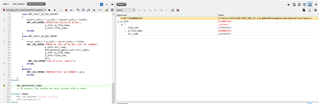
  • If I enable the DEBUG flag, app_error_handler function is called. It has an error code, a p_file_name and line_num, how can I interpret the hexadecimal value of p_file_name to locate the error?

  • Hi,

    p_file_name is a pointer to a string that shows the file name where the error was detected by an APP_ERROR_CHECK. If you enable logging it is printed directly. If not, you can inspect it with a debugger. Remember to first make a debug build as that makes this much easier (the C code you see then matches the machine code). Then inspect for instance like this if using SES:

    1. Add p_info to watch
    2. Read the value of p_file_name wihin p_info
    3. Type inn (char*)<value of p_file_name> as an expression

    then you can read the value of the string like this:

Related