zigbee messages not received in app layer

Hi,

I'm evaluating the performance of the Zigbee protocol implementation on the nRF connect SDK using nRF52840dk:s. nRF connect SDK 1.7.0, ZBOSS I'm not sure where to find but assumes latest as I write this (oct 2021). Windows 10.

I want to send data between devices for this purpose and have configured one DK as a ZED home automation profile with a dimmer switch to be able to send level control commands.

The receiving side is configured as a ZC with a level controllable output cluster end that the ZED discovers and sends to.

My send procedure in the ZED is: when found partner address and EP, allocate buffer using zb_buf_get_out_delayed(callback). In the callback, send command using ZB_ZCL_LEVEL_CONTROL_SEND_MOVE_TO_LEVEL_REQ(..., cb, ...) with params. In that cb, free buffer and ask for new using zb_buf_get_out_delayed(callback) again. Logging the time with timevals from sys/time.h reports around 15-20 ms for one send cycle without delays.

In the receiver ZC I use the zcl device cb to be notified about changes. It looks roughly like this:

static void zcl_device_cb(zb_bufid_t bufid)
{
	zb_zcl_device_callback_param_t  *device_cb_param =
		ZB_BUF_GET_PARAM(bufid, zb_zcl_device_callback_param_t);

	device_cb_param->status = RET_OK; //Set default response value

	switch (device_cb_param->device_cb_id) {
	case ZB_ZCL_LEVEL_CONTROL_SET_VALUE_CB_ID:
		gettimeofday(&tv_stop, NULL);
		received = device_cb_param->cb_param.level_control_set_value_param.new_value;

		k_sem_give(&new_data_sem);

		break;
	}
}

I then use another thread to print the received data.

The problem: if I in the ZED allocate a new buffer and start a new send as soon as my callback from the previous send is called, packets are dropped in the receiver side (often up to ~80%) before they reach the application level. However, if I add a delay before I allocate a new buffer and send, more packages are received in the receiver. 7 ms seem to be enough for ~<1% packet loss (manually checked against my send counter).

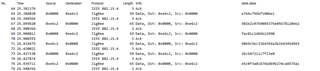
I have set up wireshark to sniff the zigbee communication, and after the initial connection and discovery, I see an exchange of packages between the ZED and ZC, where they alter to send one package each to each other. Filtering on the package lengths, I can trace equal many packages of that length in either direction as I send in my test application, so I strongly suspect this is my level control messages. However, the ZC always responds to what the ZED sends, so no packages seem to be dropped in the 802.15.4 layers but somewhere in the receiving ZC before it reaches the application level and I can log them.

Screenshot from from wireshark showing a subset of the transactions between the ZC and ZED: 
Does anyone have any idea why I can't receive all my messages without the delay? Since I use a semaphore to notify another thread it feels like I can't do the zcl device callback much more lightweight, so it should be able to free some buffer for the next receive in time, right?

Parents
  • Hello,

    packets are dropped in the receiver side (often up to ~80%) before they reach the application level

    How do you determine that this is the case? For all I know, it is correct, but are you sure that the logging is not truncated, if you are trying to log very fast? If so, what is your log backend?

    Is there a way for me to replicate this? Do you have some projects that you can share that replicates the issue?

    Best Regards,

    Edvin

  • I trigger a semaphore for each time I get a ZB_ZCL_LEVEL_CONTROL_SET_VALUE_CB_ID in my zcl device cb, that I take in another thread which is incrementing and printing a counter for each lap it runs.

    The semaphore is defined with K_SEM_MAX_LIMIT as limit, the extra threads with priority 7 and I've tested to increase the default thread (that I'm initiating Zigbee from, not sure if this is a isr or not) priority to 1.

    This is my receiving routine in the ZC:

    static void zcl_device_cb(zb_bufid_t bufid)
    {
    	zb_zcl_device_callback_param_t  *device_cb_param =
    		ZB_BUF_GET_PARAM(bufid, zb_zcl_device_callback_param_t);
    
    	device_cb_param->status = RET_OK; //Set default response value
    
    	switch (device_cb_param->device_cb_id) {
    	case ZB_ZCL_LEVEL_CONTROL_SET_VALUE_CB_ID:
    
    		k_sem_give(&new_data_sem);
    
    		break;
    
    	case ZB_ZCL_SET_ATTR_VALUE_CB_ID:
    		printk("Set_attr_value cb. \n");
    		break;
    
    	default:
    		printk("Default cb\n");
    		break;
    	}
    }
    
    void thread_process_data(void *dummy1, void *dummy2, void *dummy3)
    {
    	uint8_t count = 0;
    	while(1){
    		k_sem_take(&new_data_sem, K_FOREVER);
    		printk("Thread lap %d\n", ++count);
    	}
    }

    This is the corresponding sending in the ZED:

    static void cmd_sent(zb_bufid_t bufid)
    {
    	gettimeofday(&tv_stop, NULL);
    	zb_zcl_command_send_status_t *status  = ZB_BUF_GET_PARAM(bufid,
    						zb_zcl_command_send_status_t);
    	time_current = CALC_US(); //NOTE: Should be some kind of buffer to not drop data points.
    	k_sem_give(&sem_new_data);
    	// k_sleep(K_MSEC(20));//7 ms somewhat usable
    
    	gettimeofday(&tv_start, NULL);
    	zb_buf_free(bufid);
    
    	if (control_level++ < N_MESSAGES){
    		zb_buf_get_out_delayed(send_level_control_message);
    	}
    }
    
    // static void send_level_control_message(zb_bufid_t bufid, zb_uint16_t cmd_id)
    static void send_level_control_message(zb_bufid_t bufid)
    {
    	ZB_ZCL_LEVEL_CONTROL_SEND_MOVE_TO_LEVEL_REQ(
    		bufid,
    		partner_ctx.short_addr,
    		ZB_APS_ADDR_MODE_16_ENDP_PRESENT,
    		partner_ctx.endpoint,
    		LEVEL_CONTROL_SWITCH_ENDPOINT,
    		ZB_AF_HA_PROFILE_ID,
    		ZB_ZCL_DISABLE_DEFAULT_RESPONSE,
    		cmd_sent,
    		control_level, //Increment for visualization
    		DIMM_TRANSACTION_TIME);
    }
    
    
    void thread_process_data(void *dummy1, void *dummy2, void *dummy3)
    {
    	while(1)
    	{
    		k_sem_take(&sem_new_data, K_FOREVER);
    		time_total += time_current;
    		printk("Control sent: %3d. Time: %.3f ms, avg: %.1f ms.\n",
    			control_level,
    			time_current*0.001,
    			(time_total/control_level)*0.001);
    	}
    }


    I'm aware for instance UART logging can be slow, but since I do that in another thread I should be safe, right?

  • Ok, so I got the project that you sent me in a message. What am I looking for in the two logs? What are you lacking, and what device is lacking it? (ZED or ZC?)

    I see that you use printk quite heavily, so it isn't that easy to change to RTT logging, which may help.

    What NCS version did you start this project in, and what version are you running it in? I see that in the latest NCS version, all the zigbee samples uses LOG_INF(), and not LOG_ZIGBEE. Can you please try to port it to the latest version?

    In that case it is easier to change to RTT backend on the logging module (see how it is done in the NCS\nrf\samples\bluetooth\peripheral_uart sample). That sample uses the RTT for logging, since the UART is used by the application. 

    Best regards,

    Edvin

Reply
  • Ok, so I got the project that you sent me in a message. What am I looking for in the two logs? What are you lacking, and what device is lacking it? (ZED or ZC?)

    I see that you use printk quite heavily, so it isn't that easy to change to RTT logging, which may help.

    What NCS version did you start this project in, and what version are you running it in? I see that in the latest NCS version, all the zigbee samples uses LOG_INF(), and not LOG_ZIGBEE. Can you please try to port it to the latest version?

    In that case it is easier to change to RTT backend on the logging module (see how it is done in the NCS\nrf\samples\bluetooth\peripheral_uart sample). That sample uses the RTT for logging, since the UART is used by the application. 

    Best regards,

    Edvin

Children
Related