This discussion has been locked.
You can no longer post new replies to this discussion. If you have a question you can start a new discussion

nRF52840DK Bricked

Hello,
Recently I tested and flashed the Zephyr program to the nrf52840DK, it works fine. While I flashed as usual last time, I saw the LED5 flashing and then the PC didn't recognize the USB connection. After reconnection, the LED5 is always off now and no any response in the PC.

Aa checked the online info, I followed the suggestions here:

devzone.nordicsemi.com/.../my-nrf52-nrf51-dk-kit-doesn-t-work
1. connected and disconnected several times - no working
2, 3. changed different cables and PCs - no working
4. Pressed and held the RESET button - no USB connection or J-Link shown in the Device manager (PC)
5. Measured the VDD nRF on the board that was around 2.7V
6. Updated the J-Link version while no any indication in the PC
7. Used the J-Link commander - cannot connect to J-Link
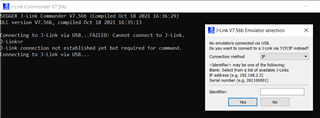
If you have any ideas, please share with me to recover the kit.
Thanks

Best,

Ethan

Parents
  • Hello,

    4. Pressed and held the RESET button - no USB connection or J-Link shown in the Device manager (PC)

    When you do this, make sure that you use a USB cable connected to J2 (The one on the short side on the DK), and that you power off and power back on the DK using the power switch on the DK while the RESET button is held. When you do this, does LED5 start blinking?

    If not, what are the following switches set to on your DK:

    - SW9 (nRF power source)
    - SW6 (nRF Only/Default)

    Make sure they are on VDD, and DEFAULT, respectively.

    Did you at any point cut any solder bridges on the DK? Please check that SB40 and SB41 are still shorted. 

    Let me know if you test this, and it still doesn't work.

    Best regards,

    Edvin

Reply
  • Hello,

    4. Pressed and held the RESET button - no USB connection or J-Link shown in the Device manager (PC)

    When you do this, make sure that you use a USB cable connected to J2 (The one on the short side on the DK), and that you power off and power back on the DK using the power switch on the DK while the RESET button is held. When you do this, does LED5 start blinking?

    If not, what are the following switches set to on your DK:

    - SW9 (nRF power source)
    - SW6 (nRF Only/Default)

    Make sure they are on VDD, and DEFAULT, respectively.

    Did you at any point cut any solder bridges on the DK? Please check that SB40 and SB41 are still shorted. 

    Let me know if you test this, and it still doesn't work.

    Best regards,

    Edvin

Children
No Data
Related