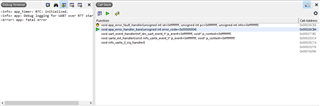
Fatal Error after sending notification

Hey Guys,
currently, I am working on my masterthesis. I have to develop an mobile application which comminicates with the nordic board via BLE. I know that there is an existing application from nordic but I had to implement some extra features. The example I use is the ble_peripheral_uart example. According to measure my traffic I am using Docklight. 

My issue is that always when I try to send a notification with docklight to my application (Notification is enabled) my embedded studio crashes and I get a fatal error. Writing messages from the app to the board is possible. I can see this on docklight. 

The confusing point is that when I started to write messages and send notifications it worked. But one day I tried it again and this error appeared, which is really annoying because I haven´t changed a single line of C-Code from the example. I tried to run a new version from the code, I tried to use different versions from my android studios code, I ran the code on several computers I changed the eval board, I changed the UART-Module I am using, I reinstalled the software - nothing worked.

I noticed that it is possible to send notification as long as I send only one letter or number. When I send more letters or numbers or add \n my code crashes. Obviously, it is a memory issue but I don´t understand why it worked at the beginning. 

Can you give my some advices?

Kind Regards,
Thomas

Parents
  • Hi Thomas,

    My issue is that always when I try to send a notification with docklight to my application (Notification is enabled) my embedded studio crashes and I get a fatal error.

    Is this Segger Embedded Studio(?) that has a fatal error and crashes, or is it that you see a fatal error in the log from the nRF? If it is the latter, then this is likely from an APP_ERROR_CHECK. In that case, testing a debug build (select "Debug" from the build configuration dropdown menu) will give you more information. With this you should see file name, line number and error code, and that will give us much more to go on.

Reply
  • Hi Thomas,

    My issue is that always when I try to send a notification with docklight to my application (Notification is enabled) my embedded studio crashes and I get a fatal error.

    Is this Segger Embedded Studio(?) that has a fatal error and crashes, or is it that you see a fatal error in the log from the nRF? If it is the latter, then this is likely from an APP_ERROR_CHECK. In that case, testing a debug build (select "Debug" from the build configuration dropdown menu) will give you more information. With this you should see file name, line number and error code, and that will give us much more to go on.

Children
  • Yes, I am using Embedded Studio. These are the error codes I get when I try to send a notification. But I have to add, that I made a mistake in my explanation. I can send more than one sign as long as I don´t add "\n". The point is that I need \n because without it, I have to send several packages until my app gets the packages. 
    Is it possible that it is something like a cache problem? Because no matter on which device I ran my C-Code, first it worked and after a few trys I got this error.

  • Hi,

    From the log it seems you are testing a release build and not a debug build. Can you build a debug build, test again, and upload the new log output here? Also, please check the file and line you hopefully see in the log and post here so that we can see which function returned an error code (assuming that is what happened).


  • Hi,
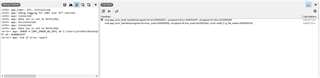
    this was the error code I got when I set up Debug build in the build configurations. Is this more helpful?

  • Yes, this is much more helpful, except for a few things

    • the screenshot does not have the full text. So me (and perhaps you) do not see which file it is.
    • Even if i saw the file name, I do not have your code. So I cannot see what is there.

    So, plese:

    1. Give me the full log output. Either by scaling the window so everything is shown, or even better copy past here using Insert -> Code. That makes it more readable.
    2. Please let me know which function returned the error, which you see from the file name and line number in the log. It could also be useful if you upload the entire file here.

    Update: i think you will benefit from reading An introduction to error handling in nRF5 projects.

  • To be honest these are the only two error code lines that appeared after debugging. 
    Here is the function where the error code has guided me to:

    void app_error_handler(ret_code_t error_code, uint32_t line_num, const uint8_t * p_file_name)
    {
        __ASM volatile(
    
        "push {lr}                      \n"
    
        /* reserve space on stack for error_info_t struct - preserve 8byte stack aligment */
        "sub sp, sp, %0                 \n"
    
        /* prepare error_info_t struct */
        "str r0, [sp, %1]               \n"
        "str r1, [sp, %3]               \n"
        "str r2, [sp, %2]               \n"
    
        /* prepare arguments and call function: app_error_fault_handler */
        "ldr r0, =%4                    \n"
        "mov r1, lr                     \n"
        "mov r2, sp                     \n"
        "bl  %5                         \n"
    
        /* release stack */
        "add sp, sp, %0                 \n"
    
        "pop {pc}                       \n"
        ".ltorg                         \n"
    
        : /* Outputs */
        : /* Inputs */
        "I" (APP_ERROR_ERROR_INFO_SIZE_ALIGNED_8BYTE),
        "I" (APP_ERROR_ERROR_INFO_OFFSET_ERR_CODE),
        "I" (APP_ERROR_ERROR_INFO_OFFSET_P_FILE_NAME),
        "I" (APP_ERROR_ERROR_INFO_OFFSET_LINE_NUM),
        "X" (NRF_FAULT_ID_SDK_ERROR),
        "X" (app_error_fault_handler)
        : /* Clobbers */
        "r0", "r1", "r2"
        );
    }


    Here is the copied log:
    Reset: Halt core after reset via DEMCR.VC_CORERESET.
    Reset: Reset device via AIRCR.SYSRESETREQ.
    Downloading ‘s132_nrf52_7.2.0_softdevice.hex’ to J-Link
    Programming 2.7 KB of addresses 00000000 — 00000aff
    Programming 146.3 KB of addresses 00001000 — 0002596b
    J-Link: Flash download: Bank 0 @ 0x00000000: 1 range affected (126976 bytes)
    J-Link: Flash download: Total: 3.005s (Prepare: 0.490s, Compare: 0.042s, Erase: 0.071s, Program & Verify: 2.266s, Restore: 0.135s)
    J-Link: Flash download: Program & Verify speed: 55 KB/s
    Download successful
    Downloading ‘ble_app_uart_pca10040_s132.elf’ to J-Link
    Programming 59.7 KB of addresses 00026000 — 00034f16
    Programming 0.1 KB of addresses 00034f18 — 00034fbb
    J-Link: Flash download: Bank 0 @ 0x00000000: Skipped. Contents already match
    Download successful
    

Related