Porting example to nRF52832QFAB

Hi,

I used the BLE blinky app on a nRF52832DK and it was working nicely.

I am then trying to make it run on a custom board with nRF52832QFAB version mounted.

I see several strange things.

- If I have the debugger attached it starts advertising, but the interval the nRF connect mobile app sees the device varies from 40ms - 4000ms and I am not able to connect to the device.

- If I remove the debugger and just flash the code the program goes into an error state as soon as I supply power.

I am using nRF52832QFAB with Segger Embedded Studio, SDK 17.1.0 and softdevice S132 V7.0.1

In the settings dialog I have changed the processor to the nrf52_xxAB version. This gave me a problem with compiling, but I found the answer on this forum about SES changes FLASH to FLASH1 in the placement file.

Then I have changed the FLASH/RAM size in the linker settings:
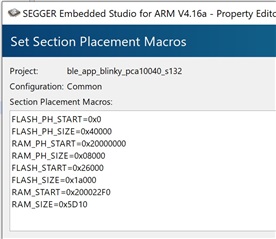
Are there anything else I need to change to run on a QFAB device?

Any suggestions why the advertising interval varies so much?

Parents
  • Hi Morten

    Glad to here you got to the bottom of your issue. We make all our example projects for the Development kits, and the recommended process is to add a custom board file for the custom board you're using. We recommend using a example project that uses the peripheral(s) you want. You are indeed required to disable the ones you don't want to use, but there shouldn't be too many if you choose a specific example you want to use.

    As to why detaching your debugger causes the device to stop advertising sounds strange, but have you tried power cycling your board after disconnecting the debugger to see if it starts up at all afterwards? How do you power the custom board exactly?  You're sure it is the custom board that is programmed right, and that it's not the nRF onboard the DK that advertises, and that it stops because you turn the DK off?

    Best regards,

    Simon

Reply
  • Hi Morten

    Glad to here you got to the bottom of your issue. We make all our example projects for the Development kits, and the recommended process is to add a custom board file for the custom board you're using. We recommend using a example project that uses the peripheral(s) you want. You are indeed required to disable the ones you don't want to use, but there shouldn't be too many if you choose a specific example you want to use.

    As to why detaching your debugger causes the device to stop advertising sounds strange, but have you tried power cycling your board after disconnecting the debugger to see if it starts up at all afterwards? How do you power the custom board exactly?  You're sure it is the custom board that is programmed right, and that it's not the nRF onboard the DK that advertises, and that it stops because you turn the DK off?

    Best regards,

    Simon

Children
No Data
Related