Sample application creation C++ support configuration

Hi,

We copied sample application from one machine to other and added the project in explorer in vscode

this project was having C++ functionalities 

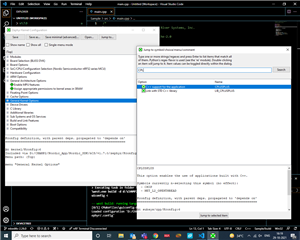
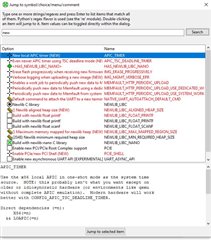
these C++ configurations (attached in screenshots ) were enabled in the machine where this project was created

Settings which were enabled:

1. C++ support for the application (Image 1)

2. Link with STD C++ library (Image 1)

3. Enabling Newlib C library (Image 2)

after copying to another machine these configuration setting were not enabled,

can you please provide an input do we need to follow this experiment every time we copy this project ?
Thank you

Parents Reply
  • Hi,

    hiteshk014 said:
    Can you please elaborate more in this workaround ?

    Yes. What I describe is not a workaround, but how this is intended to be used. When you modify the configuration using guiconfig you change configurations within the build folder. So when you delete the build folder (for instance when using a pristine build), the changes there is lost. The correct location to make persistent configurations is in the prj.conf. Any change you experiment with or find using guiconfig and want to use, you should add in prj.conf. For instance, to enable C++ support add this line to your prj.conf:

    CONFIG_CPLUSPLUS=y

    See Changing the configuration permanently for details.

Children
Related